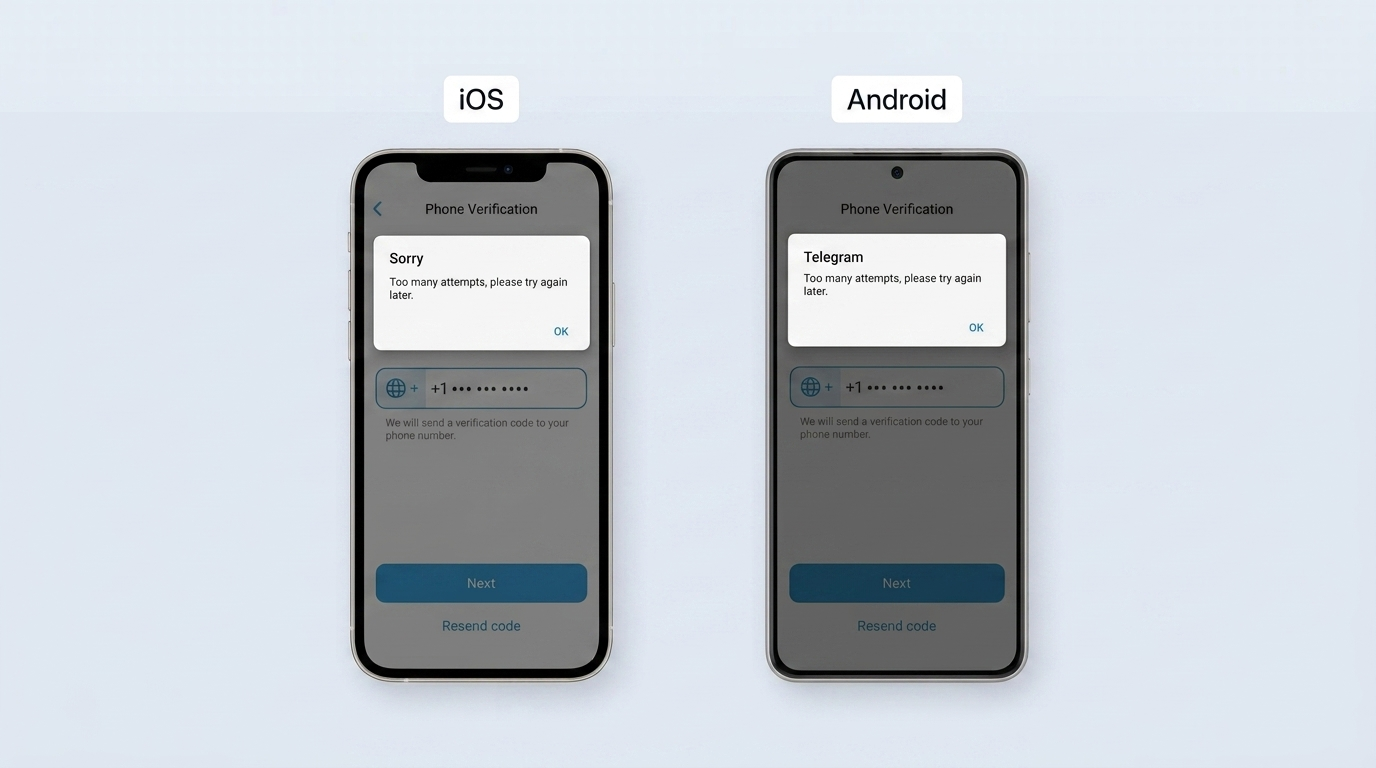
The Telegram "Too Many Attempts" error is a temporary rate limit. It is not a ban, and not a sign your account was compromised. Telegram counts how often you request a login code for one number.
Telegram pauses new codes once you cross a short threshold. The wait clears on its own, usually within 15 to 30 minutes once you stop tapping. This guide gives you the real causes, honest wait times, and a step order that fixes most cases in minutes.
What is the "Too Many Attempts" error on Telegram?
The "Too Many Attempts" error is an automatic pause on Telegram's servers. It triggers when one number requests too many login codes too quickly. Think of a keypad lock that freezes after several fast code entries.
The lock still works. It just makes you wait.
Telegram is a cloud-based messaging app with more than 1 billion monthly active users. Founder Pavel Durov announced that milestone in March 2025. At this scale, Telegram uses rate limiting as a deliberate defense, not a glitch. Rate limiting caps how many verification requests one number can send.
Each request asks Telegram for a one-time code, valid only for a short window. Cross the limit, and Telegram stops issuing fresh codes to that number.
This message does not flag your account, delete your data, or signal a breach. Your chats stay on Telegram's servers, and your number stays valid. The pause only blocks fresh code requests until the timer expires.
If you keep getting stuck at the code screen, the verification flow itself is often the issue. See creating a Telegram account without a phone number for how that flow works step by step.
Why does Telegram show "Too Many Attempts"? The real causes
Telegram shows "Too Many Attempts" when your recent behavior crosses its rate limit threshold. Four specific triggers cause almost every case. Each trigger adds to the same counter. The four causes below explain what pushes a normal login into a temporary lockout.
Repeated login code requests
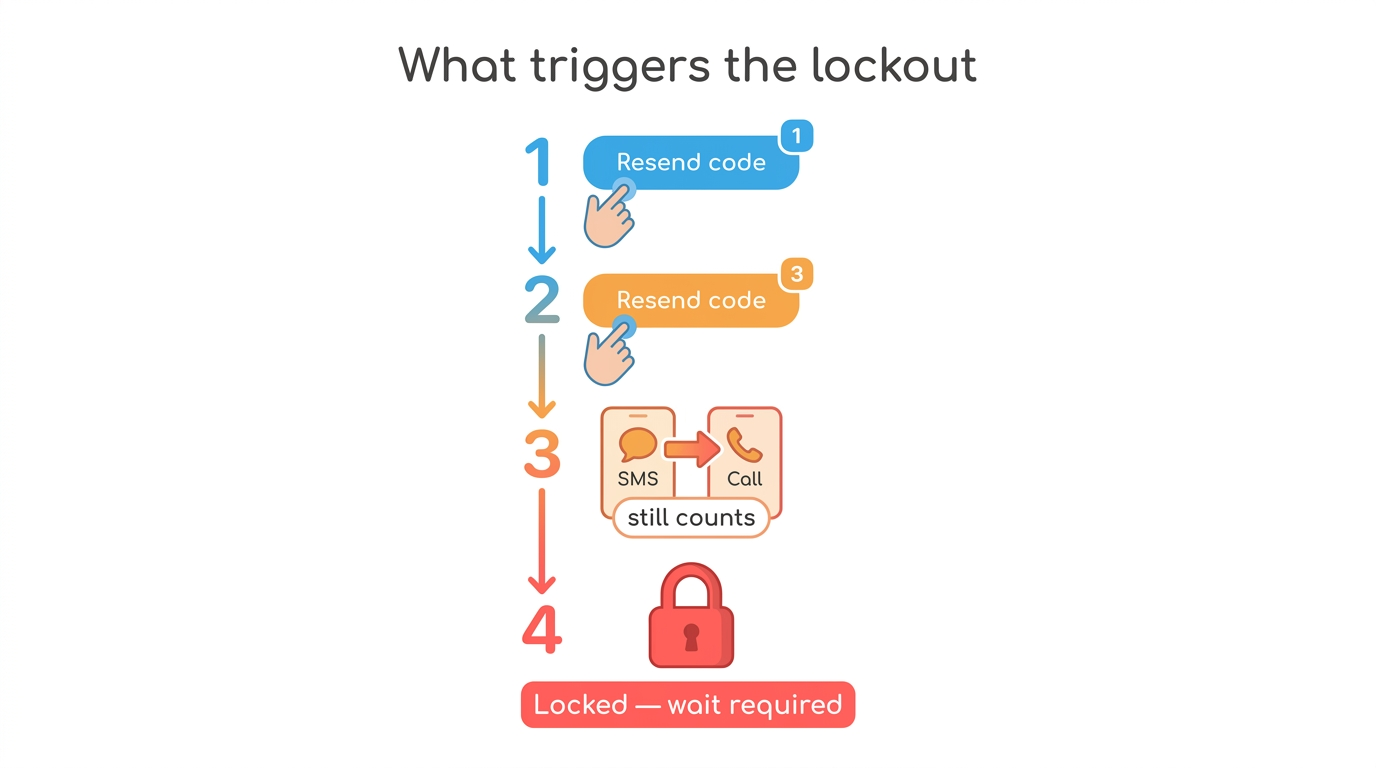
Repeated code requests are the usual trigger for the Telegram "Too Many Attempts" error. Each tap of Resend Code adds one request to your rate limit counter. Tap it four or five times in a minute, and Telegram stops issuing codes to that number. Request one code, then wait for it to arrive.
The actions that push you over the limit look like this:
- Tapping Resend Code three or more times within one minute
- Switching between SMS and call requests during the same login
- Restarting the login flow repeatedly on the same number
- Requesting a new code before the previous one has arrived
Multiple devices or simultaneous login sessions
Signing in from several devices at once stacks separate code requests on one number. A phone, a tablet, and Telegram Web each generate their own request. Three parallel sign-in attempts can spend your allowance in seconds.
Each open login screen keeps requesting until it receives a code. Pick one device before you start, then add the others later from inside your account.
Suspicious activity and security flags
Unofficial clients, shared VPN addresses, and previously flagged numbers can all trigger the "Too Many Attempts" error. Telegram watches for automated request patterns, and some third-party apps generate extra background calls.
A VPN, or virtual private network, routes many users through one shared server address. Telegram can flag that shared address, so the VPN causes the error rather than solving it.
Numbers matter too. Telegram states in its Spam FAQ that certain virtual or previously abused numbers may trigger a harsher automatic response. The explainer on virtual phone numbers covers how that routing works.
Incorrect credentials entered repeatedly
Entering the wrong number, code, or two-step password repeatedly counts against your limit. A simple typo triggers it just as easily. Every failed attempt fills the same counter that repeated code requests do. A mistyped country code alone can quietly burn through several tries.
Run this quick check as your zero step before any deeper fix:
- Confirm the country code and full number are correct
- Copy the code from the SMS instead of typing it by hand
- Verify your two-step password before you enter it
How long does the "Telegram Too Many Attempts" error last?
The Telegram "Too Many Attempts" error usually clears within 15 to 30 minutes on a first lockout. Continued attempts can stretch it toward 24 hours.
The timer is dynamic. Each new attempt during an active lockout marks your number as still trying. That works against you at the next check.
Telegram does not publish a fixed universal duration for this message, and it shows no visible countdown. On the web version, an attempted login may surface a technical detail such as FLOOD_WAIT_X. There, X is the number of seconds left, per Telegram's error documentation. Newer clients do not always show it, so treat the missing countdown as a signal to stop.
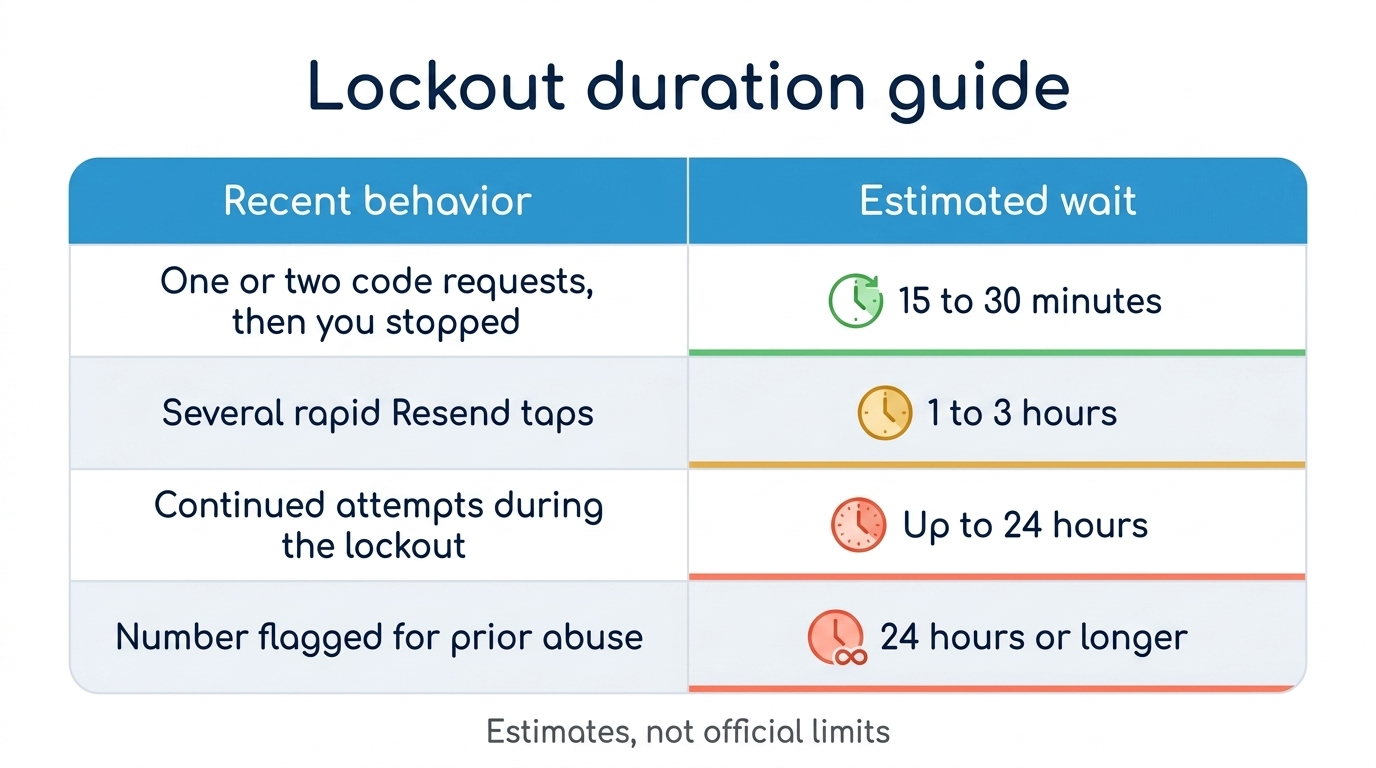
Telegram keeps the exact thresholds private, so treat these ranges as estimates, not published limits.
How to fix the Telegram "Too Many Attempts" error: step-by-step solutions
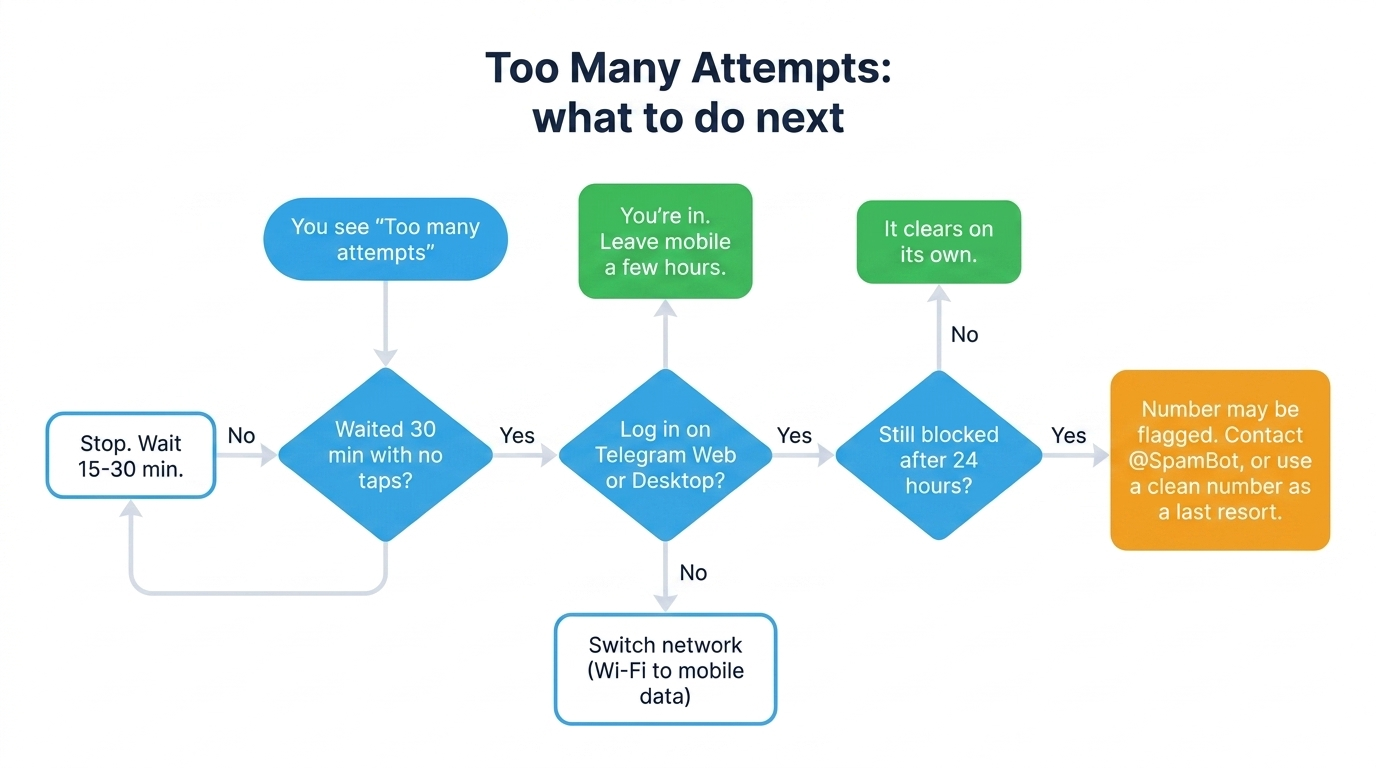
Fix the Telegram "Too Many Attempts" error by working these steps in order. The order controls how fast you recover. Most people clear the lockout at step one or step two. Move to the next step only when the current one fails.
Each step targets a different cause, so working them in sequence saves time.
Quick checks before you begin
Three fast checks resolve many "Too Many Attempts" cases before real troubleshooting starts. Each one removes a hidden cause that keeps adding failed attempts to your counter. Run all three first.
- Confirm the phone number and country code are exactly right
- Turn off any VPN or proxy before you request a new code
- Have your two-step verification password ready if you set one
Turning the VPN off comes first, not last, because a shared VPN address is a frequent flag source.
Step 1: Stop all attempts and wait
Stopping every attempt and waiting is the first fix to try, even though it feels like doing nothing. Telegram's timer only resets cleanly when your number goes quiet. Give it at least 30 minutes with no taps, no code requests, and no login screens open.
While you wait, avoid the actions that restart the clock:
- Do not tap Resend Code or Login again
- Do not switch between SMS and call requests
- Do not reinstall the app during the cooldown
Most first-time lockouts clear within 15 to 30 minutes of full inactivity.
Step 2: Switch to Telegram Web or Desktop
Logging in through Telegram Web or Telegram Desktop is often a fast way back in. Those clients do not always share the mobile lockout. When the block is tied to your device or session, a computer login can still go through. A number-level lockout, though, still blocks every client at once.
To sign in on the web:
- Open web.telegram.org in a browser
- Enter your phone number with the correct country code
- Request one code and wait for it to arrive
- Confirm your two-step password if prompted
After a successful web login, leave the mobile app alone for a few hours.
Step 3: Switch your network (Wi-Fi vs. mobile data)
Switching from Wi-Fi to mobile data changes your IP address. Your IP address is the network label that identifies your device online. Telegram rate-limits mainly at the number level, and some blocks also attach to your IP address. A new IP can clear a block of that second kind.
This step only helps with IP-specific blocks. It does not clear a lockout tied to your number. Toggling airplane mode for a few seconds forces the same IP change. Pair the network switch with the wait in step one.
Step 4: Clear Telegram cache and reinstall the app
Clearing the Telegram cache or reinstalling the app fixes login failures caused by corrupted local data. Damaged cached credentials can break authentication even when your number is fine. One warning matters first: a reinstall removes Secret Chats permanently, since they never leave your device.
To reset the app cleanly:
- On Android, open Settings then Storage and clear the Telegram cache, or uninstall the app
- On iOS, delete Telegram from the home screen, then reinstall it from the App Store
- Reopen Telegram and wait one to two hours before requesting a code
Step 5: Grant SMS permissions and check device settings
Missing SMS permissions force manual code entry, which causes the repeated typos that trigger the error. When Telegram cannot read incoming texts, you type each code by hand. That risks four or five failed tries. Wrong device date and time can also block verification.
Check these three device settings:
- Grant Telegram permission to read SMS messages for auto-fill
- Set your device date and time to automatic
- Reset network settings if codes still fail to arrive
Step 6: Request a verification call instead of SMS
Requesting a verification call helps when the SMS gateway fails to deliver your code. It does not reset the lockout itself. Telegram's Call Me option reads the code aloud instead of texting it. Use it for delivery problems, not as a cure for the rate limit.
One detail matters here. Switching from SMS to a call does not clear the attempt counter. Telegram treats every request the same, whatever the delivery method. Request the call once, then wait.
Step 7: Recover your two-step verification password
Some users who think they hit a lockout are actually stuck on a forgotten two-step verification password. The "Too Many Attempts" error appears before the password screen. A failure at that screen points to two-step verification, not rate limiting.
Three recovery routes exist, and your data survives on two of them. A recovery email is simplest: tap Forgot passwordand reset through the emailed link. An active session on another device instead unlocks a timed reset.
The reset runs for seven days, then clears the password without touching your data. With no email and no active session, the only route resets the account and wipes its cloud data.
Step 8: Contact Telegram support
Contact Telegram support when the lockout lasts more than 24 hours despite full inactivity. Two official routes exist for login problems. Reach support inside the app under Settings then Help, or through the form on Telegram's support page.
Set realistic expectations for the reply. Telegram support is not an instant 24/7 channel.
A clear first message improves your odds of real help. Describe the exact error, your number, and the steps you already tried. Replies come back inside Telegram once the team reviews your case.
"Telegram Too Many Attempts, Try Again Later": when the error won't go away
A "Telegram Too Many Attempts, Try Again Later" message that survives a long wait points to three situations. Most cases trace back to repeated attempts during the cooldown.
One situation is a flagged number, often from mass registrations or prior spam. Another is a blocked VPN or corporate IP shared by many users. The third and least common is a genuine account limitation rather than a simple rate limit.
Telegram's Spam FAQ draws the line clearly. A rate limit clears on its own after a wait. Reported-spam limitations behave differently. Limited accounts can still reply to anyone who writes first, and message people who already saved their number.
If a wait beyond 24 hours produces no change, contact Telegram's @SpamBot with your case. Do this only when you never sent unsolicited messages. Stubborn lockouts usually come from users who broke the wait with more attempts.
When using a different phone number is the right call
Using a different phone number makes sense in one narrow case. The case: your original number carries a flag from mass registrations or heavy shared use. A fresh, clean number sidesteps a flag that a wait alone will not lift. Treat this as a last resort rather than a first move.
A virtual number creates a new Telegram account. It does not recover access to the original, and your first number usually unlocks itself once enough time passes. For a clean, previously unused number in this scenario, SMSFAST supplies virtual numbers for Telegram verification. Reserve this option for flagged numbers, not for an ordinary first-time lockout.
How to prevent the "Too Many Attempts" error in the future
Prevent the Telegram "Too Many Attempts" error with two habits. Request one code at a time, and enable two-step verification. Each habit comes straight from the causes above.
Two-step verification with a recovery email adds lasting protection against repeat lockouts.
- Request one login code, then wait a full 60 seconds before any retry
- Sign in on one device first, then add others from inside your account
- Turn off shared VPNs and proxies before requesting a code
- Enter your number and country code carefully to avoid failed tries
- Use the official Telegram app rather than unofficial clients
- Grant SMS permissions so codes auto-fill without manual typing
- Keep your device date and time set to automatic
- Enable two-step verification with a recovery email for lasting protection
Final thoughts
The Telegram "Too Many Attempts" error frustrates users because it hides its timer. Yet the block stays temporary, and it worsens when you keep trying. Hold to a simple model when it appears: stop, try Telegram Web or Desktop, then wait. Continued attempts extend the block, while patience clears it.
Take one action today to avoid a repeat. Enable two-step verification with a recovery email. Sign in from one main device to keep your Telegram login stable.