A verification code that never arrives usually fails for one of a few predictable reasons. Most cases clear within minutes. The verification code travels from a service provider to your mobile phone by SMS.
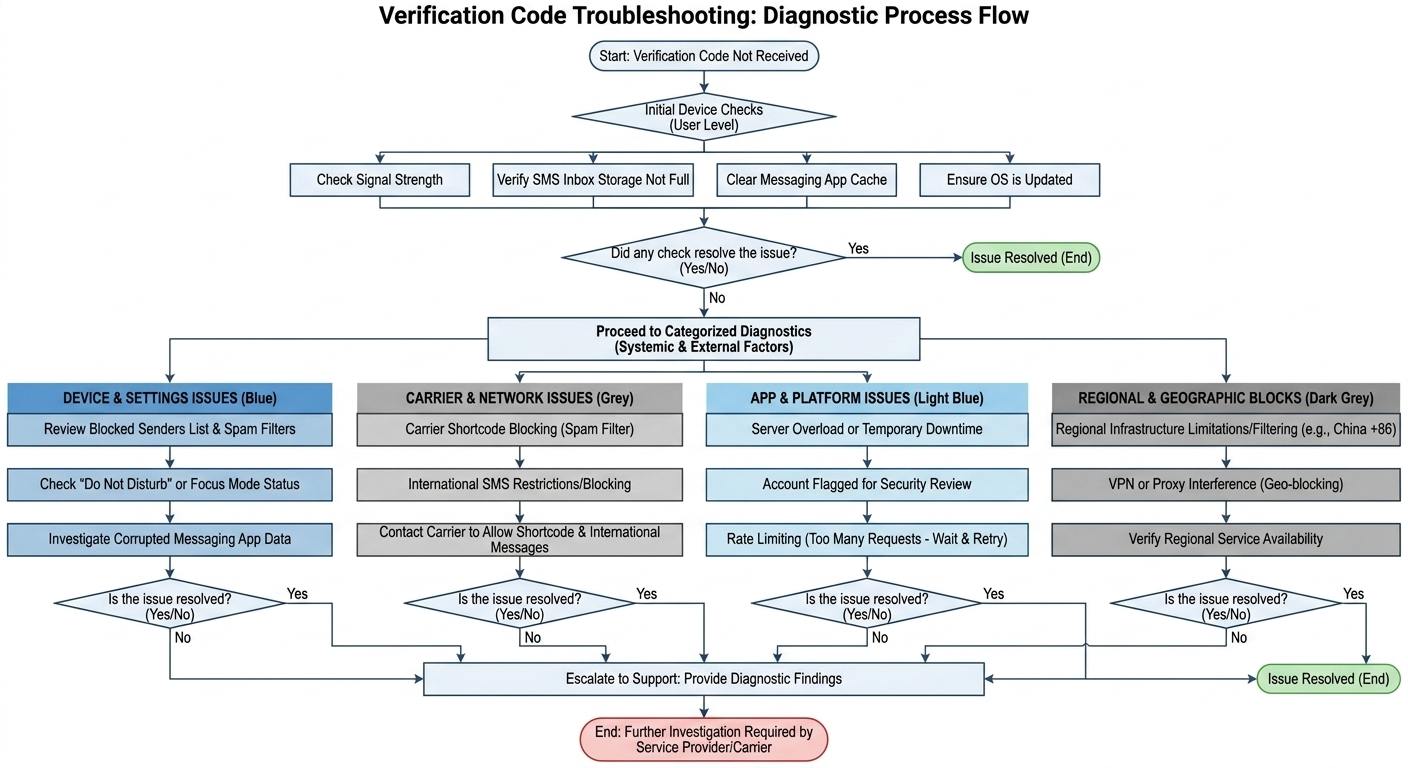
Any weak link in that chain stops delivery. Device settings, carrier filters, platform limits, and regional blocks cause most failures. The sections below cover each cause and the exact fix for iPhone, Android, and every major app.
Why verification codes are not being received: root causes explained
Why verification code not received breaks down into four root-cause categories: device settings, carrier filtering, platform limits, and regional restrictions. A verification code is a short one-time code that a service provider sends to confirm you own an account. Your mobile phone and your network carrier are the two most common points of failure. A VPN can also interfere with delivery, covered in the special cases section below.
Device-side issues
Device-side settings block more verification codes than most users expect. A full SMS inbox is a frequent and overlooked cause, because your mobile phone drops new messages once storage fills. Weak signal, blocked unknown senders, and an outdated operating system also stop delivery.
A corrupted messaging app cache (its stored temporary data) does the same. Each of these keeps the code from ever reaching your inbox.
Carrier and network-side issues
Your network carrier can silently block a verification code before it reaches your phone. Most verification texts arrive from a shortcode. A shortcode is a 5-digit or 6-digit sender number that carriers sometimes flag as spam by mistake.
Carrier blocking through spam filters and shortcode rejection stops legitimate shortcode SMS this way. The fix is direct: contact your carrier and ask them to allow shortcode and international verification messages.
App and platform-side issues
A service provider can withhold a verification code even when your phone and carrier work fine. Server overload, a flagged account, and rate limiting each stop the send. Rate limiting means the platform pauses new codes after several rapid requests.
This behavior is a security feature, not a fault. A detected VPN connection also prompts some platforms to refuse the send.
Regional restrictions and geographic blocks
Users in restricted regions face infrastructure limits, not device errors. Telegram verification code failures on +86 numbers in mainland China come from carrier filtering of international SMS. A broken phone is not the cause.
These blocks affect delivery before the code reaches the handset. The special cases section covers China, Hong Kong, and VPN scenarios in detail.
Universal quick fixes: start here regardless of device or app
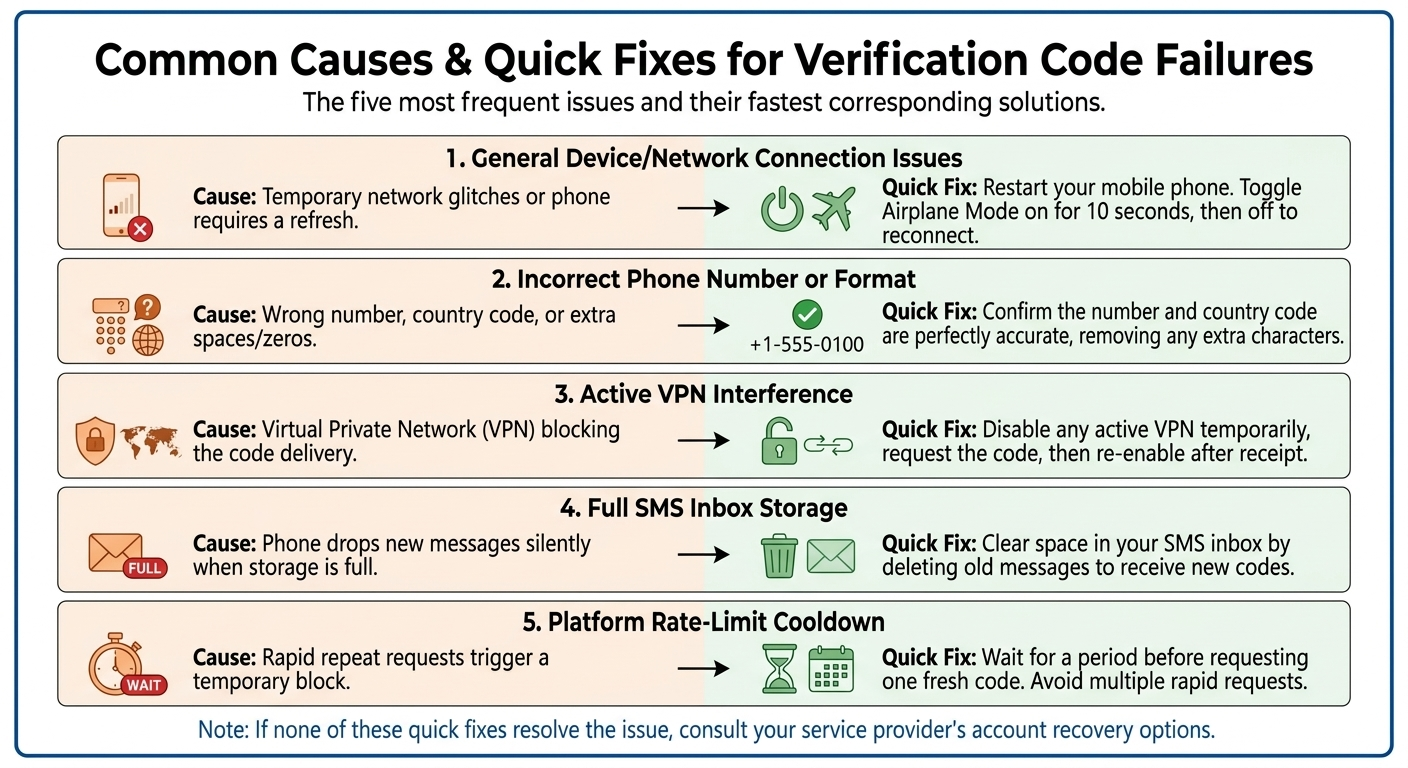
These steps clear most verification code failures in under five minutes, on any device or platform. Work through them in order, because each one escalates from the simplest cause to the least obvious.
Restart your mobile phone to force a fresh network registration and refresh the SMS connection.
Toggle Airplane Mode on for ten seconds, then off, to reconnect to the strongest available carrier signal.
Confirm the phone number and country code are correct, with no extra zeros or spaces.
Disable any active VPN, request the code, then re-enable the VPN once it arrives.
Clear space in a full SMS inbox, because your phone drops new codes silently once storage fills.
Wait, then request one fresh code, since rapid repeat requests trigger a rate-limit cooldown.
Switch to a call or email option where the platform offers one.
Step 5 solves more cases than most users realize. If none of these work, jump to when nothing works for account-recovery paths.
How to fix verification code not received on iPhone
An iPhone verification code not received usually points to Apple's Messages filtering, not your carrier. In iOS 26, the Screen Unknown Senders filter routes texts from unsaved numbers into a separate list. The Filter Spam setting is on by default.
According to Apple Support (2026), time-sensitive verification codes can reach your main inbox for one hour despite this filter. Check the filtered folders before assuming the code failed.
To surface a filtered code, tap the filter icon at the top right in Messages. Then open Unknown Senders, Transactions, or Spam. Confirm Focus and Do Not Disturb are not silencing alerts, and that the number is not on your blocked-senders list.
Apple ID codes often appear on a trusted device as a push notification rather than by SMS. Check any signed-in iPad or Mac first.
How to fix verification code not received on Android
An SMS verification code not received on Android usually traces to manufacturer spam filters or a third-party default SMS app. Android hardware varies widely, so Samsung, Xiaomi, and Google Pixel devices filter messages differently. Google Messages spam protection, Samsung message screening, and battery optimization can each hide a verification code.
A Google verification code SMS not received often clears once you set Google Messages as the default. Disabling battery limits for the app helps too.
Common Android-side culprits include:
Manufacturer spam filters on Samsung and Xiaomi devices that route shortcode texts to a separate folder.
Battery optimization that suspends the messaging app in the background and delays code alerts.
RCS and SMS conflicts, where Rich Communication Services (RCS) queues a message that a plain SMS code needs.
Third-party SMS apps that mishandle shortcode senders instead of displaying the code.
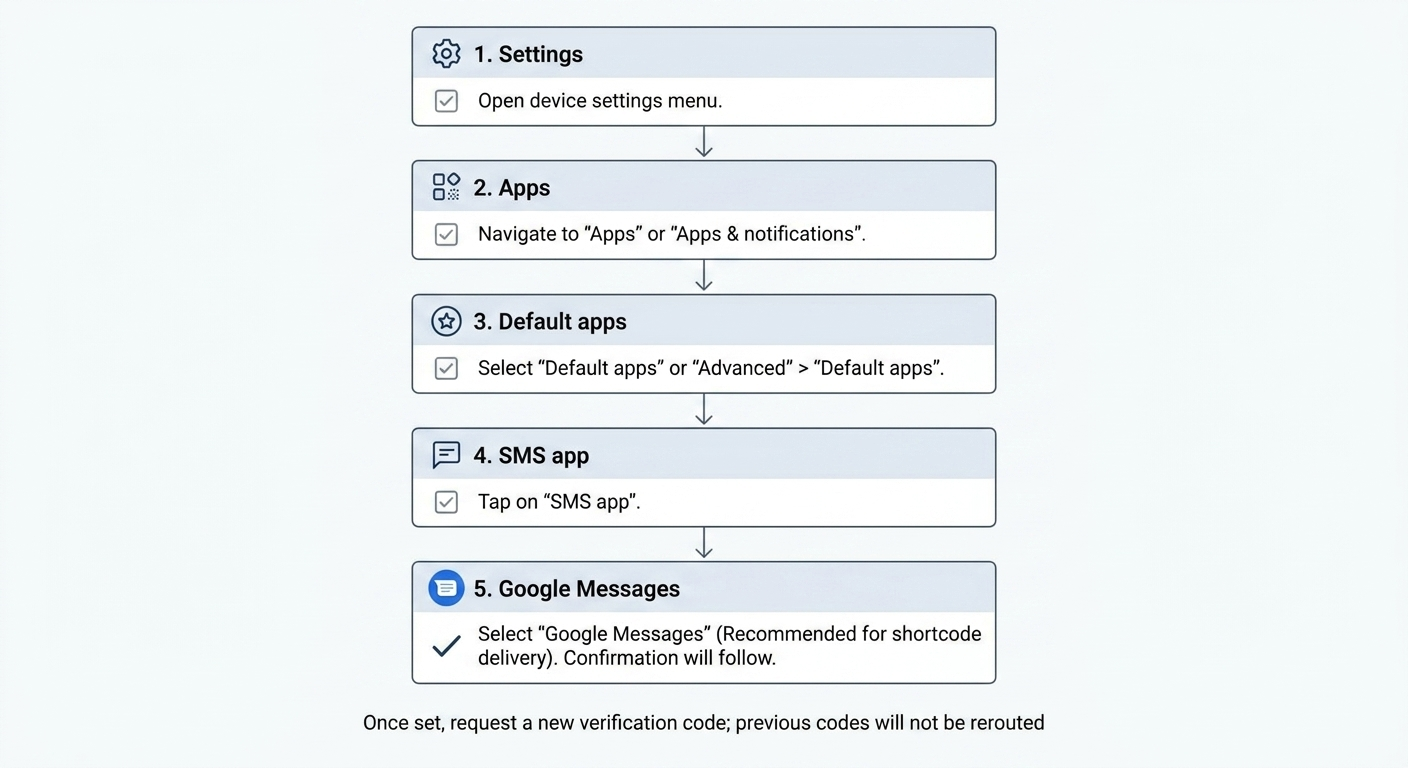
How to set or change your default SMS app on Android
Setting Google Messages as your default SMS app fixes many shortcode delivery failures. Third-party SMS apps often mishandle the shortcode senders that verification codes use, while Google Messages processes them correctly. The switch takes about 30 seconds.
After changing the default, request a new code rather than waiting for the earlier one. The earlier code went to the previous app.
Platform-specific fixes for verification code not received
Each major platform runs its own verification architecture, so the fix that works for one app fails on another. The subsections below cover the platforms users report most often. Skip straight to the service you need.
Telegram verification code not received: fixes that actually work
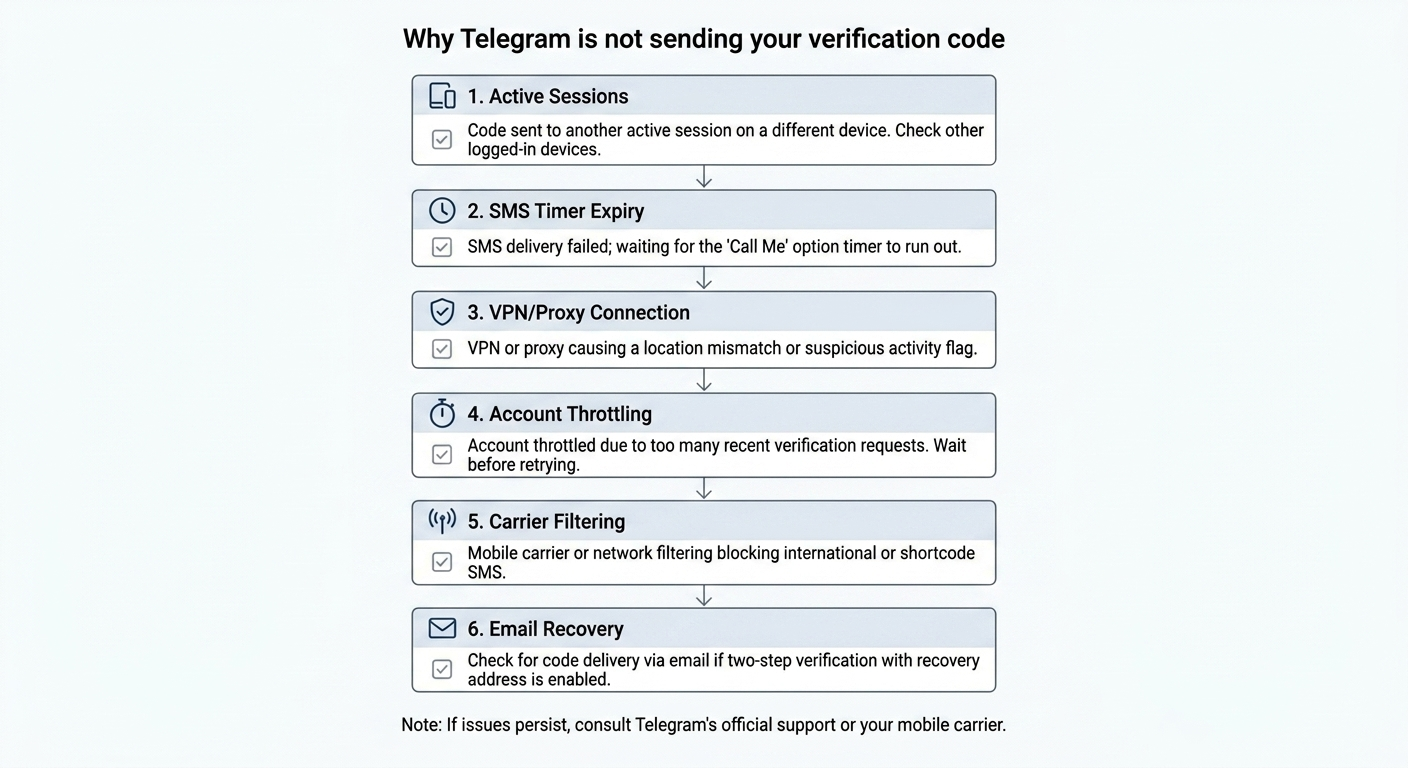
Telegram sends a verification code by SMS first. The Call Me option appears after the SMS timer runs out. If you are already signed in on another device, Telegram routes the code to that active session instead of SMS.
Check your other logged-in devices. A VPN creates a country mismatch that Telegram can read as suspicious, which stalls delivery. As of 2026, Telegram also throttles codes after repeated attempts, so request once and wait before retrying.
Telegram supports recovery by email if you enabled a recovery address in two-step verification settings. For the full number workflow, see the SMSFAST Telegram page.
WhatsApp verification code not received: solutions for SMS and call verification
A WhatsApp verification code not received usually comes from a wrong country code, rate limiting, or a VoIP number. WhatsApp blocks Voice over IP (VoIP) numbers such as Google Voice at registration. It sends nothing silently rather than showing an error.
Enter the number with the correct country code and no leading zeros. Request one code, then wait about ten minutes. After that wait, the Call me option appears and reads the six-digit code aloud.
Repeated requests extend a cooldown that can stretch to several hours, so avoid tapping resend. A WhatsApp Business verification code not received follows the same flow as personal WhatsApp, so the same fixes apply. On iPhone, a WhatsApp verification code not received follows the iOS filtering fixes above. For a carrier-grade number, see the SMSFAST WhatsApp page.
Gmail and Google verification code not received
A Gmail verification code not received can be resolved through several Google delivery paths. These paths include a Google Prompt, SMS, a backup email, a voice call, and an authenticator app. A Google verification code SMS not received often clears when you switch to the Google Prompt.
The Google Prompt pushes an approval to a signed-in device. According to Google Account Help (2026), a voice call avoids SMS spam filters when texts keep failing. For a number that receives Google codes, see the SMSFAST Google page.
Google Business Profile verification differs from a personal Google Account. As of 2026, Google made a short walkthrough video the most common verification method for most small businesses. Postcard verification is now a fallback rather than the default.
A Google Business verification code not received by SMS usually means your profile qualifies for video or phone verification instead. Confirm which method Google offers your profile before waiting on a code.
Instagram verification code not received
An Instagram verification code not received usually traces to Meta's backend systems, carrier SMS delivery, or spam filtering. Instagram shares verification infrastructure with Facebook through Meta, so an outage on one can affect the other. Check your email spam folder, since an email verification code not received often lands there. For a fully locked account, tap Get more help and follow the identity-verification path.
Facebook verification code not received
Facebook offers a code generator inside the app as a reliable alternative to SMS. A Facebook verification code not received by text has an in-app fix. Open the code generator under Settings, then Security and login.
Facebook distinguishes two-factor authentication (2FA) codes, requested at each login, from one-time login alerts. If SMS keeps failing, the code generator produces a fresh code without any carrier involved. Facebook retired Trusted Contacts, so a fully blocked account now uses the Confirm your identity flow. That flow verifies you with a government ID or a video selfie.
Apple ID verification code not received
Apple ID codes arrive on a trusted device as a push notification first. SMS or a voice call serves as the fallback. Apple ID two-factor authentication (2FA) requires at least one trusted device or trusted phone number.
According to Apple Support, Apple never sends 2FA codes by email, so treat any emailed "Apple code" as phishing. With no trusted device, request the code from Settings, then your name, then Password & Security, then Get Verification Code. This path works even offline.
Account recovery through iforgot.apple.com runs a deliberate 1-to-14-day wait for security. Repeated code requests can trigger a temporary rate limit of 8 to 24 hours.
PayPal verification code not received
A PayPal verification code not received often means a carrier spam filter blocked the shortcode. Carriers flag the 5-digit and 6-digit sender numbers PayPal uses, which stops legitimate codes. An SMS verification code not received from PayPal clears faster with an authenticator app.
This app generates a fresh one-time code every 30 seconds and needs no carrier. PayPal supports authenticator apps as a more reliable long-term 2FA method than SMS.
TikTok verification code not received
A TikTok verification code not received usually comes from regional carrier filtering, a number-format error, or periodic SMS delivery delays. TikTok routes codes through carrier gateways that can throttle or delay verification traffic in some regions. An email verification code not received from TikTok often sits in a spam or promotions folder. TikTok also supports email, authenticator, and passkey paths, so switch methods rather than resending SMS.
Signal verification code not received
Signal uses SMS for initial registration and supports a voice call as a backup. According to Signal Support, enter the full international number and omit leading zeros. Confirm your phone can receive both texts and calls.
A Signal app verification code not received on T-Mobile-based carriers often traces to a shortcode blacklist. Clear it by calling #611# and requesting its removal. Disable your VPN or allow *.signal.org on TCP port 443, since a blocked connection stops the code.
VoIP numbers such as Google Voice can be unreliable for Signal registration.
Other platforms: Salesforce, Experian, MyChart, Bumble, Swagbucks, USCIS, Brevo, imo, and more
Less common platforms share the same root causes: spam filtering, carrier shortcode blocks, and server delays. A Salesforce verification code email not received often sits in spam. An Experian verification code not received or a MyChart verification code not received matches the patterns below.
The table below maps the most-searched services to their most common cause and primary fix. A Bumble, Swagbucks, or USCIS verification code not received follows the same table. imo failures usually trace to VoIP-number rejection, so a carrier-grade number resolves most cases.
Platform
Most common cause
Primary fix
Alternative method
Salesforce
Email code filtered to spam
Whitelist the sender domain
Authenticator app
Experian
Carrier shortcode block
Ask carrier to allow shortcodes
Voice call
MyChart
Wrong contact detail on file
Update the number in account settings
Email code
Bumble
VoIP number rejected
Use a carrier-grade number
Email login
Swagbucks
Server or account delay
Wait, then request one fresh code
Email verification
USCIS
International SMS filtering
Confirm number format and carrier
Backup contact
Brevo
Spam-folder filtering
Check spam and allow the sender
Support ticket
Email verification code not received: a different problem
An email verification code not received fails differently from an SMS code, and spam filtering is the leading cause. Email codes miss the inbox for five main reasons. A spam filter diverts them, the address on file is wrong, or the mail server lags.
Blocked sender domains and full inboxes also stop delivery. Corporate and school email accounts apply aggressive filtering that quietly holds legitimate codes.
Check causes in order of frequency, starting with the spam folder. A Gmail, Salesforce, or Telegram verification code by email not received shares one fastest fix. Search the spam folder and mark the sender as safe.
Delivery method
Most common failure
Fastest fix
SMS
Carrier shortcode filtering
Ask carrier to allow shortcodes
Email
Spam-folder diversion
Search spam and whitelist sender
Special cases: regional restrictions and VPN-related verification failures {#special-cases}
Location-based and VPN-related interference blocks verification codes more often than most guides admit. Users in restricted regions, or those running a VPN, face a different category of problem than a device setting. The subsections below cover the most common scenarios.
Telegram verification code not received in China (+86) and Hong Kong
Telegram is blocked in mainland China, so +86 numbers face documented SMS verification problems. The Great Firewall has cut off Telegram since 2015 using IP blacklisting, DNS poisoning, and deep packet inspection. Chinese carriers also filter international SMS.
A Telegram verification code not received on a +86 number often never leaves the carrier network. Activate a VPN before requesting the code, which reverses the usual advice. Try email or an existing-session login as backups.
Hong Kong is less restricted but still sees occasional carrier issues. These statuses reflect conditions as of 2026 and can change.
VPN active? Why it can block verification codes and how to fix it
A VPN creates a country mismatch between your phone number and your visible location. Many systems treat this mismatch as suspicious. Telegram and WhatsApp both weigh this mismatch and can refuse to send the code. The fix is a clean sequence: disable the VPN, request the code, receive it, then re-enable the VPN.
Two scenarios apply here:
Users outside restricted regions should turn the VPN off entirely during verification, then back on afterward.
Users inside mainland China need the VPN on to reach Telegram, so connect through an obfuscated server first.
A verification code fails to deliver due to VPN interference far more often than device faults. For background, see what a virtual phone number is. When a regional block stops your local number from receiving the code, a one-time SMSFAST number is a workable alternative.
China Consular App verification code not received
A China Consular App verification code not received usually traces to number-format errors or the app's SMS infrastructure. Overseas Chinese numbers and formatting mismatches stop the code before it arrives. English-language guidance on this app is limited, so the practical fixes are direct.
Confirm the exact number format and try during off-peak hours. Contact the consulate if delivery keeps failing. Carrier-level filtering of international SMS compounds the problem for numbers registered abroad.
When nothing works: alternative ways to verify your account {#when-nothing-works}
When SMS and email both fail, nearly every platform offers a verification code alternative. Authenticator apps, backup codes, trusted-device notifications, identity verification, and account recovery each restore access without a text. Set up an authenticator app before a lockout happens, because it generates codes offline and needs no carrier.
Platform
Authenticator app
Backup codes
Account recovery
Google
Yes
Yes
Standard recovery flow
Apple ID
No
No
iforgot.apple.com
Facebook
Yes (code generator)
Yes
Confirm your identity (ID or selfie)
Telegram
No
No
Email or existing session
WhatsApp
No
No
2FA PIN reset by email
Get your virtual number today
SMSFAST delivers virtual numbers in many countries instantly, with no SIM card needed
Verify without the regional roadblocks
A regional block on your own number does not have to stall your sign-up. Where an official local number cannot receive the code, SMSFAST provides a virtual number for account verification. An instant refund to balance returns your funds if the code never arrives.
Subscribe to the SMSFAST Telegram channel, claim your free $0.25 bonus, and test your first number before any top-up. For general support questions, see the SMSFAST help center.
Frequently Asked Questions
What to do when the verification code is not coming?
Restart your mobile phone, confirm the number and country code, and disable any VPN, then request one fresh code. Most failures clear within five minutes once you check for a full SMS inbox or a carrier spam filter. If both SMS and email fail, switch to an authenticator app or account recovery.
Why am I not receiving any verification codes on my phone?
A verification code fails when your mobile phone, network carrier, the service provider, or a regional block interrupts delivery. The most frequent causes are a full SMS inbox, a blocked-senders list, and carrier shortcode filtering. Check filtered message folders first, since the code often arrives but stays hidden.
How to fix it when you're not receiving verification code texts on Android?
Set Google Messages as your default SMS app, disable battery optimization for it, and check the spam folder. An SMS verification code not received on Android often traces to manufacturer spam filters on Samsung or Xiaomi devices. After changing the default app, request a new code rather than waiting for the old one.
Why can't my phone number receive a verification code?
Your number cannot receive a verification code when it is a VoIP line or is rate-limited. A carrier shortcode block causes the same result. WhatsApp and Signal reject Voice over IP numbers such as Google Voice at registration. A carrier-grade number and a cleared shortcode blacklist resolve most cases.
How long should I wait for a verification code before requesting a new one?
Wait at least 60 seconds, and up to a few minutes, before requesting a new verification code. Rapid repeat requests trigger a rate-limit cooldown that can extend to several hours on WhatsApp and Telegram. Request one fresh code, then use only the newest message if several arrive.
How do I unblock an SMS verification code?
Contact your network carrier and ask them to allow shortcode and international verification messages. Carrier spam filters block the 5-digit and 6-digit senders that verification codes use, even when normal texts arrive. On the device side, remove the sender from your blocked list and disable unknown-sender filtering.
Is there another way to get a verification code?
Yes, most platforms offer an authenticator app, backup codes, a voice call, or a trusted-device notification. Apple ID pushes a code to a signed-in device, and Facebook generates one inside the app without any carrier. Set up an authenticator app in advance, since it produces codes offline.
How do I get my iPhone to receive verification codes?
Open Messages, tap the filter icon, and check the Unknown Senders, Transactions, and Spam folders for the code. In iOS 26, time-sensitive verification codes can reach the main inbox for one hour, per Apple Support. Confirm Focus and Do Not Disturb are not silencing the message.
What troubleshooting steps should I try in order?
Restart the phone, toggle Airplane Mode, confirm the number, disable any VPN, and clear a full SMS inbox. This ordered sequence resolves most verification code failures before you reach platform-specific fixes. If the code still fails, request one fresh code and wait out any rate-limit cooldown.
Can using a VPN affect whether I receive a verification code?
Yes, a VPN creates a country mismatch that platforms such as Telegram and WhatsApp treat as suspicious. Disable the VPN, request the verification code, receive it, then re-enable the VPN. Users inside mainland China are the exception and need the VPN active to reach Telegram at all.
VoIP numbers get silently rejected by WhatsApp, banks, and social platforms. See why non-VoIP wins for verification, and when VoIP is still the smarter choice.
Renting usually beats buying a virtual number. See real 2026 pricing, number portability rules, and which option fits freelancers, startups, and call centers.