1. Home
  2. Services
  3. Telegram

Virtual number for Telegram: match the rental to your account

Service
Telegram
Telegram
Country
Bangladesh
Bangladesh +880
Available numbers
47884 pcs.
Other countries
With a high percentage of delivery
USA (virtual)
Quantity: 442168
Deliverability:65%
$0.76
France
Quantity: 138122
Deliverability:64.6%
$3.32
USA
Quantity: 89341
Deliverability:64.1%
$1.56
Canada
Quantity: 535497
Deliverability:64%
$0.46
Philippines
Quantity: 207393
Deliverability:60%
$0.58

Trusted by thousands of users worldwide

Get a virtual number for Telegram from $0.21 · 190+ countries

Numbers activated

574K+

Countries available

190+

Average delivery rate

55%

SMS doesn’t arrive?

Auto-refund

123
oooo
oooo
oooo
oooo
oooo
oooo
oooo
ooo
ooo
ooo
ooo
ooo
%
of
Deliverability
o
123f1233
99
%
o
123f1233
99
%
o
123f1233
99
%
o
123f1233
99
%
o
123f1233
99
%

Why use a virtual number for Telegram?

Telegram ties your account to a phone number. It rechecks that number each time you sign in on a new device, so the number works as a standing login across every sign-in. Buy a short-lived number only for sign-up, and the account can slip away when Telegram rechecks it. SMSFAST runs two rental modes, so you match the number to how long the account stays active.

A virtual number for Telegram is a real mobile number with no physical SIM. It receives the Telegram verification code inside a browser dashboard.

Key takeaways:

  • Telegram rechecks the registered number on every new-device sign-in, so the number works as a standing login.
  • Activation mode covers a 20 to 90 minute sign-up; long-term rental runs 1 day to 1 year for accounts you keep.
  • Mobile-tagged numbers clear Telegram's SMS check more often than VoIP numbers, though results vary by country and operator.

Privacy in public groups

Group admins and channel owners can see your phone number when your Telegram privacy settings leave it visible. A separate virtual number keeps your personal SIM out of the account. Long-term rental on SMSFAST suits this ongoing use.

Multiple accounts on one device

Telegram runs several accounts in the same app, and each account needs its own phone number. A virtual number covers each extra registration without a second SIM or a spare handset. You switch accounts from the same Telegram menu.

Bots and channels on a dedicated line

A Telegram bot or a public channel sits on its own account with its own number. Long-term rental on SMSFAST holds that number for 1 day to 1 year and renews, so the line stays live for the whole project.

Verify without a local SIM

Numbers cover 190+ countries, so you pick the one that fits the account you want. The Telegram code lands in your SMSFAST dashboard within about a minute when carrier routing goes through. No physical SIM card sits behind it.

Does Telegram block virtual numbers?

Telegram publishes no rule that bans virtual numbers as a category. In practice, numbers tagged as VoIP often fail at the SMS gateway. Apps like Google Voice and TextNow sit outside the mobile line. Free shared numbers from public pools carry a second risk. Another user can re-register it later and take the account. 

SMSFAST issues mobile-tagged numbers and does not resell one after its rental ends. Results vary by number, country, and operator; delivery rates sit in the table above. Lose access to the number later, and you lose the account, so a long-term line helps.

Buy number for
service
Available
numbers:
pcs
service
There are no numbers

How to Receive SMS for Telegram Verification with Virtual Numbers

1

Log in to your account

Either create a new account by clicking "Registration" or log in if you already have one.

2

Fund your balance

In the top right corner, click "+" and choose a convenient top-up method. Add the amount you need.

3

Select Telegram

In the left menu, under "Select service," click "Telegram". Then, choose your region from the list.

4

Purchase a number

Click "Buy" and wait a few seconds for your temporary number to be purchased and activated.

5

Get the number

Copy the phone number from the "Number" field to activate the service.

6

Enter the code

Wait for the one-time password (OTP) to appear in the "Code from SMS" field, then enter it in the Telegram verification screen to complete registration.

You can also get messages by clicking the corresponding button in the "Actions" field for your SMS verification.

How to use your virtual number in Telegram

Enter the virtual number on Telegram's sign-up screen, read the code in your dashboard, then set Two-Step Verification.

Step 1

Enter the number in Telegram

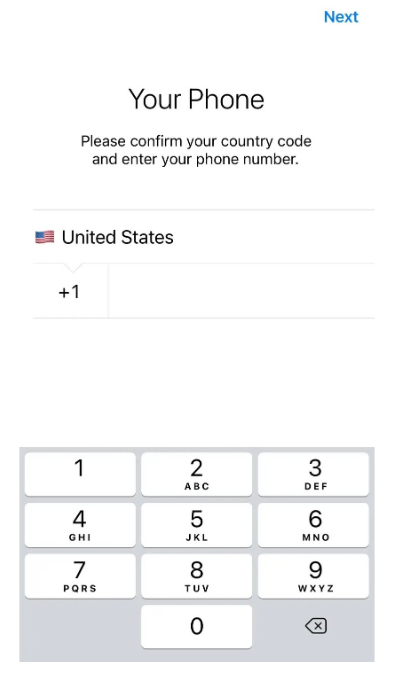
Open Telegram on your phone or at web.telegram.org and start registration. Choose the country that matches your number, then type the number exactly as the dashboard shows it. Telegram sends a five-digit verification code by SMS. Wait before you tap Call me, since the SMS needs a moment to arrive.

Enter the number in Telegram
Step 2

Receive the code in your dashboard

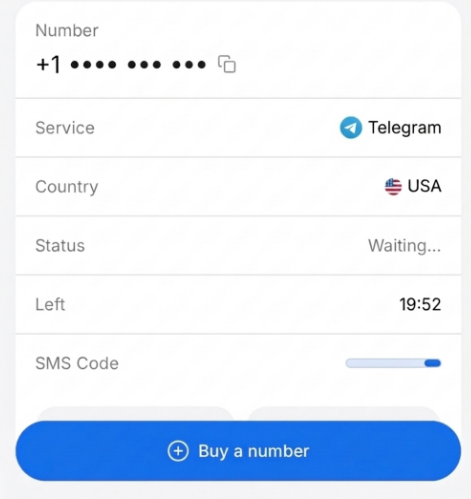
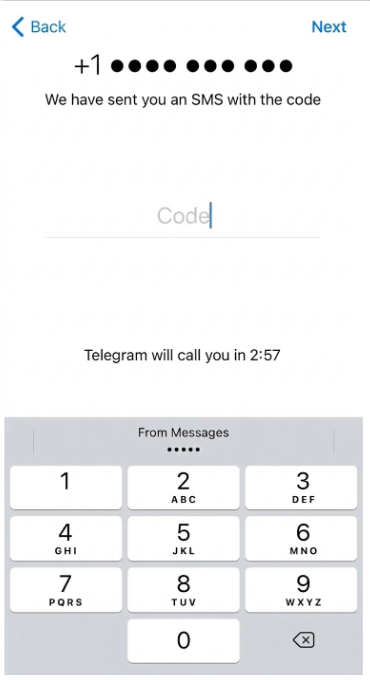
Go back to the SMSFAST dashboard and watch the inbox. The Telegram code usually arrives within a minute. Copy the five-digit code and enter it in Telegram before the on-screen timer runs out.

Receive the code in your dashboard
Step 3

Finish setup and protect the account

After Telegram signs you in, open Settings, then Privacy and Security, then Two-Step Verification. Set a password and add a recovery email. This password guards the account if the number ever changes hands. If no code reaches your dashboard, click Cancel in SMSFAST and the balance returns at once. Activation numbers refund on cancel; long-term rental cancellation is coming soon.

Finish setup and protect the account

Free or paid – what’s right for you?

Both options let you receive an SMS code on a Telegram number. The difference is in reliability and privacy.

Landline

Public numbers

$0 no sign-up needed

Available instantly

No registration

Private – messages visible to everyone

Telegram often blocks these numbers

No delivery guarantee

No refund if SMS fails

Paid numbers

Exclusive non-VoIP

From $0.21 per activation

Private - only you see the SMS

Works with Telegram in most cases

190+ countries to choose from

Delivery rate up to 55%

Auto-refund if SMS doesn’t arrive

Instant activation

Frequently Asked Questions

Does Telegram support virtual numbers for verification?

Telegram has no ban on virtual numbers. Mobile-tagged numbers usually clear its SMS check, while VoIP numbers often fail at the gateway.

Will Telegram ban an account created with a virtual number?

Telegram documents no ban tied to virtual numbers. It removes accounts that break its terms, whatever number registered them.

What is the difference between a temporary and a permanent virtual number for Telegram?

Activation lasts 20 to 90 minutes for a single sign-up. Long-term rental runs 1 day to 1 year; cancellation is coming soon.

Why is Telegram not accepting my virtual number?

Two common causes: a VoIP tag, or an over-used shared-pool number. Try a mobile-tagged number from another country or operator.

Can a user have multiple Telegram accounts with virtual numbers on one device?

Telegram runs several accounts on one device, and each needs its own number. SMSFAST hands you a separate number for every registration.

What happens if access to the original virtual number is lost?

You can lose the account unless Two-Step Verification with a recovery email is on. Long-term rental keeps the line in reach.

Can a virtual number be used without a physical SIM card?

Yes. SMSFAST numbers run in a browser with no physical SIM, no carrier contract, and no app to install.