A Facebook account accepts either an email address or a phone number. You can create a facebook account without a phone number by choosing email verification. Facebook confirms the account through a code sent to that email inbox, no mobile number required.
A virtual phone number offers a second route when the signup form pushes SMS instead of email. This guide shows how to create a facebook account without a phone number using both methods. It confirms you can create an account without a phone number today.
Why people are choosing to create Facebook accounts without a phone number
Privacy drives most decisions to keep a personal phone number off Facebook. A phone number acts as a persistent identifier that links social activity to a real-world identity. This link raises exposure to tracking and profiling.
Choosing email verification instead is a reasonable data-protection decision, not a workaround. The two subsections below explain the systemic risk first, then who this matters for most.
Privacy concerns and the risk of data breaches
A phone number attached to a Facebook account creates a direct link between social activity and a verified personal identity. In April 2021, a dataset covering 533 million Facebook users across 106 countries appeared on a public forum (Forbes, 2021). Most records included phone numbers.
Facebook attributed the exposure to a contact-importer feature it fixed in August 2019. Keeping a personal number off the account reduces how much identifying data a single leak can connect. Readers weighing this trade-off can review the explainer on disposable virtual numbers for the privacy context.
Common scenarios that require a phone-free account
Several user types need a Facebook account that carries no personal phone number attached:
Social media managers run multiple client pages and keep personal contact details separate from work profiles.
Small business owners open a dedicated business presence without exposing a private line to public messaging.
Community members join interest groups where a real number invites unwanted contact and Spamming.
Researchers and journalists observe public conversations while protecting their personal identity from the subjects they cover.
Can you create a Facebook account without a phone number?
Yes, Facebook officially supports registration through an email address with no phone number involved. People search "can i make a facebook without a phone number," and the answer is yes.
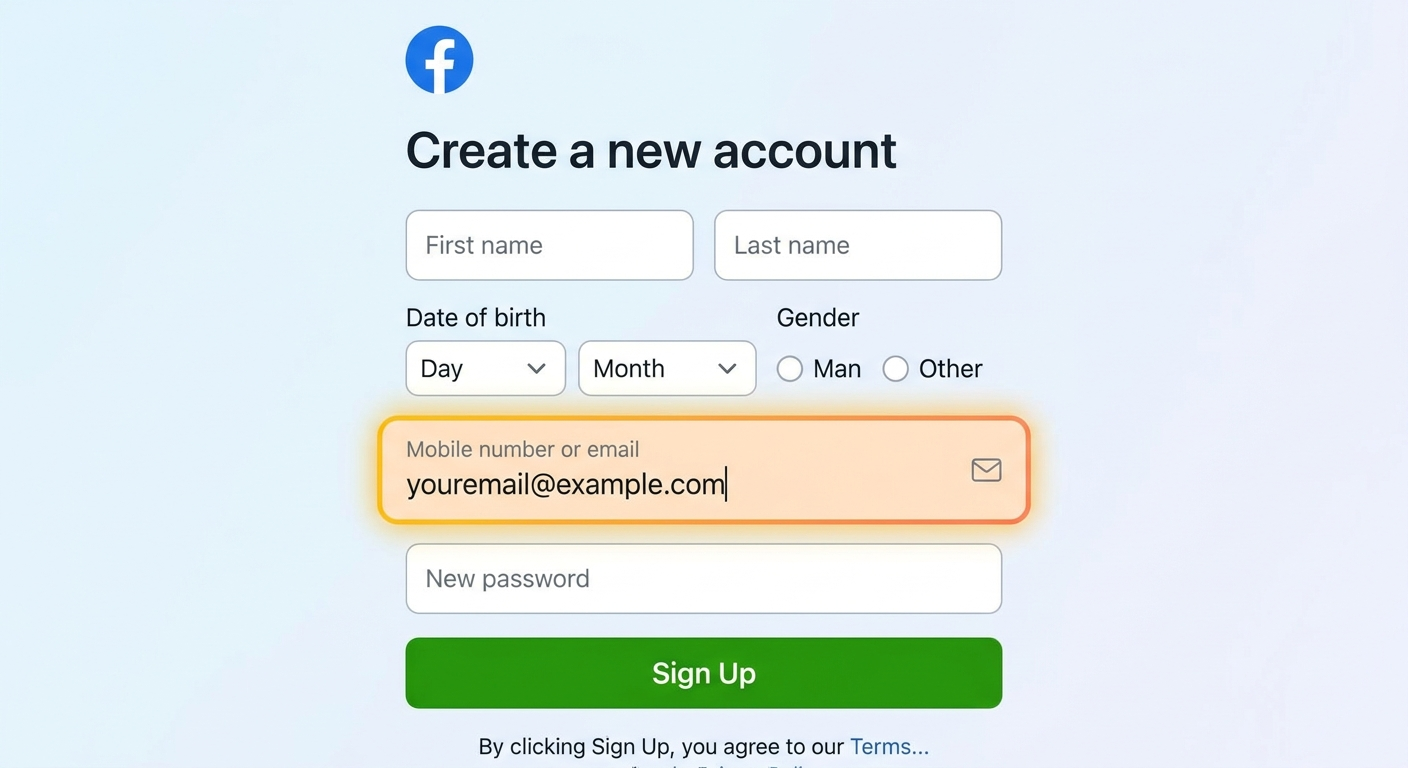
The signup field labeled "Mobile number or email" accepts a valid email. That entry routes the account onto the email verification path.
Account verification then runs through a confirmation code sent to that inbox. The process is a standard step, not a barrier. A phone number can be replaced by a virtual phone number when a specific signup screen insists on SMS.
When does a phone number actually become useful on Facebook?
A phone number adds three concrete security functions to a Facebook account, even though it stays optional at signup. First, the number gives Facebook a recovery path if the email and password are both lost. Second, Facebook sends login alerts to the number when an unfamiliar device signs in.
Third, the number supports SMS-based two-factor authentication as a backup layer beyond the password. Each function has a phone-free alternative, so keeping the number off the account remains a deliberate, informed choice.
Your two reliable methods at a glance
Two methods create a facebook account without phone number: email signup and a virtual phone number. Email signup suits a single personal account, while a virtual number suits business use and managing several profiles. The table below compares both before the step-by-step sections that follow.
Method
Best for
Privacy level
Setup cost
Best account longevity
Email signup
One personal account
Email hidden from profile
Free email inbox
Strong with email recovery set
Virtual phone number
Business and multiple profiles
Personal number stays private
Paid number from a provider
Strong with a private long-term number
Email signup fits personal use where one account is enough. A virtual phone number fits advertising, business pages, and anyone managing multiple profiles who wants each one stable.
Comparing all phone number options for Facebook verification
Four number types can verify a Facebook account, and they differ sharply on reliability, privacy, and cost. The table ranks each type so the best fit for a durable account is clear.
Provider type
Reliability
Privacy and security
Cost
Best use case
Personal number
Accepted by Facebook
Links account to real identity
Free
Users who accept identity exposure
Free SMS websites
Often rejected as flagged
Public number, shared by many
Free
None recommended for Facebook
Paid virtual number
Accepted, private line
Number is not resold after rental
Low per-number fee
Business and multi-profile accounts
Prepaid SIM card
Accepted, extra hardware
Semi-private, needs a device
SIM plus airtime cost
Users wanting a spare physical line
Free SMS websites are the one option to avoid outright, because their numbers are shared and frequently blocked. A paid virtual phone number scores well on all three factors the table compares: privacy, reliability, and cost.
Method 1: Facebook sign up without a phone number using email
Facebook sign up without phone number works on desktop browsers, mobile browsers, and the Facebook app. The steps below walk through the browser flow and the app flow. They also handle the post-signup phone prompt and the confirmation-code problems that stall most registrations. Gmail works well as a reliable email provider for this purpose.
How to create a Facebook account without a phone number on a computer
Facebook's browser signup completes in seven steps and takes about three minutes with a working email address. Gmail or another reliable provider gives you an inbox that receives the confirmation code quickly. This is how to make a facebook without a phone number on the web.
Open facebook.com in your browser and click Create new account.
Enter your first name, last name, date of birth, and gender.
In the "Mobile number or email" field, type your email address instead of a number.
Create a strong password that protects the Facebook account from unauthorized access.
Click Sign Up to submit the form and create the account.
Open your Gmail inbox and find Facebook's confirmation email.
Enter the confirmation code on Facebook to complete account verification.
A one-time password (the confirmation code Facebook sends) arrives by email within a minute. Facebook may still show a phone-number prompt after this step, which you can decline.
How to create a Facebook account without a phone number on mobile
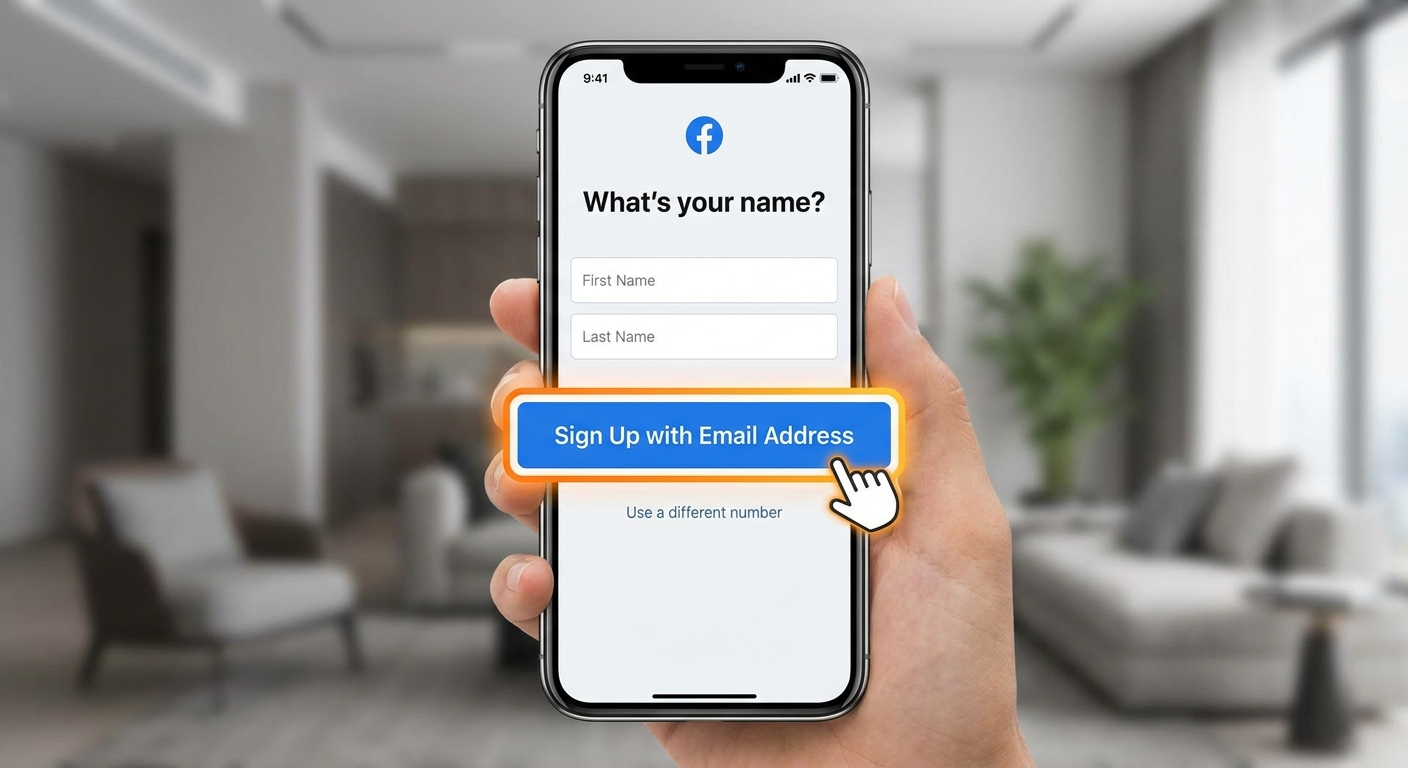
The Facebook app signup completes in eight steps on both iOS and Android. One link is easy to miss, so watch for it at step four on your mobile device.
Open the Facebook app and tap Create new account.
Tap Get started to begin the registration flow.
Enter your first name, last name, date of birth, and gender.
Tap Sign Up with Email Address rather than entering a mobile number.
Type a valid email address you can open immediately.
Create a strong password for the Facebook account.
Tap Sign Up to submit the form.
Open the confirmation email and enter the code to finish account verification.
The app hides the email option behind a secondary button. Step four is where most people accidentally revert to phone signup.
What to do when Facebook asks for a phone number after signup
Most accounts created through email see a phone-number request within the first days, and this prompt is normal. Facebook states the request supports security, while its practical goal is reducing automated and duplicate accounts to limit Spamming. You can decline the prompt with Not Now, Skip, or I Don't Have a Phone.
The Facebook account stays fully functional. Regular, organic activity over the first weeks lowers how often the prompt reappears. This protects your Privacy without adding a number.
Facebook confirmation code not received on email: issues and fixes
A missing confirmation code stalls email signup more than any other issue, and it usually clears in about two minutes. Check these five causes in order before requesting a new code:
Look in Gmail's Social and Promotions tabs, where Facebook mail often lands instead of the primary inbox.
Confirm the email address was typed correctly on the signup form, since one wrong character sends the code nowhere.
Wait 60 seconds, because delivery delays are common during high-traffic periods.
Search the inbox for "Facebook" to surface a code buried under other mail.
Add facebook.com as a safe sender so future codes skip the spam filter.
Requesting Resend Code more than once triggers a temporary block, so use each new code before asking for another.
Method 2: Facebook account creation without phone number using a virtual number
A virtual phone number is an online number that receives SMS codes without a physical SIM card. This makes it a stronger base for a long-lived Facebook account.
A virtual number complements email signup rather than replacing it. The number suits users who need multiple profiles or business-grade verification.
SMSFAST provides virtual numbers built specifically for receiving verification codes, with a dedicated Facebook verification page for this exact task. The subsections below cover why a number helps and its specific benefits. They also cover the danger of free numbers, how to pick a provider, and the full signup steps.
Why a virtual phone number is more reliable than email alone
A virtual phone number strengthens a Facebook account beyond what email verification provides on its own. The number gives Facebook's algorithm an extra trust signal, which lowers how often the account faces repeat security checks. It also creates a recovery route if the linked email is ever compromised.
A single point of failure no longer locks the account. The number also supports two-factor authentication as a second layer, without exposing a personal email or phone.
The specific benefits of using a virtual number for Facebook verification
A virtual phone number delivers five practical benefits for a Facebook account. Each benefit addresses a concrete privacy or stability need rather than a vague promise.
Privacy protection keeps your personal phone number off Facebook's servers entirely.
A second security layer supports two-factor authentication without linking a personal line.
A backup recovery path restores access if the account's email is compromised.
Profile separation lets social media managers keep each client account on its own number.
Multi-platform use covers WhatsApp, Telegram, and other services from one number.
SMSFAST numbers work across many services, so the same number can also verify a Telegram account without a phone number. This multi-platform coverage is why one virtual number often serves several registrations.
The danger of free and recycled numbers
Free SMS websites reuse the same public numbers across thousands of users, which Facebook's algorithm flags as high-risk. A reused number triggers an account block or the error "This number cannot be used for verification." These sites offer no privacy, because anyone can read the shared codes. Free SMS websites should never verify a Facebook account. A private paid number avoids the problem entirely.
What to look for in a reliable virtual number provider
A reliable virtual number provider meets six criteria that separate durable numbers from single-use ones. Weigh each criterion before paying for any service:
Dedicated numbers assigned to one user, not shared public lines.
Confirmed SMS compatibility with Facebook verification specifically.
Country choice, so you can match the number to your region.
A private line that the provider does not resell after the rental ends.
A refund path if a code fails to arrive, returning funds to your balance.
Multi-platform support covering WhatsApp, Telegram, and similar services.
SMSFAST meets all six criteria. The service provides dedicated numbers, an instant automated refund on failed codes, confirmed Facebook support, and 500+ services. You can review current pricing and options on the virtual phone number explainer.
Step-by-step: how to use a virtual number to create your Facebook account
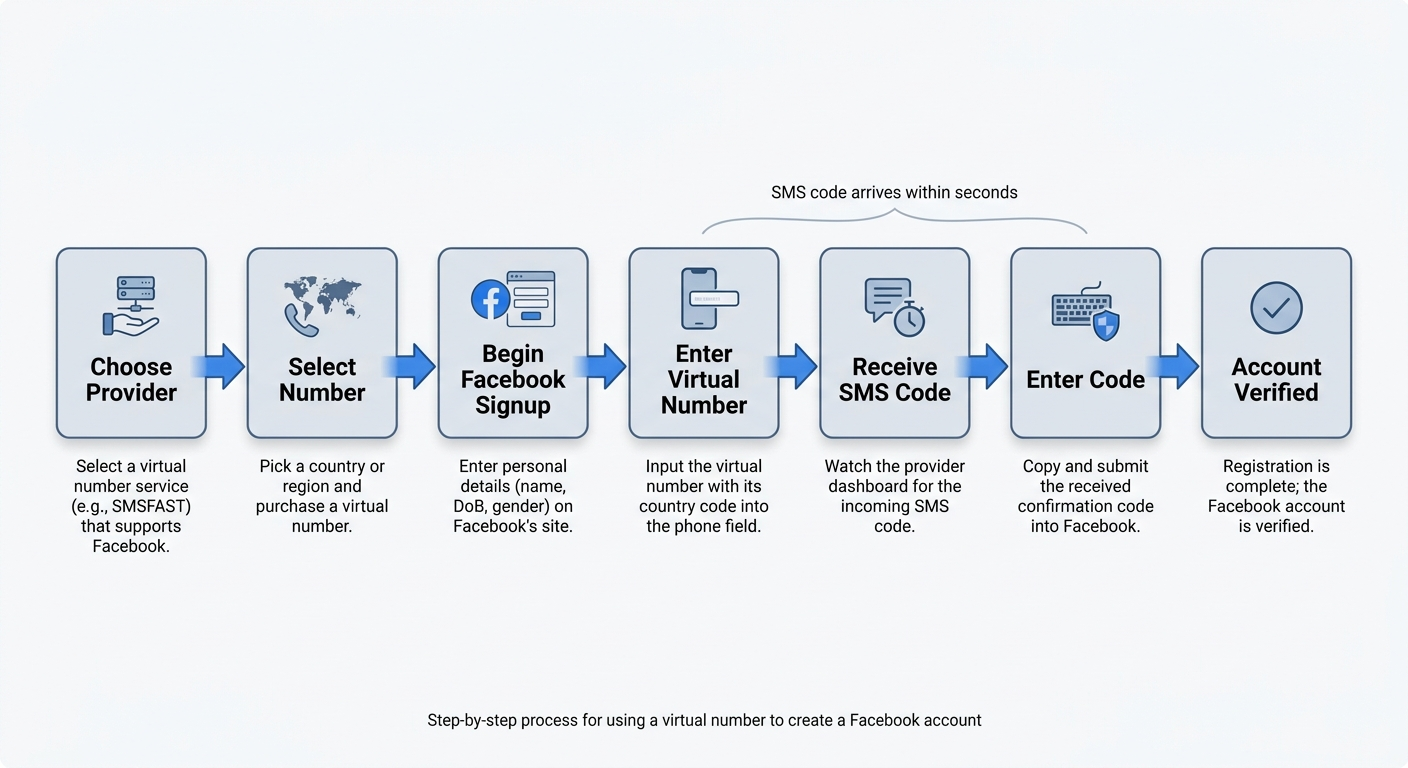
A virtual number completes Facebook verification in ten steps once you have an active number ready. Open your provider dashboard before you start, because the SMS code can arrive within seconds.
Choose a provider such as SMSFAST that confirms Facebook support.
Add funds to your SMSFAST balance using a supported top-up method.
Select Facebook as the service in the SMSFAST menu.
Pick the country or region for your virtual phone number.
Confirm the purchase, and SMSFAST activates the number within seconds.
Begin Facebook signup and enter your name, date of birth, and gender.
Enter the virtual number, with its country code, in the phone field.
Watch the SMSFAST dashboard for the incoming SMS verification code.
Copy the confirmation code from the dashboard into Facebook.
Submit the code to complete account verification.
If the code does not arrive, you click Cancel on SMSFAST and funds return to your balance instantly. The SMSFAST Facebook verification page handles this exact flow with a number matched to the service.
Troubleshooting Facebook verification: solving the most common errors
Verification errors fall into three patterns, and each has a direct fix. The subsections below cover a missing code, a rejected number, and the technical routing reasons a virtual number code stalls.
The verification code never arrived: here's what to do
A missing verification code clears in seven steps that work for both email and SMS delivery. Run them in order:
For email: check the Social, Promotions, and spam folders in your inbox.
For email: confirm the address was typed correctly on the form.
For virtual numbers: refresh the SMSFAST dashboard for the incoming SMS.
For virtual numbers: confirm the number's country code was entered correctly.
Wait 60 seconds before assuming the code failed.
Request one new code, then use it before asking again.
Switch to email verification if SMS keeps failing.
Requesting Resend Code more than once triggers a temporary block, so pace each request.
"This phone number cannot be used for verification": why it happens and how to fix it
The "cannot be used" error appears because the number is blacklisted from prior use on free or shared SMS services. Facebook's algorithm matches the number against flagged records and rejects it before sending a code.
A fresh private virtual phone number from a reliable provider resolves the error. The dedicated line carries no shared history. SMSFAST assigns private numbers that are not resold, which keeps them clear of the blacklist that causes this rejection.
VoIP blocking and SMS routing: the technical reasons your virtual number code isn't arriving
A virtual number code can stall for four technical reasons, each with a matching fix:
VoIP (Voice over Internet Protocol) blocking: Facebook rejects some internet-based numbers, so switch to a provider number confirmed for Facebook.
SMS routing delay: certain country routes deliver slowly, so pick a country with stable routing such as the United States or United Kingdom.
Country-code error: a missing or wrong prefix voids the number, so re-enter it in full international format.
Provider-side outage: a temporary fault blocks delivery, so request a fresh number and retry.
Ask your provider whether voice verification is available, because a call-based code avoids SMS routing when messages fail to arrive.
Securing your new Facebook account after verification
Account creation is the first step, and security determines whether the Facebook account survives long term. Accounts built carefully but secured poorly are lost fast, often within weeks. Three measures within the first 24 hours protect the account.
Set up two-factor authentication, warm up the account, and build a phone-free recovery plan. Multi-factor authentication is the broader protocol here, and two-factor authentication is its practical form.
Setting up two-factor authentication without SMS
SMS-based two-factor authentication needs a phone number, which defeats the goal of a phone-free account. An authenticator app gives the same protection without a number, and Authy adds encrypted cloud backup for the codes. Set it up in six steps, following Facebook's official Help Center guidance:
Open Settings on your Facebook account.
Go to Security and Login.
Select Two-Factor Authentication.
Choose Authentication App as the method.
Scan the QR code with Google Authenticator or Authy.
Confirm the generated code to activate two-factor authentication.
Google Authenticator and Authy both work with a Facebook account, and Authy's cloud sync restores codes if you change devices.
The art of account warming: how to avoid getting flagged as a bot
Account warming means interacting with Facebook gradually so the platform's algorithm builds trust in a new account. A new employee who greets everyone on day one looks suspicious. So does a brand-new account.
Facebook's defenses target bot-like behavior, not new users, so measured activity avoids the flag. Follow these habits for the first two weeks:
Add a profile photo and a few real details before posting anything.
Send friend requests slowly, a handful per day at most.
Join one or two groups that match a genuine interest.
Comment and react before publishing original posts.
Log in from the same device and location each time.
Treat the first two weeks as a quiet period with light activity.
This measured pattern signals a real person and lowers the risk of a Spamming flag on the Facebook account.
Building a phone-free account recovery plan
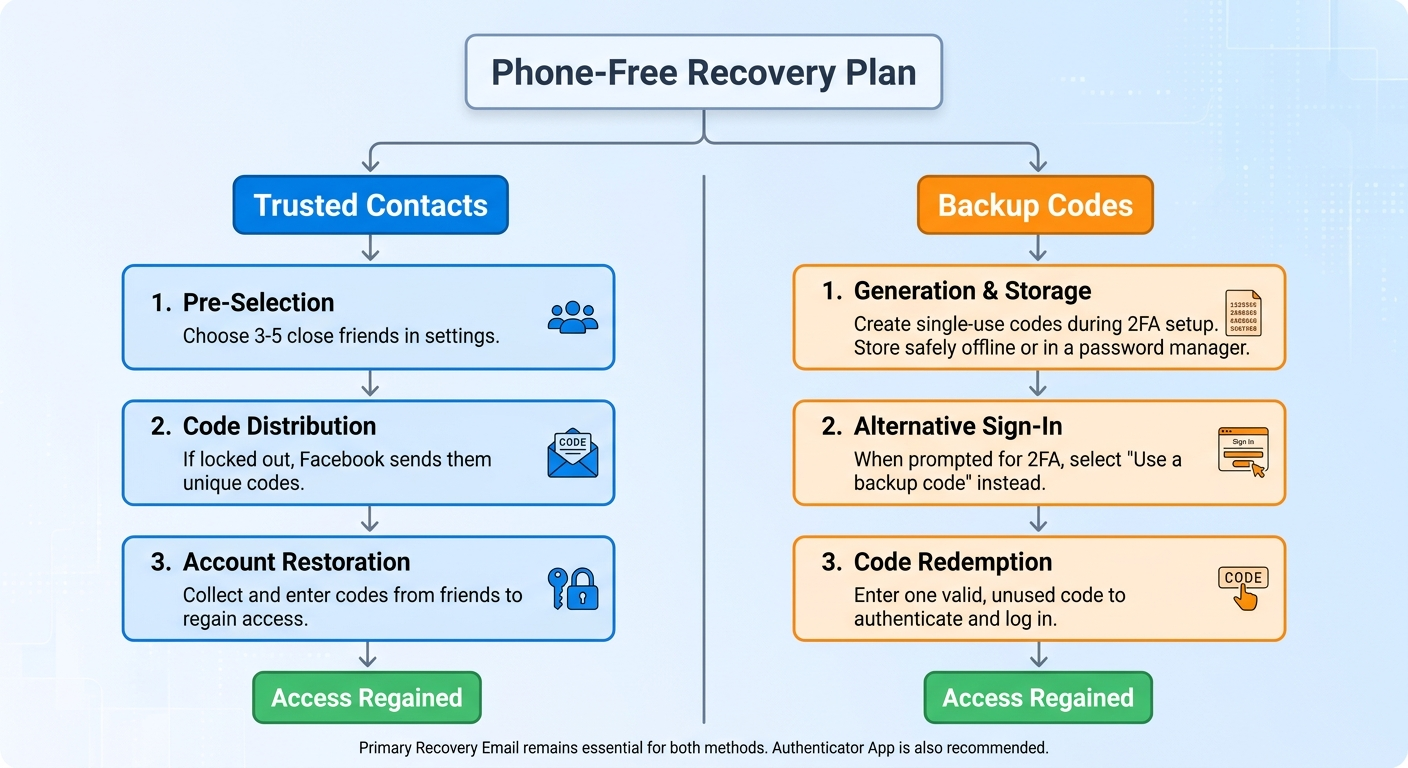
A recovery plan is the most skipped setup step and the most regretted one when access is lost. An email address stays the primary recovery path for a phone-free Facebook account, so keep that inbox secure.
An authenticator app is the backup recovery layer for a phone-free Facebook account. Generate Backup Codes when you enable two-factor authentication, so you can sign in without SMS. Backup Codes are single-use, so generate a fresh set periodically and store them where your password manager keeps them safe.
Final thoughts: your phone-free Facebook account is ready
You can create a facebook account without phone number as a platform-supported choice. Email signup verifies the account through a confirmation code sent to your inbox. A virtual phone number from SMSFAST adds a private, stable route when a screen pushes SMS. After account verification, set up two-factor authentication, warm the account, and build a phone-free recovery plan.
Step
Action
Method
Create account
Sign up with email or a virtual number
Email or virtual phone number
Handle phone prompts
Decline with Not Now or Skip
Both methods
Enable 2FA
Use an authenticator app, not SMS
Google Authenticator or Authy
Warm up account
Light, organic activity for two weeks
Both methods
Set up recovery
Email, authenticator app, Backup Codes
Both methods
Get your virtual number today
SMSFAST delivers virtual numbers in many countries instantly, with no SIM card needed
Frequently Asked Questions
Is it legal to create a Facebook account without a real phone number?
Yes, creating a Facebook account with an email address or a virtual phone number is legal and supported by Facebook. The platform offers email as an official signup path, and a virtual number is a standard privacy tool. Follow Facebook's terms of service, and both methods stay within the rules.
Will Facebook ban an account that uses a virtual number?
Facebook does not ban accounts for using a private, dedicated virtual number that passes verification. Bans and the "cannot be used" error come from free or shared numbers already flagged across thousands of signups. A private SMSFAST number that is not resold avoids that flag and verifies cleanly.
Can the same virtual number be used for multiple platforms?
Yes, one virtual phone number can verify several platforms, including Facebook, WhatsApp, and Telegram. A long-term rental number from SMSFAST stays exclusive to you, so you can reuse it across services. An activation-mode number lasts 20 to 90 minutes and suits a single one-time signup instead.
Can a phone number be added to a Facebook account later?
Yes, a phone number can be added to a Facebook account at any time through Settings. Open Settings, then Personal and account information, then Contact info, and add the number. Adding it later is optional and does not affect the email verification used at signup.
How can a Facebook account be recovered without a phone number?
A Facebook account is recovered without a phone number using the linked email address as the primary path. An authenticator app and single-use Backup Codes restore access when two-factor authentication is on. Set up all three right after account verification for the safest recovery.
What happens if a virtual number becomes inactive after signup?
An inactive virtual number does not lock the Facebook account, because verification is already completed at signup. The account stays accessible through your email and password. For long-term security, add an authenticator app for two-factor authentication and set up email-based recovery.
Why isn't the Facebook verification code arriving on a virtual number?
VoIP blocking, slow SMS routing, or a wrong country code stalls a Facebook code on a virtual number. Refresh the SMSFAST dashboard, confirm the full international number, or switch to a country with stable routing. If SMS keeps failing, use email verification instead.
Does Facebook require a real phone number under its terms of service?
No, Facebook's terms allow account creation with an email address instead of a phone number. Facebook's official guidance confirms users can register with either contact method, then verify through a code. Facebook may request extra verification for suspicious activity, but a phone number is not mandatory at signup.
It is entirely possible to create a Grindr account without a phone number. From temporary SMS services to third-party logins and secondary devices, there are practical ways to protect your identity while still enjoying the app.
In this guide, you’ll learn exactly how Venmo’s verification system works, what happens if you skip the phone number step, and which trusted alternatives can help you complete registration securely.