Want to use Grindr but worried about giving out your personal phone number? You’re not alone. Many users hesitate to link their SIM to a dating app due to privacy risks, digital tracking, or potential exposure in case of data breaches.
The good news: it’s entirely possible to create a Grindr account without a phone number. From temporary SMS services to third-party logins and secondary devices, there are practical ways to protect your identity while still enjoying the app. In this guide, we’ll show you step by step how to sign up safely, stay anonymous, and keep your personal information out of the wrong hands.
Grindr uses phone verification as a core mechanism to confirm who creates an account, what device is being used, when the verification occurs, and where the request originates. This method helps the platform maintain accurate user records, filter automated registrations, and stabilize anti-spam systems. SMS verification also supports fraud detection by linking new accounts to a reachable number during the onboarding process.
Despite these operational benefits, many users actively avoid linking their personal SIM numbers to a Grindr profile. A phone number can act as a long-term identifier and may indirectly expose private information. Because Grindr processes sensitive behavioral and location data, individuals often prefer to keep their primary number disconnected from such platforms.
Concerns around privacy intensified after regulatory findings in Europe. In 2021, the Norwegian Data Protection Authority concluded that Grindr violated GDPR rules and issued a $6 million fine for sharing user data without proper consent. Incidents like this encouraged users to be more cautious about what personal identifiers they attach to dating apps.
Why Some Users Prefer Not to Use Their Personal Phone Number
Many people avoid using their personal number due to several concrete risks:
Digital traceability: Phone numbers can be used to cross-link accounts, track online activity, or identify profiles across platforms.
Social media discovery: Some services allow reverse lookups that can reveal linked accounts or suggest profiles based on phone contacts.
Data breaches: If a platform’s data is leaked, the phone number becomes part of exposed records, which can lead to targeted phishing or unwanted contact.
Personal–professional separation: Users may wish to keep dating profiles separate from work or family communication channels.
Safety considerations: In regions with limited privacy protections, linking a SIM card to a dating profile can increase the risk of harassment or unwanted exposure.
Because of these factors, many individuals prefer to complete Grindr’s verification process using alternative methods that protect their identity while still allowing them to access the platform.
Methods to Create a Grindr Account Without a Phone Number
Users can register on Grindr without linking their primary phone number by using several practical methods. While most competitors focus only on temporary or prepaid numbers, this guide expands the approach by including options based on alternative verification flows and third-party login behavior, as well as secondary devices or SIM arrangements.
Using a Temporary Phone Number (Fastest and Most Accessible Method)
Temporary numbers are the easiest way to complete Grindr’s mandatory verification without exposing a personal SIM. They are designed specifically to receive one-time passwords and verification codes and can also serve as short-term numbers for repeated verifications.
Step-by-step: How to Sign Up for Grindr Using a Temporary Number
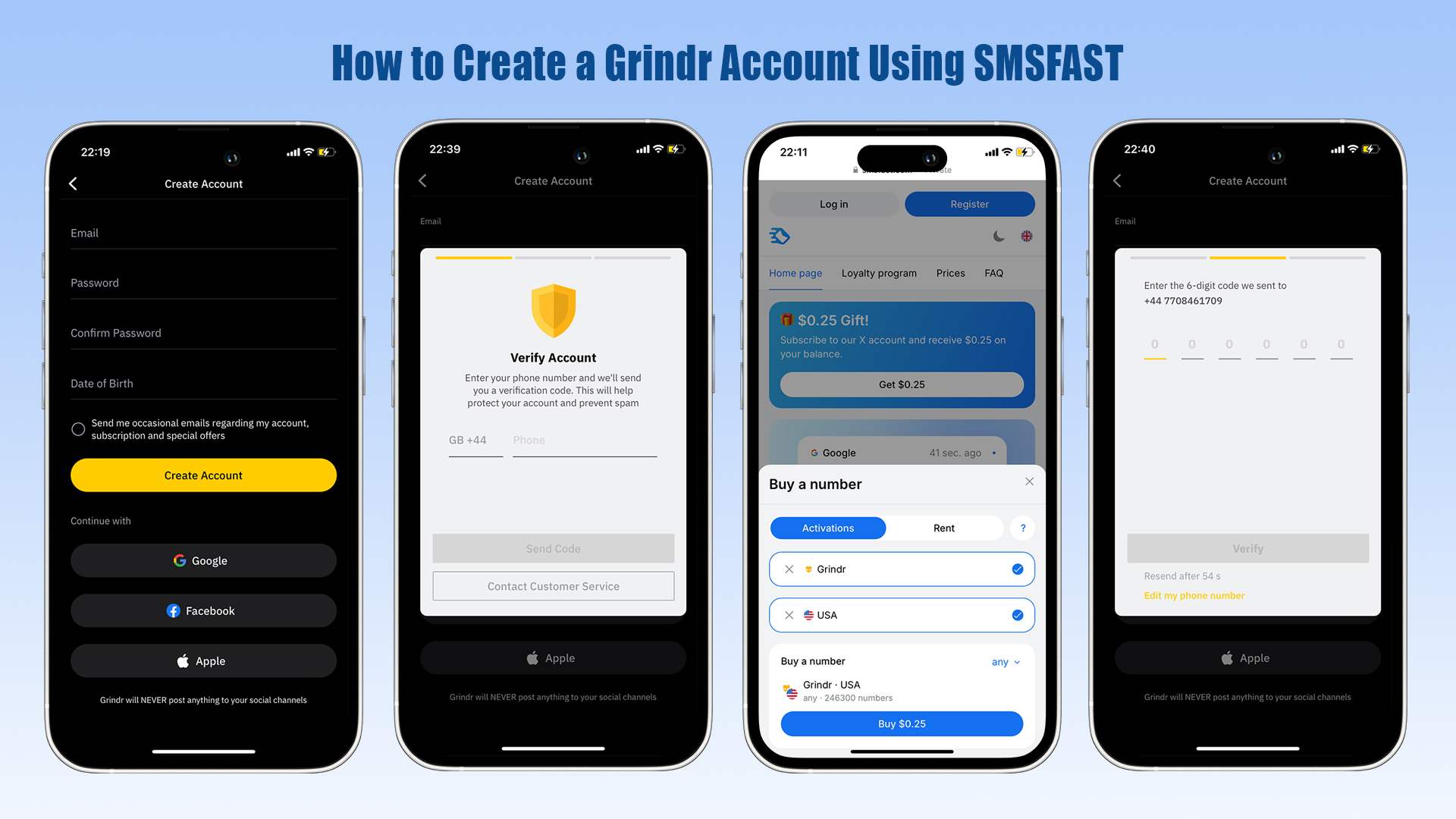
Register or Sign In on SMSFAST
Go to SMSFAST and click Registration if you don’t have an account, or log in if you already do.
Complete the registration with your email and password.
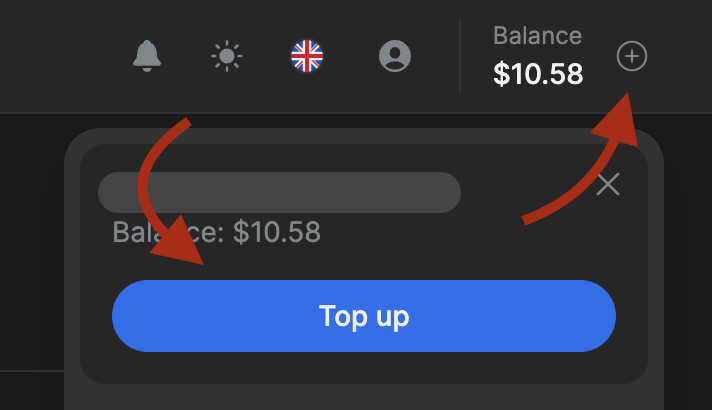
Add Funds to Your SMSFAST Balance
Click the “+” button (top right corner) or Top Up.
Select a payment method and deposit the desired amount.
Purchase a Temporary Number for Grindr
Open the left menu or service list in SMSFAST.
Select Grindr and choose the country/region for the number.
Click Buy and wait for the number to be activated.
Copy the assigned number from the Number field.
Register on Grindr Using the Temporary Number
Open the Grindr app.
Tap Create Account.
Enter the email, birthdate, and temporary number in the phone verification field.
Retrieve and Enter the Verification Code
In SMSFAST, wait for the one-time password (OTP) to appear in the “Code from SMS” section.
Copy the code and enter it in Grindr to complete verification.
Extra Tips for Reliability:
Choose numbers from high-deliverability countries (e.g., the US, UK, and Canada).
Avoid VPNs that mismatch your device country with the number.
If the code doesn’t arrive in 60–90 seconds, refresh or purchase another number.
Keep the number active in case re-verification is needed.
Using Third-Party Login (Not Fully Anonymous)
Grindr allows new users to begin account creation through a trusted third-party login without asking for a phone number right away. These platforms act as an initial identity check, enabling you to enter the app and set up parts of your profile before any SMS verification appears.
This tends to work when:
You choose Google, Facebook, or Apple instead of the email-and-phone flow.
Your device already has one of these accounts securely linked and recognized.
Grindr treats the third-party login as sufficient preliminary authentication.
Note:
While third-party login delays SMS verification, it isn’t fully anonymous. Accounts linked via Google, Facebook, or Apple are associated with a social identity, which can include real names, emails, or activity logs, reducing overall anonymity.
Grindr may still request a phone number later, for example, after logging in on a new device, enabling specific features, or triggering security checks. This approach simply delays verification, allowing early access without immediately using your personal number.
Using a Secondary Device or a Prepaid SIM (Classic but Flexible)
Some users register Grindr through a secondary phone, a portable Wi-Fi router with a SIM slot, or a prepaid SIM separate from their primary identity.
Where it works:
Countries with minimal registration requirements for prepaid SIMs
Households using mobile Wi-Fi devices or secondary phones
Dedicated numbers for app usage and repeated verification
Why it’s distinct:
Numbers remain private and independent from your main phone
Reduces cross-app linkage and digital traceability
Supports long-term account recovery and re-verification
Quick Comparison: How to Sign Up Without Your Phone
Method
How It Works
Pros
Cons
Notes
Temporary SMS Number
Receive verification codes via a service like SMSFAST
Fast, accessible, and protects real numbers
Short-term, may need multiple numbers
Works best with high-deliverability regions
Third-Party Login
Sign up via Google/Facebook/Apple
Instant access, avoids SMS initially
Not fully anonymous
Account still linked to social identity
Secondary Device / Prepaid SIM
Use a separate phone or prepaid SIM
Stable, long-term, separate identity
Requires an extra device or SIM
Some regions may require registration
How to Stay Anonymous and Protected on Grindr
Maintaining privacy on Grindr requires more than avoiding personal phone numbers. Many users unknowingly leave digital traces that can reveal their identity. The following strategies focus on minimizing digital fingerprints, controlling what is shared, and keeping your social identity separate from your dating activity.
1. Minimize Your Digital Fingerprint
Every app interaction device ID, IP address, browser version, and usage patterns can contribute to a “digital fingerprint” that identifies you across platforms. To reduce this risk:
Use a secondary device or a virtual machine for Grindr.
Avoid logging in from your main phone that contains personal apps or accounts.
Consider a fresh browser profile or app install if using the Grindr web.
Limit app permissions, especially access to contacts and system identifiers.
2. Remove EXIF Data From Photos
Photos uploaded to Grindr often contain EXIF metadata, which can reveal:
GPS coordinates where the photo was taken
Device model and camera information
Date and time of capture
To stay anonymous:
Use apps or tools to strip EXIF data before uploading photos.
Avoid screenshots of personal environments that could indirectly reveal identity.
Prefer generic or edited photos that obscure identifiable backgrounds.
3. Hide Your Geolocation
Grindr uses location data to show nearby users, but leaving precise geolocation enabled can compromise your privacy.
Consider disabling location services or using approximate locations if your device allows it.
Some devices allow mock GPS apps to obscure real coordinates.
Avoid checking in or referencing exact locations in profile descriptions or messages.
4. Keep Social Media Separate
Many users unintentionally link Grindr activity to social media accounts. To avoid this:
Do not link Instagram, Facebook, or TikTok accounts directly.
Avoid using usernames or handles identical to those on your personal accounts.
Check that profile photos or content cannot be reverse-searched on your social media.
5. Practice Safe Behavior in Chats
Even when your account and device are anonymized, your interactions can reveal identity cues. Tips for anonymous behavior:
Avoid sharing real names, workplaces, or specific routines.
Be cautious about sending photos that show faces, distinctive tattoos, or personal environments.
Use generic messaging and avoid patterns that could be traced back to you.
Limit the amount of personal information given until trust is established.
6. Use the Web Version for Additional Privacy
Grindr Web can be accessed from desktop or secondary devices without installing the app on your main phone.
Web sessions can be deleted easily, minimizing persistent digital fingerprints.
Pairing web use with a temporary number can help maintain privacy for messages, though account registration and initial sign-up still require the app.
Ideal for users who want to compartmentalize Grindr activity or avoid exposing their primary phone to location tracking.
Conclusion
Signing up for Grindr without your personal phone number is possible through a variety of methods, from temporary SMS numbers to third-party logins and secondary devices. Each approach has pros and cons depending on your goals for anonymity, convenience, and account stability.
By understanding the risks of linking personal information, choosing the right verification method, and practicing privacy-conscious behavior, you can enjoy Grindr safely while maintaining control over your digital footprint. Combining careful account setup with techniques like metadata removal, geolocation control, and web access can help you use Grindr without compromising personal information.
FAQ
1. Can I create a Grindr account without a phone number?
Yes. You can register using a temporary SMS number, third-party login (Google, Facebook, Apple), or a secondary/prepaid SIM to keep your personal number private.
2. Is it safe to use a temporary number for Grindr verification?
Temporary numbers are designed for verification codes only. They protect your personal SIM but are short-term solutions and may require multiple attempts if codes fail to deliver.
3. Does using Google, Facebook, or Apple login keep my account anonymous?
Not entirely. While it delays SMS verification, linking a social account can connect Grindr activity to your real identity, including name, email, or other account data.
4. Can I use Grindr Web without installing the app?
Yes. Grindr Web can be accessed on a desktop or secondary device to minimize digital traces. However, new account registration still requires the app, though temporary numbers can help with verification.
5. How can I stay fully anonymous on Grindr?
Use secondary devices, remove EXIF data from photos, hide precise geolocation, avoid linking social media, and maintain cautious behavior in chats. Pairing these practices with temporary numbers or prepaid SIMs increases anonymity.
In this guide, you’ll learn exactly how Venmo’s verification system works, what happens if you skip the phone number step, and which trusted alternatives can help you complete registration securely.
Telegram always requires a phone number, but it doesn't have to be yours. Learn the methods that actually work in 2026, including virtual numbers, eSIM, and privacy settings.