Venmo has become one of the most convenient ways to send and receive money in the U.S., but what if you don’t have access to a personal mobile number? If you’ve lost your SIM card, want to keep your number private, or prefer to separate financial transactions from your main phone, you can still register and verify Venmo using trusted alternatives. In this guide, you’ll learn exactly how Venmo’s verification system works, what happens if you skip the phone number step, and which trusted alternatives can help you complete registration securely.
Why Does Venmo Require a Phone Number, and Can You Use It Without One?
Venmo is a U.S.-based mobile payment platform owned by PayPal Holdings, Inc., designed for peer-to-peer transfers using linked bank accounts, debit cards, or Venmo balances. Venmo operates under U.S. financial laws, including the Bank Secrecy Act (BSA) and Know Your Customer (KYC) regulations, which require all users’ identities to be verified and traceable.
The user must be physically located in the United States.
They must have a U.S.-based cell phone capable of sending and receiving text messages from short codes.
The phone number cannot already be registered to another Venmo account.
The user must be at least 18 years old, or the age of majority in their state.
The strict verification process is partly a result of earlier data exposure incidents. In June 2018, a system vulnerability exposed public access to about 200 million transaction records through open APIs. While no bank or card information was leaked, transaction metadata, such as usernames, payment notes, and timestamps, was accessible. This event underscored the importance of identity traceability and led to tighter verification policies, including the mandatory use of personal phone numbers for all new accounts.
What Happens If You Don’t Provide a Number
Accounts cannot be created or activated without a verified mobile number. During registration, Venmo requires SMS confirmation before granting access to any user dashboard or payment function. If SMS verification isn’t completed, the registration process stops, and users cannot link payment methods, send, or receive money.
If a number becomes inactive or disconnected, Venmo will require re-verification before allowing access to payments or transfers. In such cases, users may need to confirm identity through additional steps like photo ID upload or a linked PayPal review.
How Users Actually Bypass This Requirement
Although Venmo requires a verified U.S. phone number, some users register using alternative verification methods that technically meet the same SMS confirmation requirement:
Virtual Phone Numbers — Services such as SMSFAST provide U.S.-based virtual numbers capable of receiving short-code SMS from Venmo. When sourced from legitimate providers, these can complete verification reliably.
Disposable Numbers — These are temporary, one-time-use phone numbers available through public SMS-receiving websites or short-term rental platforms. They are primarily intended for quick verifications and become invalid once the rental session expires.
Friend or Family Numbers — Occasionally used for initial setup; however, Venmo may later request replacement with a personal number to maintain account security.
While these methods can activate an account, Venmo actively monitors for number irregularities. If inconsistencies are detected, such as recycled, inactive, or non-U.S. numbers, the platform may block transactions or request additional identity proof before restoring full functionality.
How to Use Venmo Without a Phone Number
Venmo’s registration system requires a verified U.S. number for SMS-based authentication. However, users without a personal SIM card can still activate an account by using alternate methods that meet Venmo’s verification conditions. The options below explain who they’re for, how they work, and where they can be used effectively.
Option 1. Use a Virtual Phone Number
A virtual phone number is a cloud-based number that operates over the internet rather than a physical SIM card. These numbers are often used for online registrations, multi-platform logins, and international verification tasks.
Which Providers Are Recognized in the U.S.?
SMSFAST – designed specifically for receiving verification codes from major apps like Venmo, PayPal, and Google.
TextNow – provides numbers supported by U.S. carriers for basic SMS use.
Burner and Hushed – paid apps offering temporary or semi-permanent virtual numbers for privacy use.
How to Buy a Virtual Phone Number for Venmo Through SMSFAST
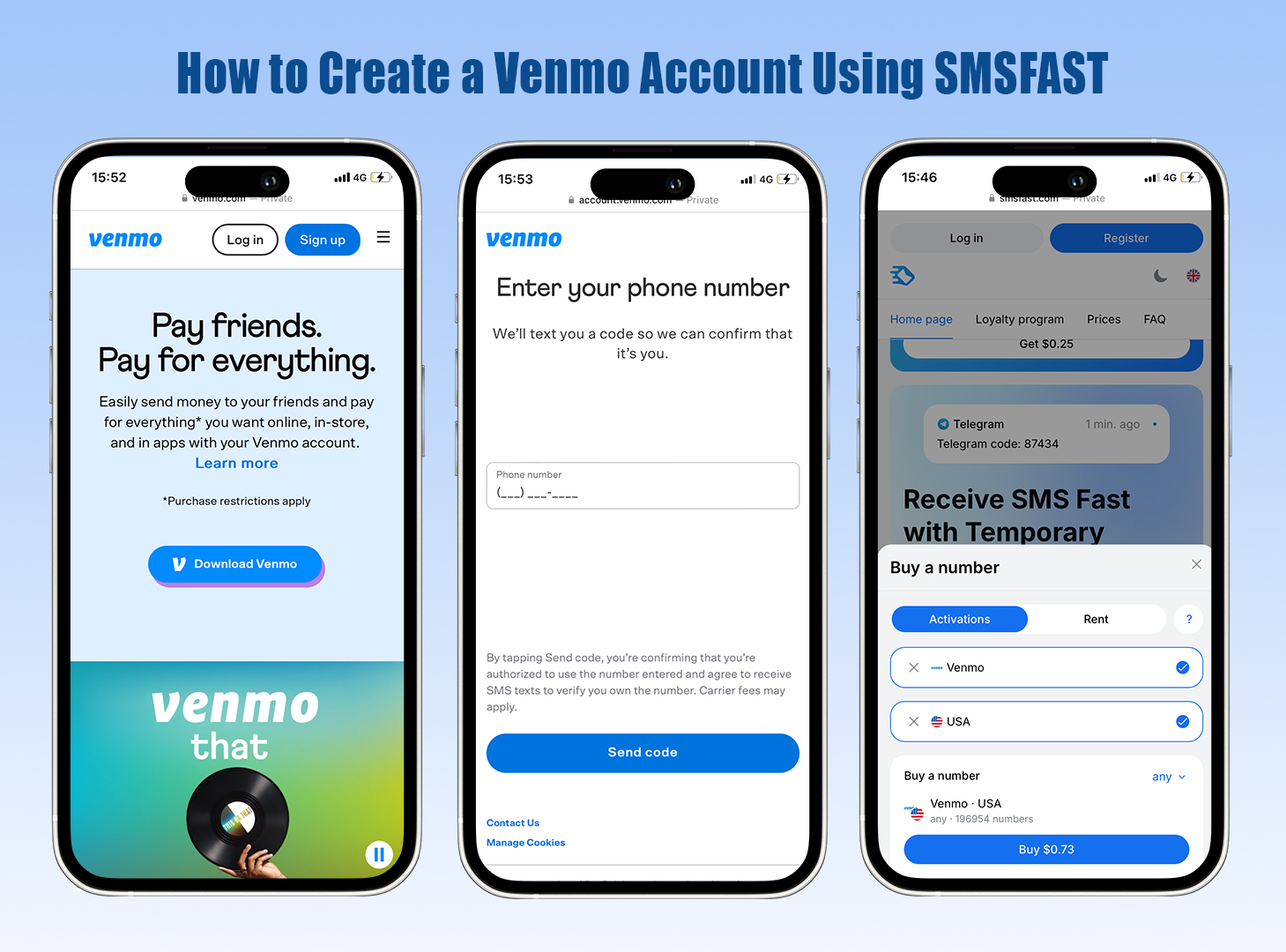
To register or verify your Venmo account using a virtual U.S. number, you can follow these exact steps on the SMSFAST platform. This method works for users who do not have access to a personal SIM card or wish to keep their private number separate from financial apps.
1. Log in to your account
Visit the official SMSFAST website. If you are a new user, click “Registration” to create an account. Existing users can simply log in with their credentials.
2. Fund your balance
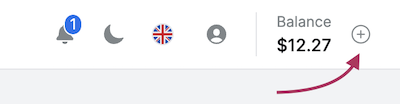
In the top-right corner, click the “+” icon. Choose any available payment method to top up your balance. Add the amount required for one Venmo verification (usually shown near the service name).
3. Select Venmo as the service
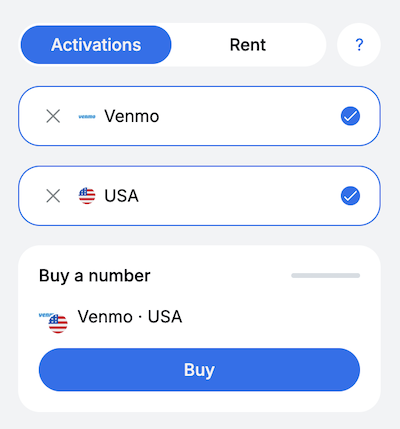
In the left-hand menu, open “Select service.” Scroll or search for “Venmo” in the list of supported apps. Then choose the desired region (USA) from the available list of countries.
4. Purchase a number
Click “Buy” next to Venmo. The system will automatically assign and activate a number suitable for Venmo SMS verification. Wait a few seconds until the number appears in your dashboard.
5. Get the number
Copy the virtual phone number from the “Number” field. Go to Venmo’s registration or login page, paste the number into the phone number field, and request your verification code.
6. Enter the verification code
Wait for the one-time password (OTP) from Venmo to arrive. The message will appear in the “Code from SMS” field in your SMSFAST account. Copy the code and enter it on Venmo’s verification screen to complete registration.
You can also retrieve messages manually by clicking the “Get SMS” button in the “Actions” column if the code does not appear automatically.
Option 2. Use a Disposable Number
A disposable number is a short-use line meant for one-time verification. Unlike virtual numbers, which stay active under your account, disposable numbers expire quickly and aren’t tied to any personal identity. They are typically used for quick verifications or short-term testing, not for ongoing financial use.
These numbers sometimes work if Venmo doesn’t immediately recognize their temporary nature. However, results vary depending on the source and how often that number has been recycled.
When They Typically Fail
The number has already been used for another Venmo registration.
The provider reassigns numbers too frequently.
Venmo’s system flags them as unverified VoIP or non-U.S. numbers.
How to Use One Safely
Pick a trusted provider that offers genuine U.S. disposable numbers.
Use the number only to complete registration, then update it later with your own verified one.
Avoid reusing the same number for multiple accounts.
Keep a screenshot of your verification SMS in case Venmo requests proof of identity later.
This method works best for short-term or experimental use, not for long-term account management.
Option 3. Use a Friend’s Number (With Caution)
Using a trusted friend’s or family member’s number can work for initial activation, especially when that person can receive the Venmo SMS code immediately.
Advantages
Fast and reliable if both parties are in the same region.
No need for third-party services.
Risks and Limitations
The borrowed number remains visible in Venmo’s system history. If the friend later uses the same number to register their own account, one or both profiles may trigger a security flag.
Shared numbers can complicate identity recovery, especially if Venmo requests re-verification via SMS months later.
Venmo’s algorithm links account activity to phone numbers; using another person’s number may violate the platform’s identity consistency policy.
For secure operation, users should replace the borrowed number with a verified personal or virtual number immediately after setup. This step prevents future account restrictions and ensures compliance with Venmo’s authentication policy.
Feature / Criteria
Virtual Phone Number
Disposable Number
Friend’s or Family Number
Definition
A cloud-based number that operates over the internet and stays active as long as the service is maintained.
A short-term or one-use number purchased for temporary SMS verification, valid only for a limited session.
A trusted contact’s personal number is used for initial verification.
Temporary SMS services that rent U.S. numbers for one-time use.
Any personal number belonging to someone you know and trust.
Who Uses It
People without a U.S. SIM card or who want to keep their main number private.
Users who only need quick or experimental access.
Users who temporarily rely on someone nearby for activation.
Reliability
High — works consistently with legitimate providers like SMSFAST.
Moderate — may fail if Venmo detects it as recycled or VoIP.
High initially, but long-term reliability depends on replacing it later.
Venmo Compatibility
Supported if the number can receive short-code SMS.
Not officially supported; success varies by provider quality.
Works if both users are in the U.S. and the number is active.
Risks / Limitations
Possible re-verification if the number is flagged as VoIP.
Short lifespan; often blacklisted or reused.
Account security tied to another person’s number; potential identity conflicts.
Best Use Case
For regular Venmo users who want privacy and stable verification.
For one-time registration or testing.
For quick setup when other options aren’t available.
Compliance with Venmo Policy
Generally compliant if linked to a traceable U.S. number.
May violate Venmo’s identity verification rules if reused.
Acceptable short-term, but must update to a personal number soon after.
How Can You Protect Your Account on Venmo?
If Venmo Locks Your Account for Verification
Venmo may lock an account if the registered number becomes inactive, mismatched with user data, or detected as previously used on another profile. The platform temporarily restricts all money transfers until your identity is confirmed. To restore access:
Log in and follow the on-screen instructions in the Venmo app or on the web.
If the verification SMS doesn’t arrive, select “Didn’t receive a code?” to trigger a resend or switch to email verification if available.
If your number is no longer accessible, contact Venmo Support and verify your identity using a photo ID and linked bank details.
Avoid deleting the account during this process — doing so may erase your transaction history and linked payment data.
Updating Phone Information for Compliance
To stay compliant with Venmo’s KYC and FinCEN regulations, make sure your phone details remain current.
Open the Venmo app → Settings → Account → Phone Number.
Add a new number, confirm it via SMS, then remove the outdated one.
Venmo’s system may temporarily lock changes if the number type changes (for example, from virtual to SIM-based). In that case, you’ll need to verify again before full access is restored.
Keeping a traceable number ensures your account remains eligible for withdrawals, transfers, and dispute resolution.
Avoiding Scams and Fake Number Sites
Several third-party sites advertise free Venmo verification numbers, but most recycle old data or reuse flagged numbers already detected by Venmo’s system. To stay safe:
Use verified providers only, such as SMSFAST, which issues legitimate U.S.-based virtual numbers that can receive Venmo’s short-code SMS.
Never share your Venmo code with anyone claiming to “activate” your account on your behalf. Venmo employees will never request your one-time password.
Avoid entering personal data (name, email, password) on suspicious “SMS receiver” sites. These often log and resell your information.
If your account ever gets compromised, change your Venmo password immediately, revoke device sessions in Settings → Security, and notify Venmo’s support team to freeze transactions until verification is complete.
Conclusion
While Venmo’s verification system depends on U.S.-based phone numbers for security and compliance, using a virtual number from a verified provider like SMSFAST can be an effective alternative for users who value privacy or don’t have a personal SIM card. Disposable numbers may work temporarily, but only stable and traceable virtual lines ensure long-term access and compliance with Venmo’s policies. Always use legitimate platforms, keep your contact details updated, and monitor your account for any unusual activity. With the right approach, you can maintain both convenience and safety while using Venmo, without ever exposing your real phone number.
Frequently Asked Questions
Can you set up a Venmo account without a phone number?
No. Venmo requires a valid U.S.-based mobile number to create an account. The system uses it for identity verification, two-factor authentication, and security alerts. Without a number, registration cannot be completed.
Why is my phone number already registered on Venmo?
This message usually means your number is linked to another Venmo account, possibly from a previous registration or a recycled number that once belonged to another user. To resolve it, contact Venmo Support with proof of number ownership (for example, your carrier bill or SMS screenshot).
Can you create a Venmo with just an email?
No. An email alone isn’t enough to pass Venmo’s identity verification. You can start registration with an email address, but the process will stop until a verified U.S. phone number is added.
How to make a separate Venmo account?
You can create a new Venmo account using a different phone number, email address, and bank account. Each profile must have a unique verified number and payment source. Creating duplicate accounts with the same data may trigger Venmo’s fraud detection system.
Can you use a virtual phone number for Venmo?
Yes, but only if it’s a U.S.-based number that can receive short-code SMS. Trusted providers like SMSFAST often work, though Venmo may still request additional verification later. Free or recycled VoIP numbers usually fail due to carrier restrictions.
How many personal Venmo accounts can I have?
Each person can only hold one personal Venmo account under Venmo’s user policy. However, you may also open a separate business profile within the same account to receive payments for goods or services.
Can I have two Venmo accounts with the same phone number?
No. A single phone number can only be linked to one active Venmo account at a time. If you try to register again with that number, Venmo will reject the attempt until it’s removed from the original account.
Telegram always requires a phone number, but it doesn't have to be yours. Learn the methods that actually work in 2026, including virtual numbers, eSIM, and privacy settings.
Whether you’re managing multiple Gmail accounts, testing new tools, or simply protecting your personal data, learning how to create a Gmail account without a phone number is becoming a practical step toward safer digital independence.