1. Home
  2. Services
  3. Google (YouTube, Gmail)

Virtual phone numbers for Google, Gmail and YouTube — verify your account, protect your privacy

Service
Google (YouTube, Gmail)
Country
Ecuador
Ecuador +593
Available numbers
120068 pcs.
Other countries
With a high percentage of delivery
Colombia
Quantity: 117006
Deliverability:78%
$0.34
Chile
Quantity: 132979
Deliverability:73%
$0.38
USA
Quantity: 125453
Deliverability:66%
$0.42
United Kingdom
Quantity: 378103
Deliverability:65.34%
$0.36
Brazil
Quantity: 193701
Deliverability:63.48%
$0.35

Trusted by thousands of users worldwide

Get a virtual number for Google (YouTube, Gmail) from $0.24 · 190+ countries

Numbers activated

402K+

Countries available

190+

Average delivery rate

56%

SMS doesn’t arrive?

Auto-refund

123
oooo
oooo
oooo
oooo
oooo
oooo
oooo
ooo
ooo
ooo
ooo
ooo
%
of
Deliverability
o
123f1233
99
%
o
123f1233
99
%
o
123f1233
99
%
o
123f1233
99
%
o
123f1233
99
%

Why use a virtual number for Google, Gmail and YouTube?

Google requires a phone number at three moments: creating an account, enabling two-factor authentication, and unlocking advanced YouTube features. Gmail and YouTube are part of the Google ecosystem, so one Google Account gives you access to these services. Some YouTube features may require a separate phone verification step. A virtual number from SMSFAST lets you complete each step without sharing your personal phone with Google.

Privacy and anonymity

Your phone number is a key data point Google collects. A virtual number from SMSFAST keeps your real number out of your Google profile when you set up a work Gmail or privacy-focused YouTube channel.

Create a second Google account

Google may use a phone number to verify account ownership and limit repeated registrations. SMSFAST lets you use a separate number for each new account or verification step. SMSFAST helps freelancers, marketers and creators keep separate Google accounts for business, content creation or testing without buying extra SIM cards.

No SIM card needed

SMSFAST numbers work through the web, with no SIM card to order and no carrier required. Select a country, copy your number, and the SMS verification code typically arrives within two minutes when delivery succeeds.

Instant activation and 2FA support

SMSFAST delivers numbers instantly, and the Google SMS verification code typically arrives within one minute. Two-factor authentication secures your Google Account. For one-time Google verification, activation mode is usually enough. If you need ongoing access for account recovery or future SMS-based 2FA codes, choose long-term rental.

Auto-refund guarantee

If the Google SMS verification code doesn't arrive in activation mode, click Cancel in your SMSFAST account. If no SMS was received, your balance is refunded instantly. You can then try another number or country.

Does Google block virtual numbers?

Google may reject numbers from public VoIP pools or shared number sources used across many users that show repeated registration patterns. SMSFAST provides paid, exclusive non-VoIP numbers that are not part of public pools. Each number is assigned to one user at a time during the activation period. Delivery rates vary by country and are shown in the table above. 

Buy number for
service
Available
numbers:
pcs
service
There are no numbers

How to Receive SMS for Google (YouTube, Gmail) Verification with Virtual Numbers

1

Log in to your account

Either create a new account by clicking "Registration" or log in if you already have one.

2

Fund your balance

In the top right corner, click "+" and choose a convenient top-up method. Add the amount you need.

3

Select Google (YouTube, Gmail)

In the left menu, under "Select service," click "Google (YouTube, Gmail)". Then, choose your region from the list.

4

Purchase a number

Click "Buy" and wait a few seconds for your temporary number to be purchased and activated.

5

Get the number

Copy the phone number from the "Number" field to activate the service.

6

Enter the code

Wait for the one-time password (OTP) to appear in the "Code from SMS" field, then enter it in the Google (YouTube, Gmail) verification screen to complete registration.

You can also get messages by clicking the corresponding button in the "Actions" field for your SMS verification.

How to verify a Google account with a virtual number

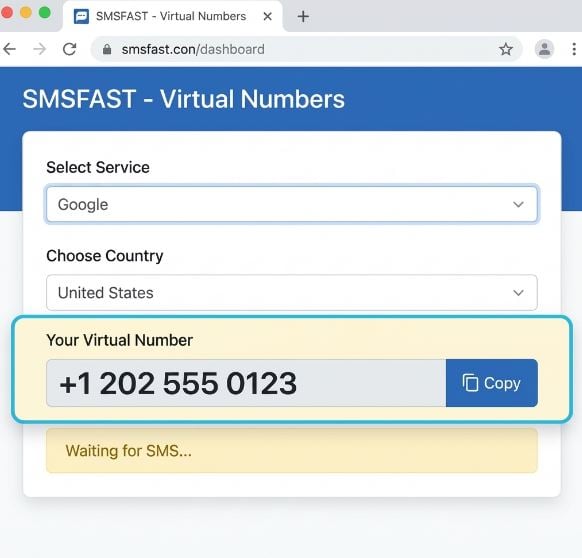
Step 1

Get your virtual number on SMSFAST

Go to SMSFAST, select Google from the service list, and choose a country. Copy the virtual number assigned to your account. You'll need it on the next screen in Google's registration flow.

Get your virtual number on SMSFAST
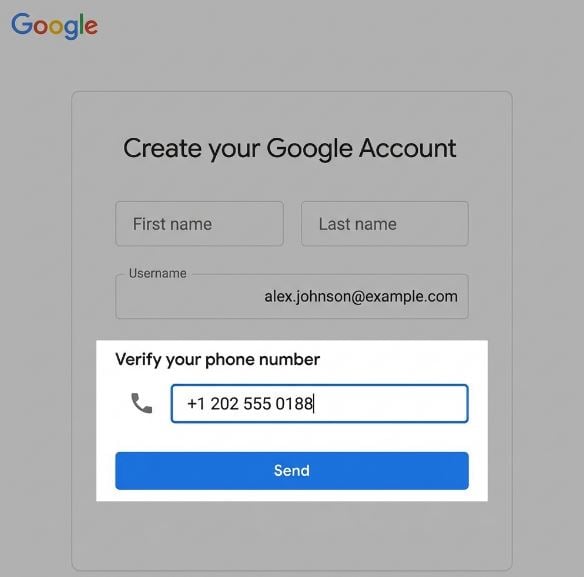
Step 2

Enter the virtual number in Google

Open accounts.google.com/signup and fill in your name and email. When Google asks for a phone number, enter the SMSFAST number exactly as shown, including the country code. Tap or click Send.

Enter the virtual number in Google
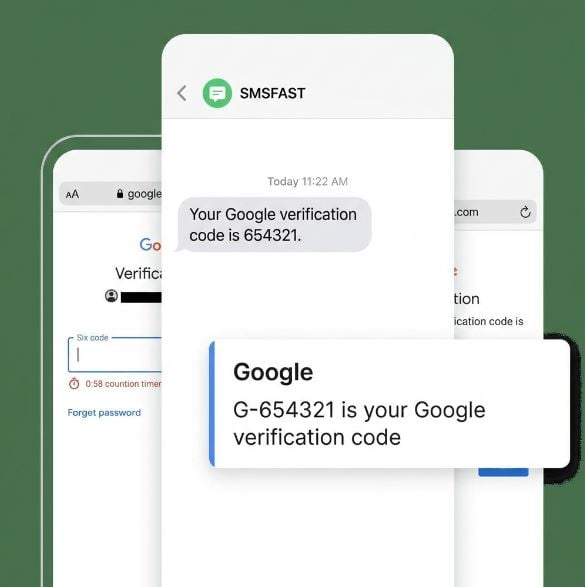
Step 3

Receive and enter the verification code

Return to your SMSFAST account and check the incoming SMS verification. The six-digit code from Google typically appears within one minute. Enter it in Google before the on-screen timer expires.

Receive and enter the verification code
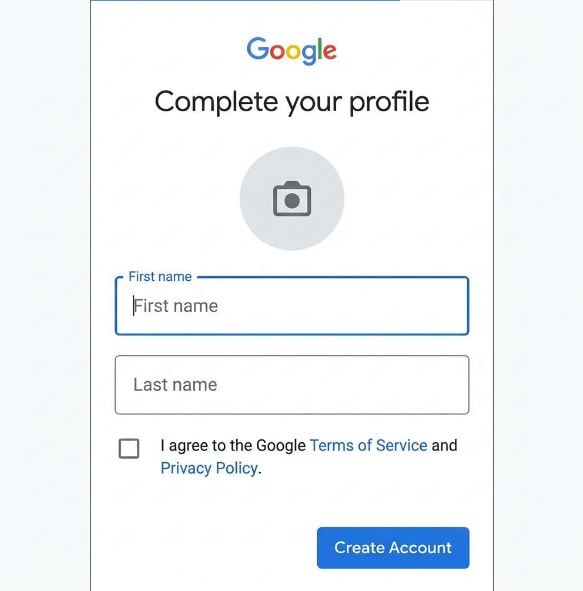
Step 4

Complete your Google account setup

After Google accepts the code, complete your profile and agree to the terms. Your Google Account is now active, granting access to Gmail, YouTube and other Google services.

Complete your Google account setup

Free or paid – what’s right for you?

Both options let you receive an SMS code on a Google (YouTube, Gmail) number. The difference is in reliability and privacy.

Landline

Public numbers

$0 no sign-up needed

Available instantly

No registration

Private – messages visible to everyone

Google (YouTube, Gmail) often blocks these numbers

No delivery guarantee

No refund if SMS fails

Paid numbers

Exclusive non-VoIP

From $0.24 per activation

Private - only you see the SMS

Works with Google (YouTube, Gmail) in most cases

190+ countries to choose from

Delivery rate up to 56%

Auto-refund if SMS doesn’t arrive

Instant activation

Frequently Asked Questions

Does SMSFAST work for creating a new Gmail account?

Yes. SMSFAST virtual numbers are compatible with Gmail account creation. When Google asks for a phone number during signup, enter the SMSFAST number, receive the SMS verification code, which typically appears within one minute when delivery is successful, and complete setup. If no SMS arrives in activation mode, cancel the order and your balance is refunded instantly.

Can I use a number from SMSFAST to verify YouTube channel features?

Yes. YouTube is part of the Google Account ecosystem, but it requires a separate phone verification to unlock features such as uploading videos longer than 15 minutes, enabling live streaming, and accessing the Community tab. SMSFAST virtual number works for this YouTube-specific verification step.

Why is my Google verification code not arriving?

The most common reason is that the number has been used for a previous Google registration. Select a different number in SMSFAST. If you cancel before the SMS arrives, your balance is refunded instantly. This refund option applies to activation mode. Long-term rental cancellation is not available yet. Choosing a country with a higher delivery rate, shown in the table on this page, also may improve the chance of successful delivery.

Can I use the same SMSFAST number for Gmail and YouTube?

It depends on the verification step. Gmail is a type of Google Account, so one number activates both during account creation. YouTube channel verification is a separate process and may require its own number. SMSFAST lets you get multiple virtual numbers from one account.

How long is the number active?

SMSFAST offers two options. Activation mode covers 20 to 90 minutes, enough for a single Google or YouTube SMS verification. Long-term rental runs from 1 day to 1 year and is renewable, keeping the number exclusively yours if you need continued access to the Google account tied to it. 

Is using a virtual number for Google account verification legal?

Using a virtual number for account verification is generally legal in most countries. SMSFAST operates as a registered business-to-consumer (B2C) service. You remain responsible for following Google’s terms of service and local regulations.

Can I use SMSFAST number for other platforms besides Google?

Yes. SMSFAST supports SMS verification for 190+ platforms, including WhatsApp, Instagram, Facebook, TikTok, and Amazon. If you purchase a number and cancel before the SMS arrives, your balance is refunded immediately, so the refund-to-balance option reduces the financial risk of trying another number or country.