Guides
Tinder without a phone number: private ways to verify in 2026
Tinder needs a phone number and an SMS code for every account. A virtual number keeps your personal one private. See the steps, costs, and limits.
Oct 09, 2026 · 16 min read
A Tinder ban usually lands with no warning and no clear reason. The app bans accounts after it finds violations of its Community Guidelines or Terms of Use.
Four stages get you from a ban notice to a clear next move: read the ban, file an appeal, weigh honest options if that appeal fails, and keep a clean account afterward. Each step rests on the app's own published policy, not guesswork.
Key takeaways
Working out how to get unblocked on Tinder starts with reading which state you're in, and three states look different at login. A reduced-visibility drop keeps you logged in, a suspension locks you out for a set period, and a permanent ban permanently blocks access with an explicit notice..
Match your response to the state you see, since each one needs a different next step.
Ban type | What you'll see | Recommended first action |
| Shadowban (community term) | Normal login, sharp drop in matches and likes, no error | Review recent activity, then wait and watch |
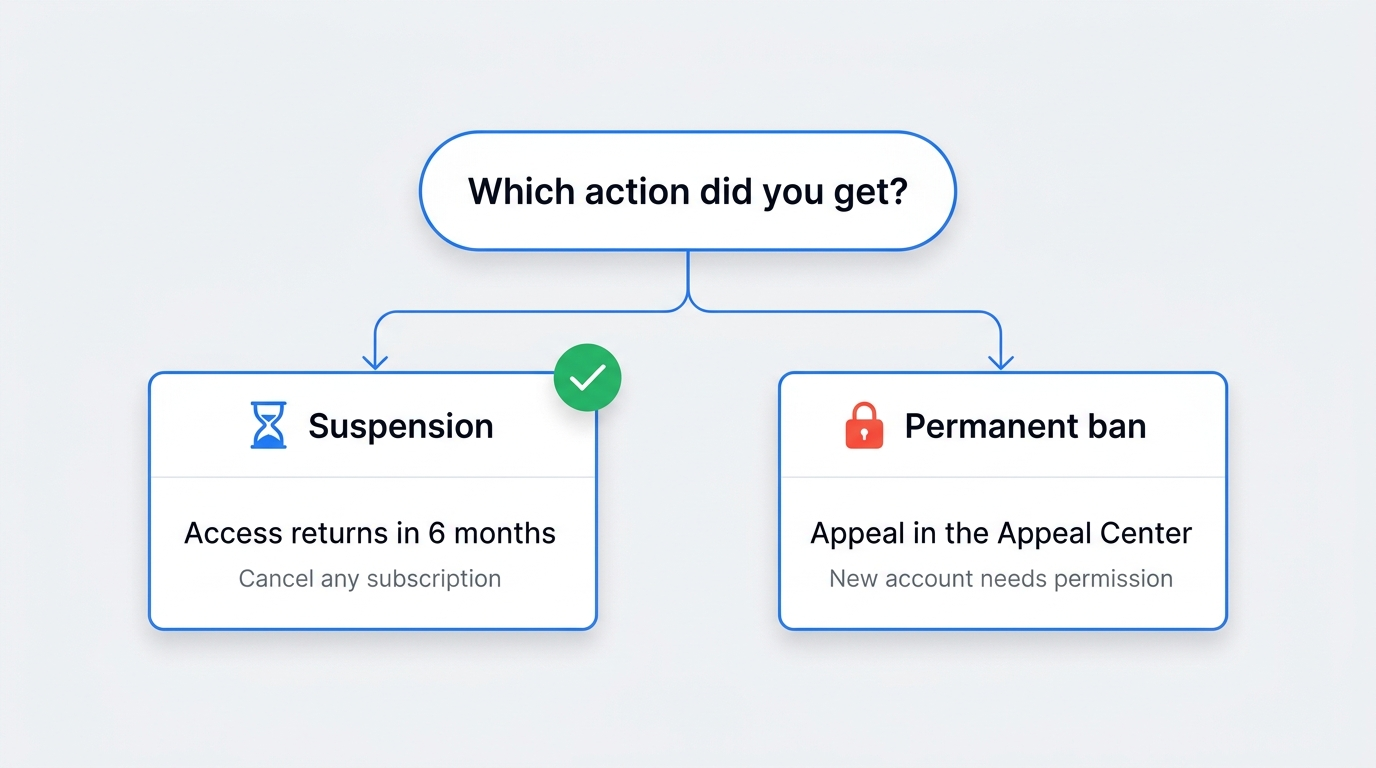
| Temporary suspension | Lockout screen at login; access returns in 6 months | Appeal if the action looks wrong |
| Permanent ban | Explicit ban notice at login; new accounts blocked | File an appeal in the Appeal Center |
A shadowban shows up as a steep, unexplained fall in matches and likes while your login still works and no error appears. "Shadowban" sits outside the app's official status list, so treat these symptoms as community-reported rather than confirmed policy. Watch your match rate across a week before you assume the worst.
Suspension looks different: a lockout screen or error replaces your feed at login. Access to a suspended account returns in 6 months.
A permanent ban posts an explicit notice the moment you try to log in, and the Appeal A ban is defined as blocking both account access and new-account creation. This state skips any wait-and-retry option. Your next move goes straight to the formal appeal, covered below.
Tinder bans accounts for breaking its Community Guidelines or Terms of Use, and a few triggers cover most cases. Rapid swiping shows up in user reports without confirmation, while a chargeback is documented: a reversed payment ends the account under the Terms of Use.
Common ban triggers, ordered by how often users cite them:
Two anonymized patterns show the range:
User A drew several reports on a borderline photo and woke to a suspension. User B ran two accounts on one phone and landed a permanent ban.
Each traces back to a documented rule.
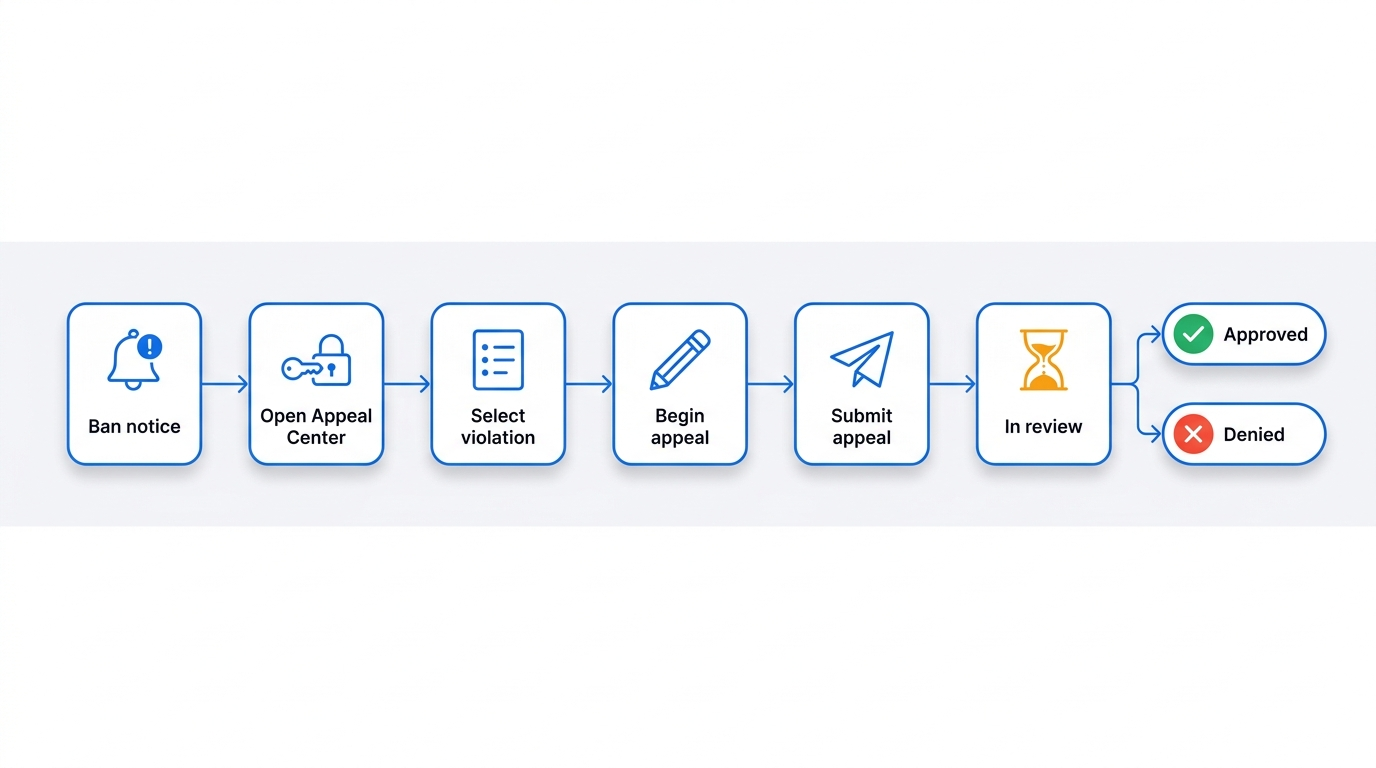
Learning how to get unbanned on Tinder starts here: the Appeal Center gives the one official way to contest a ban, and you reach it with the same login as your banned account. A review team re-reviews the case and reverses the action when the original decision was wrong.
The flow stays short: pick the violation, tap Begin appeal, tap Submit appeal. After that, the case shows In review, then settles as Approved or Denied.
Numbered steps to file:
One confirmed requirement comes first: the same login details as your account open the Appeal Center, and nothing moves without them. Beyond that, keeping your account email, the date of the action, and a short note on your recent activity on hand helps you write the appeal faster, even though Tinder does not require them to get unbanned.
Weak appeals get closed fast at a first screen, so knowing how to get unbanned from Tinder means writing for a human reader. A factual, concise message earns a closer look than an angry or repetitive one. The app publishes no guidance on wording, so tone advice here comes from community observation, not official policy.
One workable shape keeps it tight: name the action you contest, state the account email or phone, explain in two sentences why the activity fits the rules, and ask for a human review. One measured paragraph does more than three emotional ones.
No public response time exists for appeal decisions, so patience helps. You hold a 6-month window to file an appeal from the date of the action. Community estimates of 3–14 day reviews carry no official guarantee, so hold off until the status changes.
Getting past a Tinder ban comes down to the appeal, not a workaround, and a denied appeal reinforces the violation so the account stays closed. The app documents no second appeal, no resubmission path, and no separate escalation channel once a decision stands. Repeat appeals with no new facts tend to waste what little standing you had.
Weigh one honest question before you act further. With genuinely new evidence, such as proof the flagged activity never happened, a single clear follow-up may still fit. If you have nothing new to add, your time moves better toward the honest options below than toward re-arguing a closed case.
Yes, a Tinder ban can reverse, but only through an approved appeal when the original call was wrong. Appeal outcomes include reversing a ban and reinstating an account. No reversal rates appear anywhere official, so treat any success percentage as unverified.
A pattern, not a guarantee:
The honest read: an erroneous or borderline first ban stands a fair chance on appeal, while a repeat or severe case rarely moves. Severity draws that line: the Community Guidelines escalate from a warning to a ban as violations repeat or worsen.
Getting unbanned on Tinder runs through the appeal first, and after a permanent ban no sanctioned shortcut exists. The Appeal Center glossary defines a ban as blocking both account access and new-account creation, and the guidelines permit a single account per person. Your realistic route depends on which action you received.
The honest way to unban Tinder runs through the appeal, not around it, so resolve the original action rather than open a second profile. The Terms of Use bar a removed user from creating a replacement account to evade a restriction, and require the company's express written permission before that user opens a new one. An unbanned account, in other words, comes from clearing the original flag.
For a signup the app does permit, a virtual number keeps your personal line off the platform. A service such as SMSFAST receives the one-time code in a browser for a low one-time fee, though some platforms decline certain virtual numbers. It keeps your number private, yet does not override a ban or grant a banned user a new account.
A suspension, unlike a ban, lifts on its own, which makes waiting the pragmatic choice. A suspended account returns in 6 months, so a wait restores access with no workaround. Mark the date, skip new accounts in the meantime, and sign back in once the window closes.
Cancel any subscription during that wait. Billing continues even while the account sits locked; the iPhone or Android subscriber must cancel it themselves. Cancel through your app store so a suspended account stops charging you.
A healthy account comes from steady, rule-following use. Keep your profile truthful and consistent, run the app by hand, and hold to a single account per person. The Community Guidelines prohibit third-party apps that add features or game the system, which covers most swipe bots and auto-likers.
A quick checklist keeps an account in good standing:
To avoid a Tinder ban the second time, watch the habits that feel safe yet carry real risk. Automation tops the list. Spammy, repetitive messaging and very rapid swiping draw attention next. Mismatched profile details show up as a suspected trigger, without official confirmation.
Mistake | Risk level | Suggested action |
| Swipe bots or automation apps | High (policy-confirmed) | Remove all third-party tools |
| Spammy, repeated messages | Medium to high | Write personal openers |
| Very rapid swiping | Medium (user-reported) | Slow to a natural pace |
| Inconsistent profile details | Unconfirmed | Keep details consistent |
An unbanned Tinder account comes from the appeal, not a workaround, and a calm, factual case beats a loud one. Whether the ban lifts comes down to the facts you present, so file within the 6-month window. Getting unbanned rewards patience and honesty far more than speed.
Not yet sure which action you received? Start at the Quick diagnosis section above and read your login screen first, since the right next step depends on it.
Subscribe to our Telegram channel and receive $0.25 on your balance.
Yes, through the Appeal Center. The app re-reviews the case and reverses a ban when the original decision was wrong, then reinstates the account. The app publishes no success rate, so outcomes vary by case.
A ban blocks account access and new accounts until an approved appeal reverses it. A suspension differs: a suspended account returns in 6 months. Check your login notice to tell which action you received.
No, not without the app's permission. The guidelines permit a single account per person and bar a banned user from creating new ones, and the Terms treat an evasion account as a fresh violation.
The app lists no set response time. You hold up to 6 months from the action to file an appeal, and the status moves from In review to Approved or Denied once review finishes. Community estimates of 3–14 days stay unofficial.
Bans follow Community Guidelines or Terms of Use violations: fake profiles, multiple accounts, spam, harassment, and fraud rank among the main ones. Rapid swiping and payment disputes appear in user reports but stay unconfirmed.
Tinder needs a phone number and an SMS code for every account. A virtual number keeps your personal one private. See the steps, costs, and limits.
Compare 2FA methods, providers, and real 2026 pricing across free and enterprise tiers, with NIST-aligned definitions and a buyer's framework.