Two factor authentication solutions: the complete 2026 buyer's guide
Stolen credentials sit at the center of most attacks in 2026. Account compromise jumped 389% year over year and made up roughly half of all threats eSentire tracked across 2025, per its 2026 Annual Cyber Threat Report. Attackers reach that scale by logging in with valid credentials, not by breaking down the door. A single reused password with no second factor is all it takes.
Key takeaways
2FA pairs your password with a second proof of identity: a code, a key, or a fingerprint.
Hardware security keys and authenticator apps beat SMS for high-value accounts.
Software multi-factor authentication (MFA) runs about $3 to $10 per user each month, with capable free tiers for small teams.
The most common mistake: treating every user and system as equally risky.
What is 2FA in security?
Two-factor authentication (2FA) confirms your identity with two separate factors, so a stolen password alone cannot open the account. NIST defines it as proof of a physical or software token paired with a memorized secret. Think of an ATM: the card in your hand plus the PIN in your head. Neither one works alone.
The three types of authentication factors
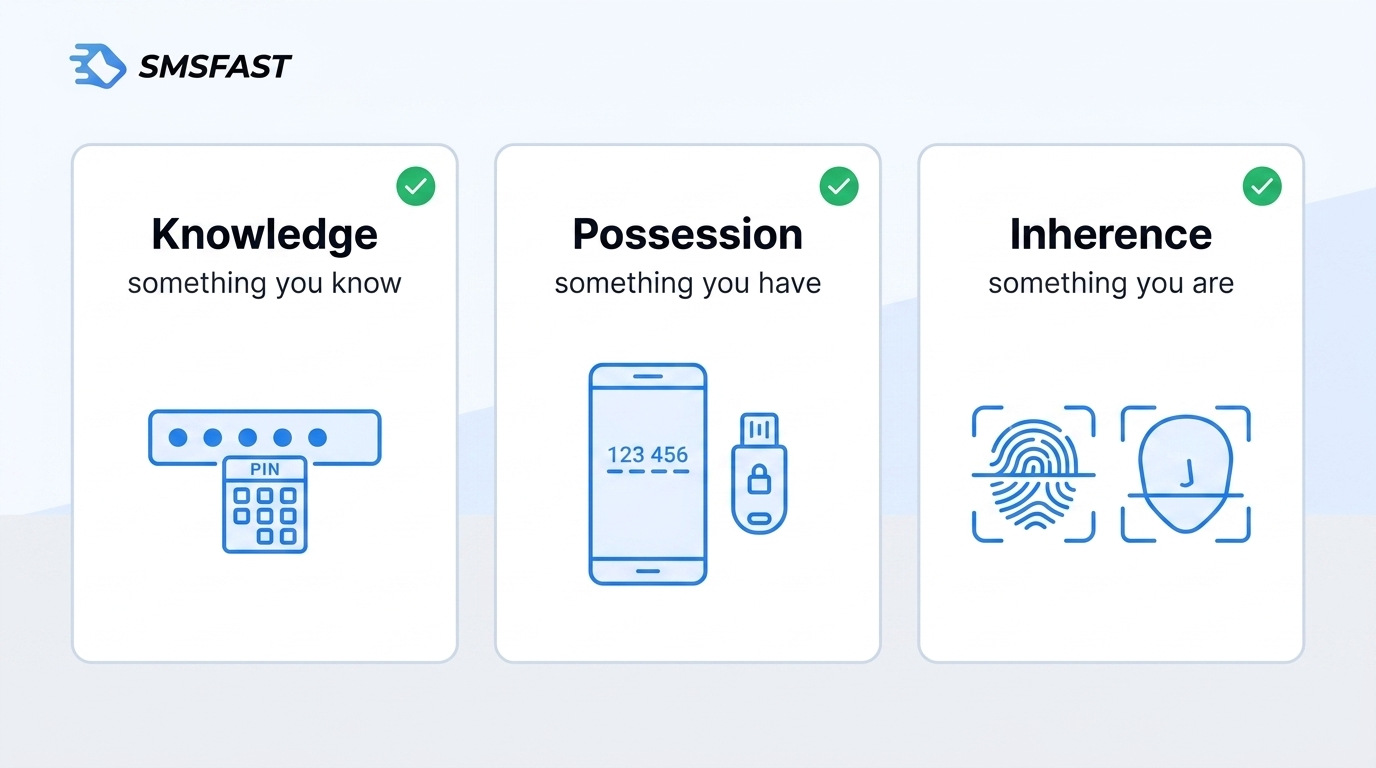
Every authentication factor falls into one of three groups, and NIST names all three. Combine any two of them and you get 2FA.
Knowledge, something you know: a password, a PIN, or an answer only you hold.
Possession, something you have: a phone running an authenticator app or a hardware security key.
Inherence, something you are: a fingerprint (think Touch ID), a face scan, or another biometric trait.
A one-time passcode counts as possession once it reaches a device you control.
2FA vs. MFA: clearing up the confusion
2FA uses exactly two factors, while MFA uses two or more. Every 2FA setup counts as MFA, though not the reverse. NIST calls MFA an authentication system that needs more than one distinct factor.
The gap matters at purchase time. One vendor markets a password plus a security question as MFA, yet two knowledge factors add no real second layer. Ask how many distinct factor types a product checks before you commit.
Why your organization needs 2FA now more than ever
Unpatched software flaws became the top way attackers break in during 2025, yet stolen credentials still surface in 39% of breaches across the full attack chain, according to the Verizon 2026 Data Breach Investigations Report. A password on its own no longer protects anything that matters. 2FA closes the gap attackers rely on.
Real-world attacks 2FA prevents
2FA blocks attacks a password alone cannot stop. The FTC describes credential stuffing as attackers replaying stolen login pairs at scale, and it points to MFA as the stronger control.
Credential stuffing: automated logins using leaked password lists.
Phishing: fake pages that grab your password the moment you type it.
Password spraying: one common password tried across many accounts.
Compliance requirements driving adoption
Regulators now treat MFA as a baseline, not a bonus. New York's DFS requires MFA for every user accessing any information system, a rule that took effect November 1, 2025, under 23 NYCRR Part 500. PCI DSS 4.0 goes further for payment data, mandating MFA across the cardholder data environment. NIST issued MFA guidance for criminal justice systems (CJIS) in 2025. Skip these controls and a routine audit becomes a finding.
Types of two-factor authentication methods compared
2FA methods differ sharply in how much protection they give. The table ranks the main options by strength and convenience, with hardware keys at the top and SMS near the bottom for high-risk accounts. For the basics of code-based checks, see what a SMS code is.
Method
Security level
User experience
Best for
Hardware security key
Highest
Extra device to carry
Admins, privileged accounts
Passwordless / passkeys
Very high
Very smooth
Modern apps and workforces
Authenticator app (TOTP)
High
Simple, app-based
Most businesses
Push notification
High
One tap to approve
Teams wanting low friction
Biometric
High
Fast, device-bound
Phones and laptops
SMS or call code
Basic
Familiar to everyone
Low-risk sign-ups only
SMS and call-based 2FA
SMS 2FA texts a one-time password to your phone. It sets up in seconds, yet an intercepted code defeats it. SIM-swapping lets an attacker hijack your number and read that code, so teams route sensitive accounts to apps or keys. For low-risk sign-ups, a service like SMSFAST receives the code without exposing your number.
Authenticator apps (TOTP)
An authenticator app generates a time-based one-time password (TOTP), a fresh six-digit code that rolls over every 30 seconds with no network needed. Apps like Google Authenticator and Duo Mobile cost little and give small teams solid protection. Lose the phone without a backup, though, and access goes with it.
Push notifications
Push 2FA sends an approval prompt to your phone; one tap signs you in. That ease invites push bombing, where attackers spam prompts until someone taps approve. Number matching blocks it: you type an on-screen code, a defense CISA recommends.
Hardware security keys
A hardware security key, a physical security token, stores your credentials on a device you tap or plug in, and phishing sites cannot copy it. FIDO2 keys resist phishing better than any code-based method, so admins and privileged accounts default to them. Privileged users often carry two: one active, one backup. Common forms use USB-C or USB-A with NFC.
Biometric authentication
Biometric 2FA reads a fingerprint or face scan tied to one device, so the factor never leaves your hardware. WebAuthn brings this to the browser: by March 2026, Chrome and Safari on macOS both showed 100% WebAuthn availability, with passkey-ready reach at 90% and 93%. A server-side leak exposes no reusable secret.
Passwordless authentication
Passwordless authentication drops the password and signs you in with a passkey, a biometric, or a hardware key. WebAuthn makes it work, and Duo Mobile delivers it through Duo Push with a required biometric or PIN check. It differs from "password plus 2FA," where the password still exists as a weak link.
Top 2 factor authentication providers for 2026
The right 2FA provider depends on five things: pricing, integration depth, supported methods, small-business fit, and adaptive authentication. Most options come from identity and access management (IAM) platforms like Okta and Microsoft Entra ID. Picks below rest on vendor documentation and published 2026 pricing, not hands-on testing.
Enterprise-grade solutions
Four vendors cover the bulk of large deployments, each with a different strength. Okta focuses on broad app integrations, Microsoft Entra ID fits Microsoft 365 shops, Cisco Duo balances security with easy rollout, and RSA Security's SecurID and Ping Identity cover regulated and federation-heavy environments.
Provider
Key strengths
Starting price (2026)
Best for
Cisco Duo
MFA, SSO, device trust
~$3/user/mo
Fast, low-friction rollouts
Microsoft Entra ID
Conditional Access, M365 fit
Free to ~$7 (P1)
Microsoft-based estates
Okta
Extensive app integration catalog
~$6 to $17/user/mo
Multi-app enterprises
RSA SecurID
Hardware tokens, regulated use
~$2 to $6/user/mo
Banks and government
Ping Identity
SSO, federation, APIs
~$3 to $6/user/mo
Large federated setups
Cisco Duo publishes Free, Essentials at $3, Advantage at $6, and Premier at $9 per user each month. Microsoft Entra ID runs Free, P1 at $7 and P2 at $10 after Microsoft's July 2026 increase, often bundled with Microsoft 365 E3 or E5. Okta sells per-user suites, from $6 (Starter, SSO and basic MFA) to $17 (Essentials, adaptive MFA and governance), with Professional and Enterprise by quote. Treat each figure as a budgeting anchor and confirm a live quote.
Small business-friendly options
Small teams do not need enterprise pricing to get real MFA. Cisco Duo Free covers up to 10 users at no cost, with the authenticator app and strong MFA included. Past 10 users, Duo Essentials at $3 per user each month adds single sign-on (SSO), passwordless, and device tools without enterprise weight.
Two clear defaults fit most small businesses:
Ten users or fewer: Duo Free delivers app-based MFA at no cost.
Ten to twenty-five users: Duo Essentials at $3 per user adds SSO and passwordless.
The tradeoff is depth: entry tiers skip the adaptive authentication and detailed reporting that larger teams need.
Two factor authentication cost: what to budget for
Software MFA costs about $2 to $6 per user each month at entry tiers, up to about $10 for the richest plans. Market estimates put the full spread between $0.50 and $8.00 per user. SMS-based 2FA bills per use instead, near $0.05 per verification plus delivery.
Does 2FA cost money? Free vs. paid options
Yes and no: capable free tiers exist, but they hit limits fast in production. Microsoft Entra ID Free skips Conditional Access and risk-based MFA. Cisco Duo Free caps at 10 users with no adaptive authentication. Auth0 Free stops at 25,000 monthly active users. Free suits a pilot, not a regulated rollout.
Hidden costs to watch for
The sticker price rarely matches the final bill. One team budgeted for licenses alone, then watched integration and hardware costs pass the software quote. Watch these line items:
Implementation and integration with existing directories and apps.
User training and first-weeks support load.
Hardware token purchase and periodic replacement.
Higher support tiers for faster response times.
Per-use SMS charges that scale with login volume.
Policy and process rewrites to cover the new controls.
Key features to look for when choosing 2FA solutions
Five features separate a strong 2FA product from a box-ticking one: integration, deployment flexibility, adaptive authentication, SSO support, and compliance mapping. PCI DSS 4.0 mandates MFA for all cardholder-data access, so coverage gaps become audit gaps.
Five questions to ask any 2FA vendor about integration:
Which legacy authentication clients and protocols does this support?
Does it sync cleanly with our Active Directory or identity provider?
Will our service accounts keep working once MFA switches on?
Does SSO extend to third-party and on-prem apps, not just cloud?
What breaks first when we turn it on, and how do we roll back?
Integration and compatibility
Integration decides whether 2FA reaches every system or only the easy ones. Common failures hit legacy authentication clients, Active Directory sync, SSO that skips third-party apps, and service accounts that break when MFA switches on.
Deployment flexibility
Deployment choice shapes cost and control: cloud for speed, on-premises for sovereignty and isolation. On-prem MFA still fits regulated and air-gapped environments, while Microsoft now steers new setups to cloud Entra MFA and no longer offers MFA Server.
Adaptive and risk-based authentication
Adaptive authentication raises or lowers the challenge based on risk signals like device history, location, and network fingerprint. A login from a new country at 3 a.m. triggers a step-up prompt, while a trusted laptop passes quietly. Cisco Duo's Risk-Based Authentication, for one, steps up to Verified Duo Push when it spots anomalies. By 2026, enterprise buyers expect this as standard.
SSO integration and secure remote access support
SSO paired with MFA cuts many weak logins down to one strong gate. Hybrid and remote teams need reliable SSO plus secure VPN or ZTNA access, so a stranded contractor cannot route around the control.
Common vulnerabilities and how to avoid them
2FA is not bulletproof. Attackers have found ways around every method, so knowing the gaps keeps a rollout honest. Two weaknesses defeat 2FA most often: social engineering of the user and interception of SMS codes.
Phishing and push bombing
Phishing and push bombing target the person, not the technology. Attackers lure you into typing a code on a fake page, or spam prompts until you tap approve. The staff rule: never approve a prompt you did not start. Number matching, backed by CISA, stops it.
SIM-swapping risks
SIM-swapping hands your number to an attacker, who then catches every SMS code. Documented cases include the hijack of Jack Dorsey's Twitter account in 2019 and the breach of the SEC's X account in 2024. Cut the risk with three moves:
Move high-value accounts off SMS codes to an app or key.
Set a carrier PIN or port-out lock on your account.
Keep your main line off public sign-ups with a separate virtual number.
Framework for choosing the right 2FA solution
A simple framework beats endless vendor demos. Match the solution to three inputs: security needs, organization size, and budget. High-risk data points to phishing-resistant keys, while a small team may thrive on a free tier.
Questions to ask before you buy
The right questions expose real differences between vendors. Silverfort's RFP checklist gives a practitioner template covering directory coverage, agent removal, and MFA integration; its agentless Universal MFA even reaches legacy protocols like Kerberos, NTLM, and LDAP. Put these to any shortlist:
Which legacy protocols and service accounts does this cover?
Does it remove agents and proxies, or add them?
How does conditional access work for on-prem resources?
Does it integrate with our current SSO and MFA?
What happens when a user loses their device?
Implementation best practices
A staged rollout prevents the helpdesk flood that sinks rushed launches. Four steps keep a rollout clean:
Audit current authentication methods and account types.
Pilot with privileged users and IT first.
Expand in phases with clear user communication.
Monitor sign-in data and tune policies over time.
Keep non-technical users in mind from day one, since their experience decides adoption.
Final thoughts
The smartest next move is not picking a vendor. It is auditing what you run now. Score your current authentication against five criteria: integration, deployment, adaptive risk, SSO, and compliance fit.
Odds are at least one of your systems still runs on a password alone. Close that gap first, then match each account to its real risk: hardware keys for admins, apps for staff, and SMS only where the stakes stay low.
$0.25 Gift!
Subscribe to our Telegram channel and receive $0.25 on your balance.
Frequently Asked Questions
What is the best two-factor authentication method?
Hardware security keys resist phishing better than any code-based method, because FIDO2 blocks the fake-page attacks that beat codes and prompts. For most staff, an authenticator app balances security and cost. The right method matches each account's real risk rather than one universal pick.
What is the difference between single-factor and two-factor authentication?
Single-factor authentication checks one proof, usually a password. Two-factor authentication adds a second, separate factor, such as a code or a key, so a stolen password alone fails. That second layer blocks most automated credential attacks, including credential stuffing and password spraying.
Can an organization still be breached if 2FA is in place?
Yes. 2FA cuts risk sharply but never to zero. SIM-swapping, phishing, and push bombing can defeat weaker methods like SMS. Phishing-resistant options, such as FIDO2 hardware keys, close most of those gaps for high-value accounts and privileged users.
Can SSO and MFA be used together?
Yes, and the pair works better together. SSO gives users one login, while MFA guards that single gate with a second factor. Most enterprise providers, including Okta and Microsoft Entra ID, combine the two by default across cloud and on-prem apps.
What is replacing traditional two-factor authentication?
Passwordless authentication and passkeys are replacing password-plus-code setups. Built on WebAuthn, they sign users in with a biometric or a hardware key and remove the password entirely. Adoption climbed through 2026 across major browsers and platforms like Chrome and Safari.
Daniel Moore
Privacy & SMS Verification Researcher at SMSFAST
Privacy & SMS verification researcher at SMSFAST. Writes practical guides on virtual numbers, OTP delivery issues and keeping your personal number private.
Compare 8 OTP service providers by pricing, channels, and fraud protection. See real cost breakdowns, hidden platform fees, and which vendor fits your business.
OTP bots are automated tools sold on Telegram for $10-$50 per session that intercept your 2FA codes in real time. Learn how they work, which industries they target, and how to stop them.