An Instagram account opens with either a phone number or an email address, so your personal number stays optional at sign-up. Email works as a tested alternative, an existing number comes off an account later, and your privacy settings control who finds you by phone. Every method below carries verified steps and honest limits, so you can pick the one that fits your account.
Key takeaways
A phone number is not mandatory. Instagram accepts an email address at sign-up, confirmed on its official Help Center.
Email sign-up links to your identity less tightly than a phone number, a higher-privacy route for a fresh Instagram account.
A saved phone number comes off later through Accounts Center, as long as one confirmed contact method stays on the account.
Your phone number sits off your public profile by default, and contact-sync settings govern phone-based discovery.
Do You Need a Phone Number for Instagram? The Straight Answer
No, you can run an Instagram account without a phone number. The account signs up with an email address or a phone number, and the official Help Center documents the email path for a new profile. Email verification sends a confirmation code to your inbox instead of an SMS code to a SIM.
Instagram may still ask for phone verification on an existing Instagram account when it flags unusual activity, repeated code requests, or a risk check. Email-only works as an observed path, reliable in practice yet not a documented rule in every region.
Can You Make an Instagram Account Without a Phone Number? (Yes, Here's Proof)
Yes, you can make an Instagram account without a phone number. Instagram's sign-up screen takes an email address and sends a confirmation code to that inbox. The profile then finishes with no SMS code, per the official Help Center. One caution: no single official registration page labels email-only as the standard route. Treat it as a tested path, dependable in practice rather than a written guarantee.
Why Is Instagram Asking for My Phone Number in the First Place?
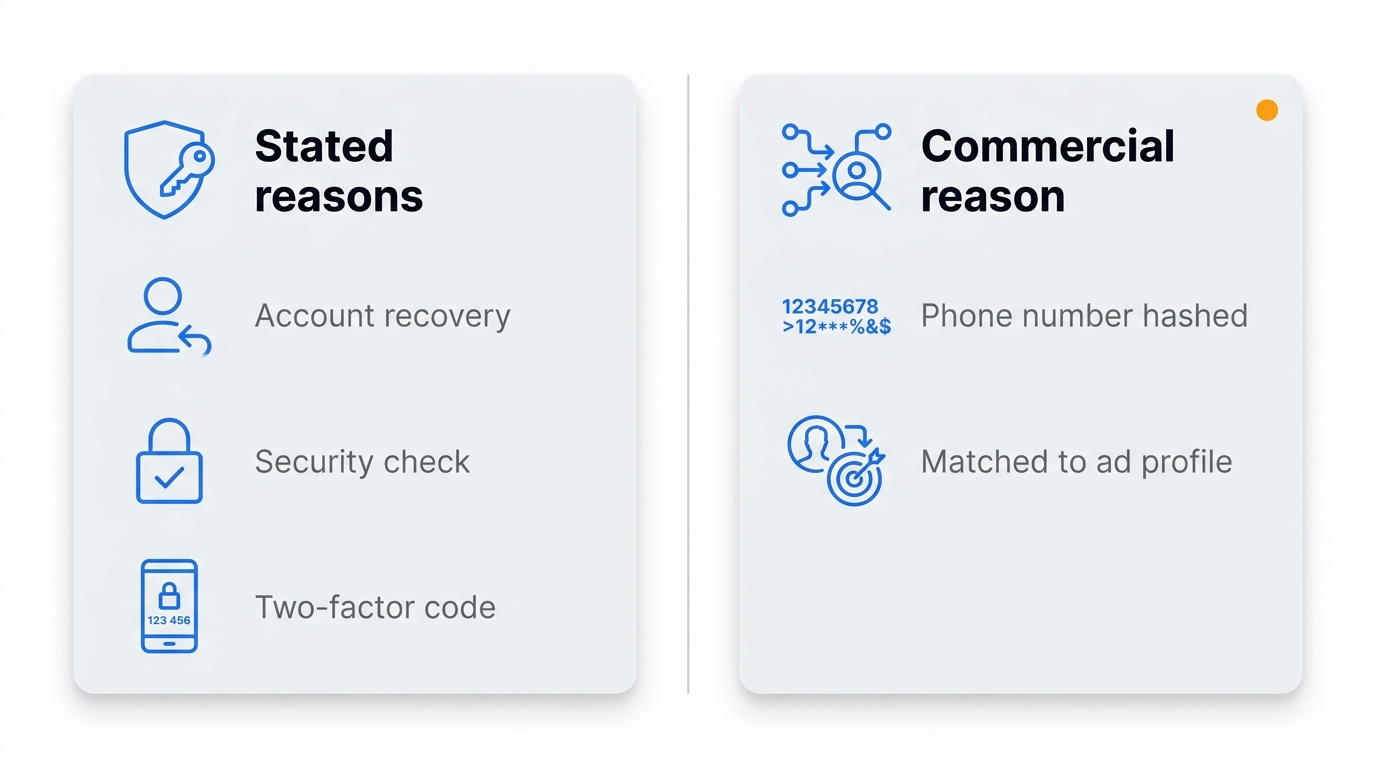
Instagram asks for your phone number for recovery, security, and ad targeting. Recovery is the stated reason, since a linked number restores access to your Instagram account and confirms your identity during a security check. A linked number also receives the SMS code Instagram sends during two-factor checks.
The commercial reason sits underneath. Meta hashes phone numbers and emails and matches them to Meta profiles for advertising, per Meta's advertiser documentation. That link ties a number you give Instagram to your Meta ad profile.
Bot prevention and login alerts come up often in third-party guides. No official Instagram page names them as phone-specific triggers, so weigh those as likely rather than certain. Your privacy settings affect how much user data your Instagram account exposes through that connection.
How to Create an Instagram Account Without a Phone Number (Step-by-Step)
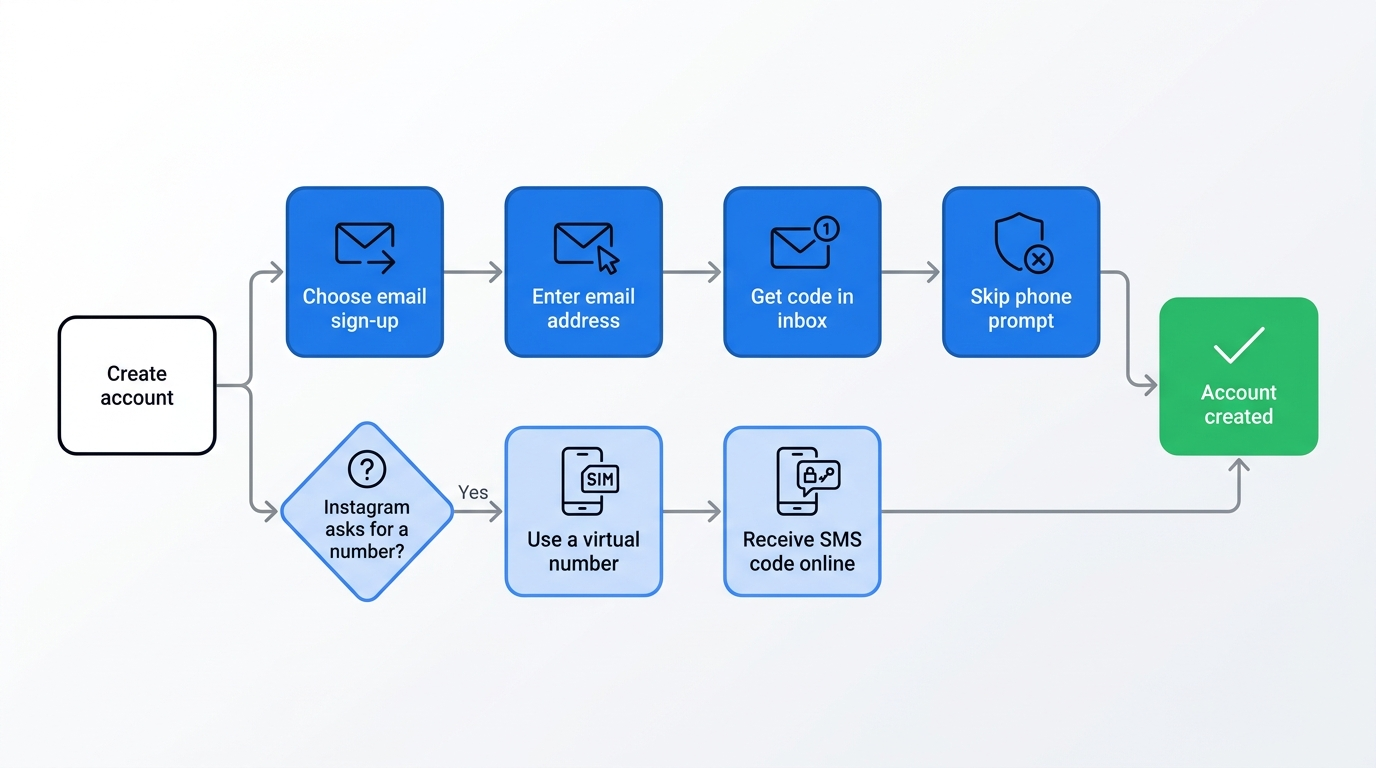
Email sign-up creates an Instagram account in seven steps, no SIM needed.
Open the Instagram app or Instagram.com, then tap Create new account.
Choose the email option. The label reads "Sign up with email address" or "Sign up with email or phone number" depending on your device.
Enter an email address only you can access, then tap Next.
Type the confirmation code Instagram sends to that inbox.
Set a password and birthday, then pick a name and username.
Agree to Instagram's terms to finish the profile.
Skip the phone-number prompt if it appears. Instagram asks some accounts to add a number afterward, and this step can be skipped in some cases.
One caveat stays: Instagram sometimes insists on a number for an account it flags during sign-up. A desktop sign-up draws these prompts less often than the mobile app, so try the browser first. The next section covers the virtual-number route for that case.
What to Do If Instagram Forces Phone Verification Anyway
A virtual phone number lets you create an Instagram account without your personal number when Instagram rejects email alone. That virtual number receives the SMS code online, no physical SIM. A paid provider such as SMSFAST sells one for Instagram with a private line.
Honest limits apply. Codes do not always arrive, shared free numbers turn unstable, and short-lived numbers expire. Instagram tends to reject VoIP numbers, so a mobile-tagged line fits better, though results vary by carrier and country. A one-time number suits a quick sign-up, not an account you need to recover later.
Does an Instagram Account Without a Phone Number Work Normally?
An email-only Instagram account posts, messages, and browses like a number-verified one in testing. Core features hold up across checks:
Posting photos, Reels, and Stories works without a linked number.
Direct messaging and content tagging run as normal.
Login stays active across several devices at once.
The Explore feed and account discovery behave as standard.
Your privacy settings still manage recovery and two-factor options, which thin out without a linked number. Two honest caveats remain. Account recovery leans harder on your email without a phone fallback, and some accounts still meet extra verification prompts tied to risk checks. Core functionality looks normal, yet "no limits at all" overstates it.
Comparing Options: Email Sign-Up vs. Virtual Numbers vs. Other Methods
Email sign-up wins on privacy and reliability for a personal Instagram account. An email address links to your identity less tightly than a phone number, which makes it the higher-privacy route. A virtual number service fits only when Instagram demands an SMS code. Google Voice stays free but caps personal numbers to US users with a Google account, per Google Voice Help. The secondary-SIM figures below sit as estimates, flagged for a final check.
Method
Privacy level
Reliability
Cost
Best for
Email sign-up
High, no number to trace
High, Instagram-native
Free
A private personal account you keep
Virtual number service
High, real number stays hidden
Inconsistent, stronger on paid lines
Low, per number
An account that still demands an SMS code
Secondary SIM
Low, tied to a real identity
High, standard SMS
Price of a prepaid SIM
People who already own a spare SIM
Google Voice
Medium, Google holds a name and email
Medium, US numbers only
Free personal tier, US only
US users who want a free spare number
Already Have an Account? How to Remove Your Phone Number From Instagram
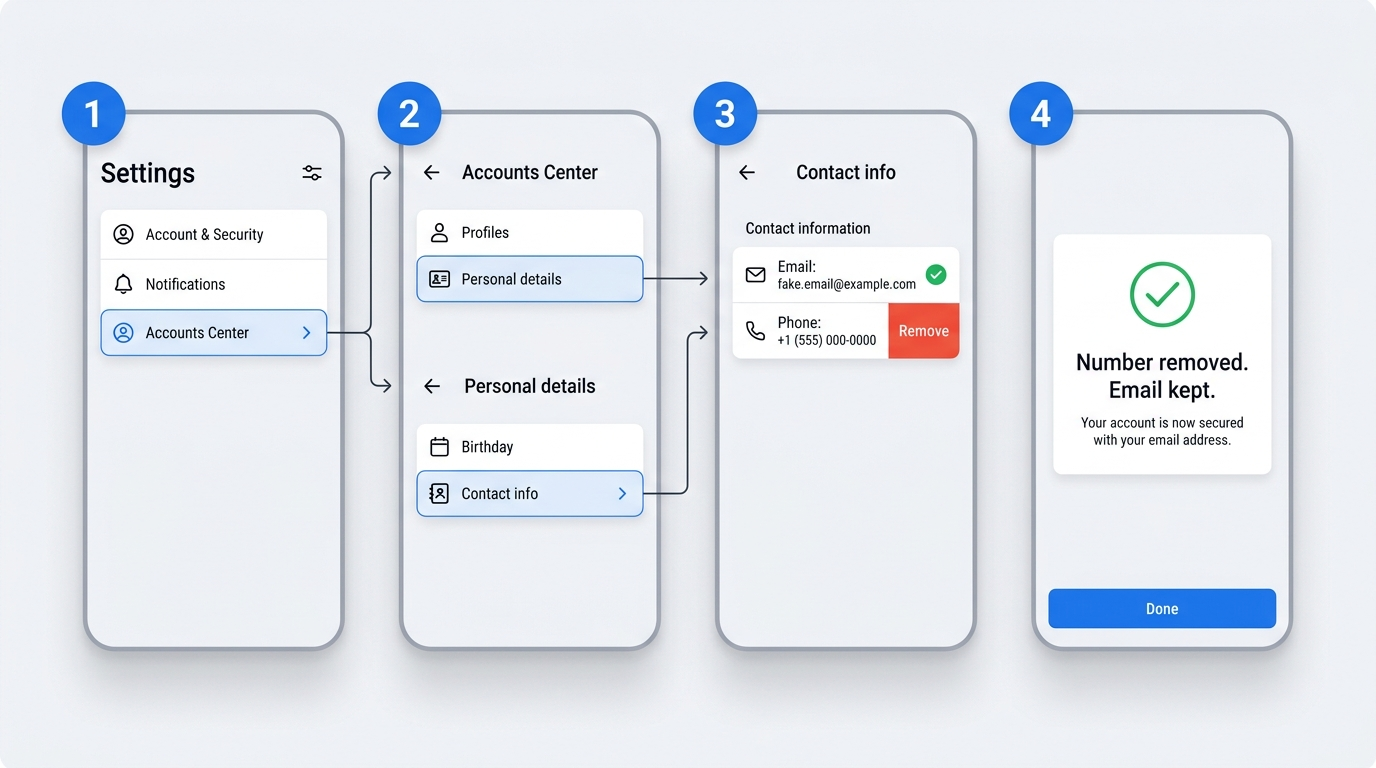
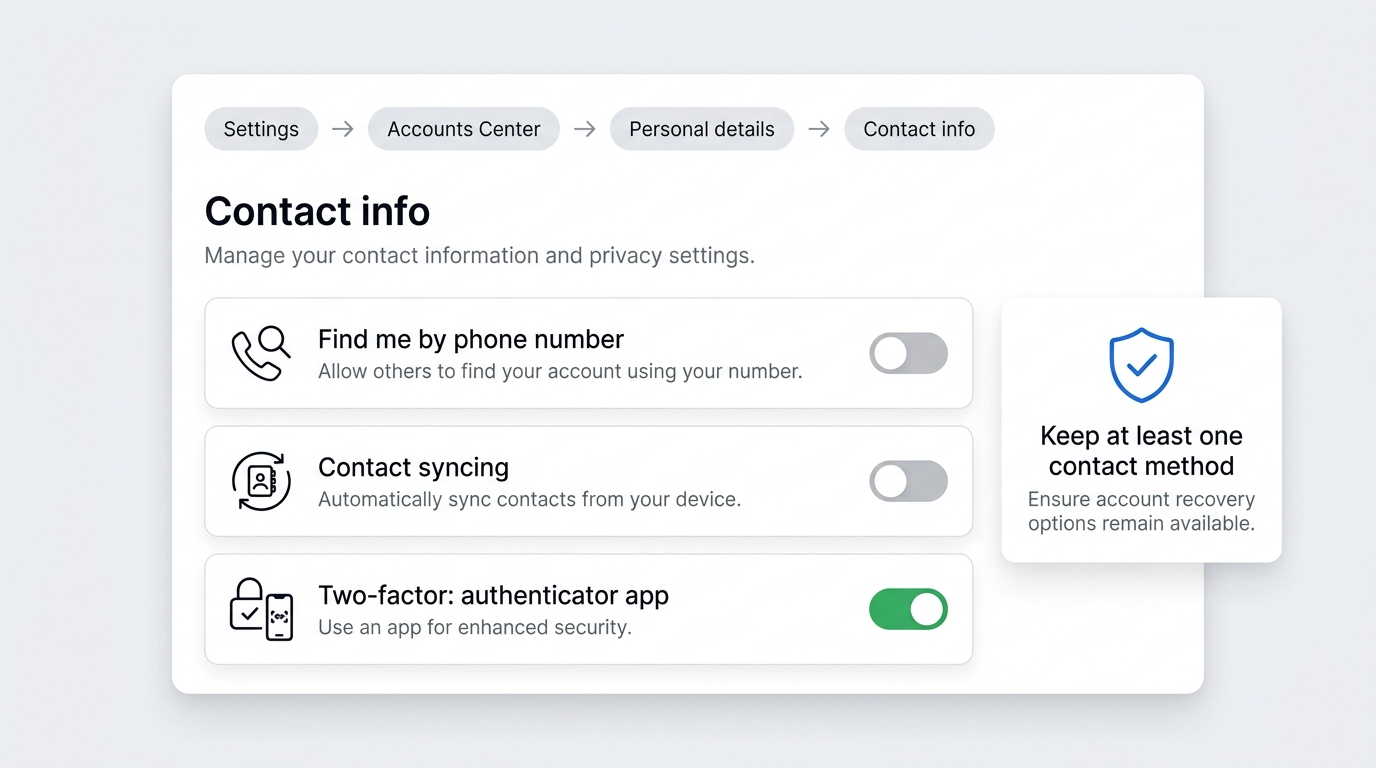
You remove a saved phone number from an Instagram account through Accounts Center, as long as one confirmed contact method stays on the account. Confirm an email address first, because Instagram keeps at least one confirmed contact method on every account and blocks removal of the last one.
Open Settings, then tap Accounts Center.
Tap Personal details, then Contact info.
Add and confirm an email address if none sits on the Instagram account yet.
Select your phone number, then remove it and confirm.
The older route through Settings, Personal info, Contact info no longer matches the Instagram account layout, so use Accounts Center instead. If SMS two-factor is on, move it to an authenticator app first, since Instagram keeps a number that still backs two-factor.
How to Remove Phone Number From Instagram Without Login Access
No setting removes a phone number from an Instagram account while you stay locked out. Instagram documents one route only: regain access through its recovery flow, then update contact info from inside the account.
Recovery usually runs through the linked email or the number itself, so a confirmed email gives you the way back in. Once you log in again, the removal steps above apply. A support request through the Help Center is the fallback when recovery stalls, with no set turnaround. No reliable data puts a success rate on the locked-out case, so this guide sets no figure.
How to Hide Your Phone Number on Instagram (Without Removing It)
Instagram keeps a saved phone number off your public profile already, so hiding it means turning off phone-based discovery. A phone number on a personal Instagram account stays off the public profile by default, which the official Help Center confirms.
The setting that matters sits in discoverability, not a hide button. In Settings, open Accounts Center, then Personal details and Contact info. Switch off the option that lets people find you by your phone number. A saved number then stops surfacing your Instagram account to anyone who holds it.
No single toggle masks a stored number without touching discovery, so this control is the real lever. A quick privacy-settings audit on your Instagram account takes a minute and closes a frequent gap.
Is My Phone Number Visible to Other Instagram Users? What You Should Know
No one can look up your Instagram account by typing your phone number, and phone-based discovery runs only through synced contacts. Phone-based discovery works one way. A person who saved your number and turned on contact syncing may see your account in suggestions. That happens only if your account keeps contact discovery switched on.
A check from a second account confirms the pattern. With contact discovery off, the number stops acting as a bridge to your Instagram account. Default behavior for a freshly linked number is not spelled out on an official page. Set the discovery controls in privacy settings rather than assume them. A business or creator profile differs, since it can publish a public contact phone.
Common Mistakes and Troubleshooting When Signing Up Without a Number
An Instagram account sign-up without a phone number usually fails for three fixable reasons: a blocked temporary email, code delays, and risk prompts.
Temporary email addresses often get rejected. Fix: use a standard Gmail, Outlook, or iCloud mailbox.
Confirmation codes can lag by a minute. Fix: wait 60 to 90 seconds and request one resend, not several.
Repeated code requests can push an account into extra review. Fix: let the first code land first.
A flagged sign-up can trigger a phone prompt. Fix: switch network or use desktop.
A rejected virtual number blocks the SMS code. Fix: pick a fresh number or verify by email.
The "flagged as suspicious" wording appears in guides, not an official Instagram page, so read it as an observed pattern, not a status.
Why Create an Instagram Account Without a Phone Number? Real Use Cases
People create an Instagram account without a phone number to separate identities, protect privacy, or sign up on a SIM-free device.
A second account stays off your primary number, so the two profiles never link through contact sync.
Email sign-up suits a privacy-conscious user who keeps a number out of ad-matching systems.
A tablet or a SIM-free phone still creates an account through email alone.
A virtual phone number handles account creation without a personal number when email verification stalls.
Business and testing accounts come up as common patterns too. Official documentation does not list them as named use cases, so weigh those as practice rather than policy.
Final Thoughts: Full Control Over Instagram Privacy Is Achievable
The right path depends on the account. A new private account clears sign-up on email. One that trips a forced check needs a virtual number for one code. The caveats matter more than the method.
Recovery leans on whatever contact you keep, and a risk check can still ask for a number. Confirm a second contact before dropping a saved number, then move two-factor to an app. Audit the discovery controls so your number stops surfacing your profile.
$0.25 Gift!
Subscribe to our Telegram channel and receive $0.25 on your balance.
Frequently Asked Questions
Can I create an Instagram account without a phone number?
Yes. You sign up with an email address instead of a phone number, and Instagram's Help Center documents the email path. Email verification sends a confirmation code to your inbox. Instagram may still ask for a number if it flags the sign-up for extra review.
Can I create an Instagram account using only an email address?
Yes, in Instagram's tested sign-up flow. You enter an email address, confirm the code Instagram sends to that inbox, and finish the profile with no SMS code. No official page labels email-only as the standard route, so treat it as dependable in practice rather than a documented certainty.
Why does Instagram ask for a phone number during sign-up?
Instagram asks for a phone number for recovery and security, and Meta also hashes and matches the number to your Meta ad profile. A linked number restores access and receives two-factor codes. You can decline it at sign-up and add an email instead.
Will an Instagram account created without a phone number have full functionality?
Mostly. An email-only account posts, messages, tags, and logs in across devices the same as a verified one in testing. Two gaps remain: recovery leans on your email alone, and risk checks can still prompt for a number. "No limits" overstates it.
How can I remove an existing phone number from my Instagram account?
Open Settings, tap Accounts Center, then Personal details and Contact info, and remove the number. Instagram keeps at least one confirmed contact method, so add an email first. If SMS two-factor is on, move it to an authenticator app first, since Instagram keeps a number still tied to two-factor.
PayPal lists a phone number as mandatory for Personal accounts. Compare Google Voice, SMS verification services and email-first sign-up, with costs and risks.