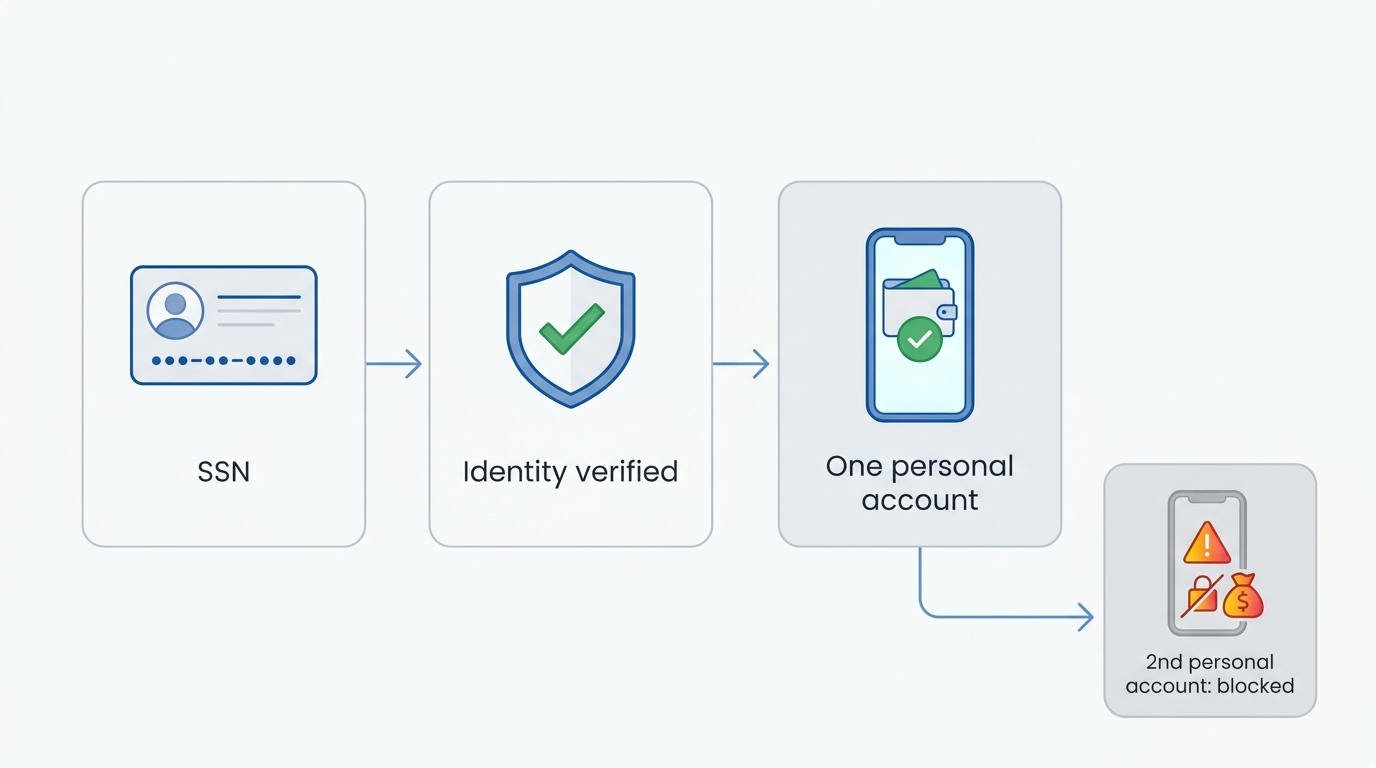
Cash App fully verifies one personal account per person, keyed to your Social Security number. Your phone or email does not set that limit; your SSN does. That single detail explains most confusion about multiple Cash App accounts.
You can still connect a business account or a second person's account on one device. This guide covers the real rules, the legitimate paths, and the risks of skipping them.
The short answer: what Cash App actually allows
Cash App fully verifies one personal account per Social Security number. Its Terms of Service require your legal name, date of birth, and SSN at sign-up. In practice, the same SSN will not clear a second personal profile through verification.
Cash App owner Block, Inc. reported 57 million US monthly transacting actives at the end of 2024. That figure comes from its SEC filing. A platform at that scale needs strict identity rules.
Cash App supports three clear setups, one personal and two extras:
One SSN maps to one verified personal account per person, and stays your core profile.
Connected accounts let you switch between linked profiles on one device, each keeping its own $Cashtag and balance.
A business account upgrades from your personal profile to accept customer payments and report income to the IRS.
The rest comes down to intent. Connecting accounts and upgrading to business both stay inside the rules. Creating a second verified personal account under your own identity does not. The next section explains why.
Understanding Cash App's "one person, one account" policy
Cash App ties one fully verified personal identity to each Social Security number. The limit works through identity verification, not a blanket account ban. That system protects the platform and your funds at once. Your SSN anchors that single verified identity.
Cash App requires identity verification under the Bank Secrecy Act and FinCEN rules. Those laws force financial platforms to confirm who you are before you send, receive, or withdraw money. Know Your Customer checks sit at the center of that process.
Two similar terms cause the confusion: connected accounts and duplicate accounts. Connected accounts describe two profiles you legitimately link and switch between. Duplicate accounts describe two verified personal profiles built to look like separate people.
Cash App treats those two cases differently. Linking supported accounts follows policy. Faking a second identity breaks it and puts money at risk.
Why Cash App enforces this rule
Users often see the one-account limit as arbitrary. The reason sits in regulation, not corporate preference. Cash App must screen for money laundering and identity misuse under Bank Secrecy Act and anti money laundering obligations.
Cash App runs identity checks to reduce false or duplicate account creation across 57 million US monthly actives. Multiple verified profiles under one person weaken those checks. One verified account per SSN keeps each customer traceable and each transaction attributable.
The role of your SSN in account verification
Your SSN works as a digital fingerprint inside Cash App. Cash App cross-references that number against identity databases during verification. Two verified personal accounts cannot share one SSN without the system flagging the overlap.
A verified account unlocks higher limits, the Cash Card, investing, and savings. Unverified accounts stay capped near $250 in sends over seven days. Entering a false SSN triggers Cash App's risk detection. That flag can close the account permanently.
The verification process explained
Cash App verifies each account through three linked identifiers, matched against your name and date of birth. Together they make duplicate verified profiles hard to hide.
Phone number starts sign-up and handles account recovery.
Email links to the profile and supports secure login.
Social Security number confirms your legal identity for full verification.
Cash App checks all three at once. A new phone number changes one identifier, not the SSN behind it. That cross-check makes a second verified personal account fail at the identity stage.
Can you have multiple Cash App accounts? The full breakdown
Multiple Cash App accounts have three different answers, depending on what you mean. Cash App supports linked accounts and one business upgrade, but not a second verified personal account under your own identity.
Confusion between these three cases causes real account locks. The sections below separate the supported paths from the prohibited one.
Connected accounts vs. duplicate accounts: what's the difference?
Connected accounts let one person switch between linked profiles on a single device. Cash App's Connect Your Accounts guidance keeps each linked profile's $Cashtag, balance, and activity separate. Its Terms of Service assume you may hold more than one account, then aggregate limits across them.
A freelancer shows the clean use case. One person can link a personal profile and a business profile, then switch between them without logging out. Duplicate personal accounts under one identity fall outside this feature.
Connected accounts give you four practical benefits:
Account switching moves you between linked profiles from the profile icon.
Separate balances keep personal money and business money apart.
Distinct $Cashtags give each profile its own public handle.
Single login manages linked accounts without repeated sign-outs.
Cash App documents this setup in its help center for multiple accounts. Linking stays supported. Duplicating your own verified identity does not.
Can you have more than one Cash App account with the same bank account?
One bank account can link to more than one Cash App account. That link does not make a second personal profile allowed. Cash App limits duplication at the SSN, not at the bank link. The identity check, not the funding source, sets the rule.
This point matters because of a common myth. Changing your phone number or email does not unlock a second verified personal account. Cash App matches your SSN, name, and date of birth, so new contact details change nothing at the identity layer. A third-party number, from any provider, will not create a second verified personal Cash App account.
Linking one bank to several accounts also raises your detection odds. Cash App's models read shared funding and shared identity as a risk signal, not a workaround.
Cash App account limit: what the rules actually say
Cash App's account rules come down to four clear limits. Here is the summary in one place.
One verified personal account per SSN stays the hard limit for individuals.
One business account upgrades from your personal profile for selling goods or services.
Linked accounts connect on one device for switching, not for extra identities.
A second person's account can link to yours, since it belongs to a different individual.
These limits reward organization, not duplication. The next section shows the legitimate way to run a second Cash App account.
How to make a second Cash App account: the legitimate way
The legitimate second account on Cash App is a business account, not a duplicate personal profile. A Cash App Business account upgrades from your existing personal account and keeps its own reporting. That path splits work income from personal spending inside the rules.
Cash App Business accounts accept customer payments, add sales tools, and issue tax forms. Creating a second personal account for yourself stays prohibited. Upgrading to business solves the same problem legitimately.
When to use a business account
Use a Cash App Business account when you accept payment for goods or services. The trigger is commercial income, not a personal transfer between friends.
Cash App issues a 1099-K once your business receipts pass the federal IRS threshold. That threshold is more than $20,000 and more than 200 transactions in a year. Some states set lower thresholds, so your form may arrive sooner.
A business account fits several situations:
Freelancers invoicing clients for design, writing, or consulting work.
Small sellers taking payments for products online or in person.
Coaches and service providers collecting fees for sessions.
Side-hustle owners who cross IRS reporting thresholds.
Watch one common mistake. Upgrading without needing to means paying a fee on every incoming payment. Cash App deducts a 2.6% plus $0.15 processing fee on each business payment received. Keep a personal account for personal transfers.
Upgrading to a business account: step by step
Cash App lets you switch from personal to business inside account settings. The move takes minutes and stays reversible.
Open your profile by tapping the profile icon on the Cash App home screen.
Go to personal settings and find the account type option.
Select business and confirm the switch to a Cash App Business account.
Add business details such as your category and, where needed, an EIN.
After the switch, a green business badge appears on your profile. Cash App applies the 2.6% plus $0.15 fee to payments you receive, not payments you send. Switching back to a personal account later is possible, so weigh the change first. Cash App documents the switch in its business FAQs.
Personal account vs. business account: key differences
A personal account stays free and fits everyday transfers, while a business account adds tools and a fee. The table sets the trade-off side by side.
Feature
Personal account
Business account
Account limit
One per SSN
Separate account, one permitted
Fee on payments received
None
2.6% + $0.15 per payment
Tap to Pay fee
None
3% per payment
Best for
Paying friends and family
Selling goods and services
Tax reporting
No 1099-K
1099-K at the IRS threshold
Profile badge
Standard profile
Green business badge
Switching back
Not applicable
Reversible via Cash App
The 2.6% plus $0.15 fee applies to money you receive on a business account, confirmed in Cash App's tax FAQ.
How to create another Cash App account: and when it's actually appropriate
Creating another Cash App account makes sense only for a different person or a business upgrade. A second verified personal account for yourself stays against policy. Cash App fully supports a second person's account linked on your device.
Cash App reads intent through identity and behavior. The scenarios below show where a second account fits and where it does not.
Scenarios where a second account makes sense
A second Cash App account fits when a different individual owns it or when you split business from personal. Each case rests on a real, separate purpose.
A spouse or partner keeps their own verified account and links it to yours.
A business upgrade separates customer payments from personal transfers.
A sponsored teen account gives a 13 to 17 year old their own supervised profile.
A managed kids account lets a parent run a profile for a 6 to 12 year old.
Each scenario ties to a distinct person or account type. None relies on faking a second identity for one adult.
Cash App age limits: who can have an account
Cash App now supports supervised accounts for minors as young as six. Block launched managed accounts for kids aged 6 to 12 in April 2026, expanding beyond teens.
Cash App's Families pages set the age structure clearly.
Ages 6 to 12 use a managed account that a parent controls, with no separate app for the child.
Ages 13 to 17 use a sponsored account with their own app access under a sponsor.
A sponsor must hold a verified account and sit at least 15 years older than the minor.
Ages 18 and over open a standard personal account tied to their own SSN.
The managed and sponsored options give minors a supervised account. That path corrects a myth that no account is possible before 18. Managed accounts for kids aged 6 to 12 remain unavailable to New York residents.
How to connect multiple Cash App accounts legitimately
Cash App's Connect Your Accounts feature links profiles and lets you switch between them. The steps below follow Cash App's official guidance.
Tap the profile icon on your Cash App home screen.
Open account settings and find the linked accounts option.
Add the account using its phone number or email and verify it.
Switch between accounts from the profile menu whenever you need to.
Linked accounts keep separate $Cashtags, balances, and histories. Connected accounts handle account switching and clean separation without a second identity.
The dangers of creating unauthorized multiple accounts
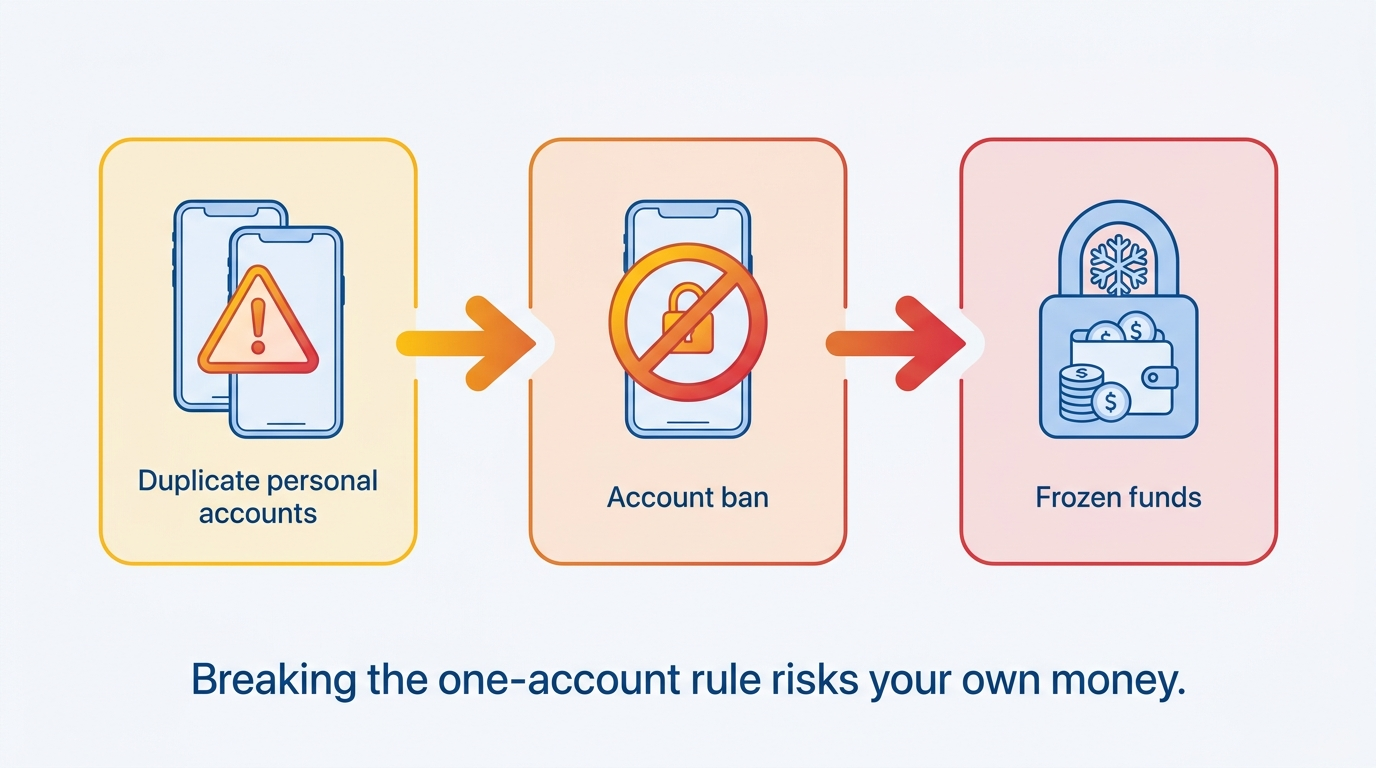
Unauthorized duplicate accounts risk an account ban and a fund freeze on your own money. Cash App reads a second personal identity as a policy violation. The cost lands on your balance, not just your access.
Cash App can suspend a profile, close it permanently, and hold funds during review. An account ban and a fund freeze both follow from breaking the one-account rule. The sections below show the mechanics.
How Cash App detects duplicate accounts
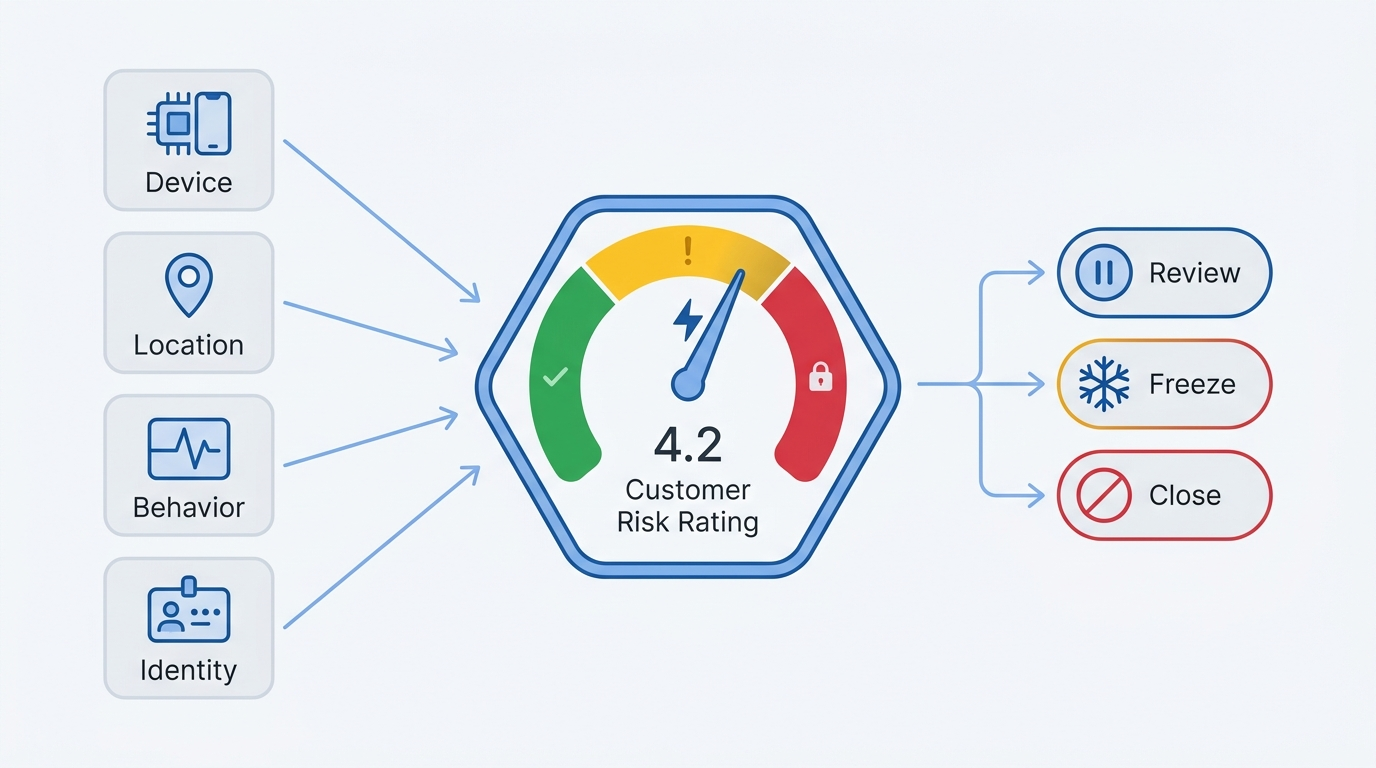
Cash App detects duplicate accounts through machine learning models that score risk across multiple signals. Block assigns each customer an activation risk rating, then a continuous risk rating, described in its detection approach. The models weigh many signals, which sort into four broad groups:
Device information links profiles that share a phone, browser, or device fingerprint.
Location signals flag accounts opened from the same IP or geolocation pattern.
Behavioral patterns compare transaction timing, amounts, and counterparties.
Identity overlaps cross-match SSN, name, and date of birth across accounts.
This is why swapping a phone number fails. Behavioral and hardware signals stay consistent even after new contact details. Block's models can block a transaction in real time, escalate an account for manual review, or close it outright.
Fund freezes: understanding the two categories
A fund freeze on Cash App falls into one of two categories, and both can lock your balance. Knowing the difference tells you what to expect.
A review hold starts with Cash App, which pauses funds during an investigation of suspected misuse or policy violations.
A legal hold follows a court order or levy, processed through the partner bank that holds your balance.
Cash App custodies balances through partner banks including Wells Fargo, Sutton Bank, and The Bancorp Bank. Spreading money across several small accounts backfires. More accounts create more identity overlaps, which raises detection odds rather than lowering them.
What happens if the policy is violated: consequences explained
A policy violation on Cash App can lead to suspension, permanent closure, and a frozen balance. An account ban blocks access to the profile. A fund freeze holds the money inside it during review.
A temporary suspension differs from a permanent closure. Cash App may restore a suspended account after review if the details check out. A permanent closure ends access to the profile and its $Cashtag for good. Frozen funds may return after a cleared review, or stay held if the closure stands.
Cash App enforces closures under its terms and its risk models. Recovery runs through an appeal, and many closures for genuine violations still stand. Timelines vary, and no outcome is promised. Following the one-account rule from the start avoids the whole process.
Reclaiming an account: the appeal process
An appeal asks Cash App to review a closed or frozen account, though outcomes vary and many stand. The steps below start the process through official channels only.
Open Cash App and go to the support or profile section.
Select the account issue and request a review of the closure or hold.
Provide the identity details Cash App asks for during the review.
Wait for Block's decision, which can take several days or longer.
Contact Cash App only through in-app chat, cash.app/help, or its official phone support. Cash App never asks for your PIN or sign-in code. Impersonators often target people during a frozen-account panic. One account, kept within the rules, avoids appeals and freezes entirely.
Managing a single Cash App account effectively
One well-managed Cash App account holds more capability than a second profile would add. The better question is not how to get a second account. It is whether your existing account already works at full strength.
Cash App bundles a Cash Card, direct deposit, savings, and investing into one profile. The sections below cover the tools worth turning on.
Understanding Cash App Green: the premium tier
Cash App Green is a free status tier that unlocks Cash App's banking benefits. You earn it in one of two ways each month.
Spend $500 or more with your Cash App Card or Cash App Pay in a month.
Receive $300 or more in qualifying direct deposits in a month.
Free in-network ATM withdrawals apply once you hold Green status.
Free overdraft coverage up to $200 covers Cash App Card transactions.
Green also raises your savings rate and adds priority phone support. One optimized account outperforms any imagined second profile.
Security best practices for a Cash App account
Strong security protects the single account you rely on. Four habits cover the essentials:
Use a unique password that you do not reuse on other apps.
Turn on the Security Lock so face, fingerprint, or PIN approves each payment.
Prefer an authenticator app over SMS codes for a second factor.
Ignore anyone requesting your PIN, since Cash App staff never ask for it.
Cash App confirms it never requests your PIN or sign-in code on its security page. Phishing texts and impersonated support calls remain a common threat, so treat unsolicited contact with suspicion.
Using Cash App's built-in tools to organize finances
Cash App includes several financial tools that go unused by default. Turning them on captures value you already pay nothing extra for.
Tool
What it does
Best use
CSV export
Downloads your transaction history
Tax prep and bookkeeping
Monthly statements
Summarizes account activity
Record keeping
Cash App Savings
Holds a separate savings balance
Setting money aside
Investing
Buys stocks and bitcoin
Small, regular investing
Cashback offers
Applies instant Cash Card discounts
Everyday spending
Direct deposit
Receives paychecks up to two days early
Primary banking
Freelancers gain the most from the CSV export and monthly statements. Both simplify tax season without a second account. One account, fully used, covers what people bring to Cash App.
Read the SMSFAST blog for more plain-English guides on account verification, privacy, and virtual numbers.
Frequently Asked Questions
Can you have two Cash App accounts with the same phone number?
No, Cash App does not support two verified personal accounts under one identity, even with different phone numbers. Cash App matches your SSN, name, and date of birth, not your phone number. A new number changes contact details only, so the identity check still blocks a duplicate verified account.
Can you link the same bank account to two Cash App accounts?
Yes, one bank account can link to more than one Cash App account. That link does not make a second personal account allowed. Cash App caps duplication at the SSN, not the bank link. Shared funding across accounts also raises detection odds under Cash App's risk models.
What happens to funds if Cash App bans an account?
Cash App can hold your balance during a review after a ban or policy violation. A review hold pauses funds pending investigation, while a legal hold follows a court order through the partner bank. You can appeal through official channels, though many closures for genuine violations still stand.
Can a minor have their own Cash App account?
Yes, Cash App supports supervised accounts for minors from age six. Kids aged 6 to 12 use a managed account run by a parent, with no separate app. Teens aged 13 to 17 use a sponsored account with their own app access. A sponsor at least 15 years older supervises it.
Is there a way to have a personal and business Cash App account simultaneously?
Yes, Cash App lets one person run a personal account and a business account together. You upgrade a personal profile to business, or link the two and switch between them. Cash App deducts a 2.6% plus $0.15 fee on payments received into the business account.
Can Cash App be used on two different phones?
Yes, Cash App lets you sign in to one account from more than one device. Cash App may request extra verification when you access an account from a new phone. Signing in on a second device does not create a second account, since the same SSN and profile apply.
What is the difference between connected accounts and multiple accounts on Cash App?
Connected accounts are profiles you legitimately link and switch between on one device. Multiple accounts under one identity describe prohibited duplicate personal profiles. Connected accounts keep separate $Cashtags, balances, and histories, while duplicate verified accounts trigger Cash App's risk detection and possible closure.
SMS or email verification code missing? See the exact fixes for iPhone, Android, WhatsApp, Telegram, Google, and 10+ other platforms, including VPN and regional blocks.
VoIP numbers get silently rejected by WhatsApp, banks, and social platforms. See why non-VoIP wins for verification, and when VoIP is still the smarter choice.