1. Home
  2. Services
  3. LinkedIn

Virtual phone number for LinkedIn: verify and stay private

Service
LinkedIn
LinkedIn
Country
Pakistan
Pakistan +92
Available numbers
66325 pcs.
Other countries
With a high percentage of delivery
Canada
Quantity: 565005
Deliverability:66%
$0.22
USA
Quantity: 221414
Deliverability:64.63%
$0.47
Barbados
Quantity: 6519
Deliverability:43%
$0.59
Panama
Quantity: 12657
Deliverability:41.22%
$0.46
Qatar
Quantity: 1690
Deliverability:39.5%
$0.63

Trusted by thousands of users worldwide

Get a virtual number for LinkedIn from $0.21 · 190+ countries

Numbers activated

10K+

Countries available

190+

Average delivery rate

53%

SMS doesn’t arrive?

Auto-refund

123
oooo
oooo
oooo
oooo
oooo
oooo
oooo
ooo
ooo
ooo
ooo
ooo
%
of
Deliverability
o
123f1233
99
%
o
123f1233
99
%
o
123f1233
99
%
o
123f1233
99
%
o
123f1233
99
%

Why use a virtual number for LinkedIn?

LinkedIn SMS verification ties a phone number to two-factor authentication, new sign-in checks, and locked account recovery. A number added to the Contact Info section, however, becomes visible to data scraping tools that harvest contact details. LinkedIn's Help Center draws a firm line: cell and landline numbers pass verification, VoIP numbers do not. SMSFAST supplies mobile-tagged numbers that generally fit that accepted type; results vary by number, country, and carrier.

Shield from recruiter scrapers

Data scraping tools and browser extensions harvest whatever a profile shows publicly. PhantomBuster's profile scraper pulls any phone number listed in contact info. Verify with a SMSFAST number, and your personal line never enters LinkedIn's records, so no lookup or leak can trace it to you.

2FA without exposure

LinkedIn runs SMS-based two-factor authentication (2FA) at sign-in. Turn 2FA on with a SMSFAST number, and the account gains a second factor while your mobile line stays off the platform. A long-term rental, 1 day to 1 year, keeps that number ready for future codes.

A number for each account

Managers who run several company Pages or operating accounts each need a distinct number for account verification. A number already verifying one account will not clear a second while it stays in use, a limit users report widely. SMSFAST assigns a fresh number for each registration.

Travel-proof verification

Professionals who relocate or work abroad often lose an old SIM or hit roaming gaps that delay account verification codes. With SMSFAST, the LinkedIn code reaches you in the browser dashboard from anywhere, without a SIM or roaming. Pick a country to match your account region.

Does LinkedIn block virtual numbers?

LinkedIn accepts cell and landline numbers and rejects Voice over IP (VoIP) lines, the one account-verification rule its Help Center states outright. Two other triggers surface in user reports that the platform does not document: reused public-pool numbers, and automated-looking sign-ups.

A number already tied to one account will not verify another at the same time, though LinkedIn does not document this. SMSFAST supplies mobile-tagged numbers from its own pool, not the free public pools, and a long-term rental stays exclusive to one user. Delivery rates by country sit in the table above.

Buy number for
service
Available
numbers:
pcs
service
There are no numbers

How to Receive SMS for LinkedIn Verification with Virtual Numbers

1

Log in to your account

Either create a new account by clicking "Registration" or log in if you already have one.

2

Fund your balance

In the top right corner, click "+" and choose a convenient top-up method. Add the amount you need.

3

Select LinkedIn

In the left menu, under "Select service," click "LinkedIn". Then, choose your region from the list.

4

Purchase a number

Click "Buy" and wait a few seconds for your temporary number to be purchased and activated.

5

Get the number

Copy the phone number from the "Number" field to activate the service.

6

Enter the code

Wait for the one-time password (OTP) to appear in the "Code from SMS" field, then enter it in the LinkedIn verification screen to complete registration.

You can also get messages by clicking the corresponding button in the "Actions" field for your SMS verification.

How to set up a virtual number on LinkedIn

Four steps add a SMSFAST number to LinkedIn: buy the number, enter it in your settings, read the code, and confirm it.

Step 1

Get your LinkedIn virtual number on SMSFAST

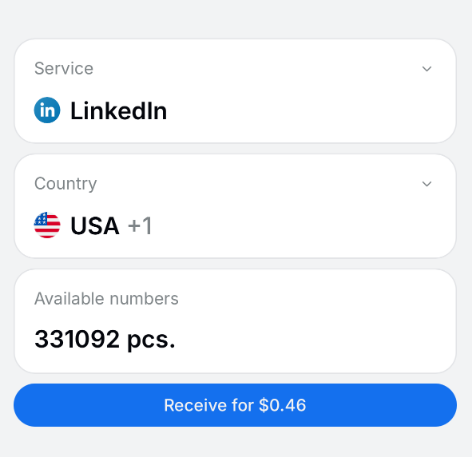
Sign in to SMSFAST, or create an account first. New users who subscribe to the SMSFAST channel on Telegram get a $0.25 bonus to test the first number. Select LinkedIn from the service list, choose your country, and click Receive. Copy the number exactly as the dashboard shows, country code included.

Get your LinkedIn virtual number on SMSFAST
Step 2

Add the number in LinkedIn settings

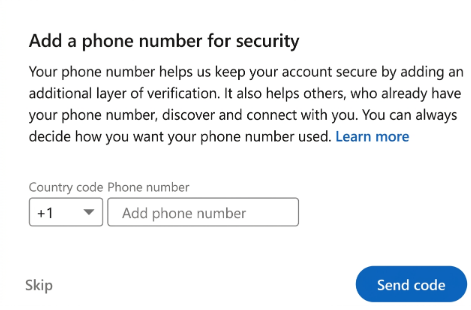
Open Settings & Privacy, then Sign in & security, then Phone numbers, or use the sign-up form for a new account. Enter the SMSFAST number in the exact format from your dashboard, country code included. Click Send code. Skip fast repeat requests, which can delay the SMS.

Add the number in LinkedIn settings
Step 3

Read the code in your SMSFAST dashboard

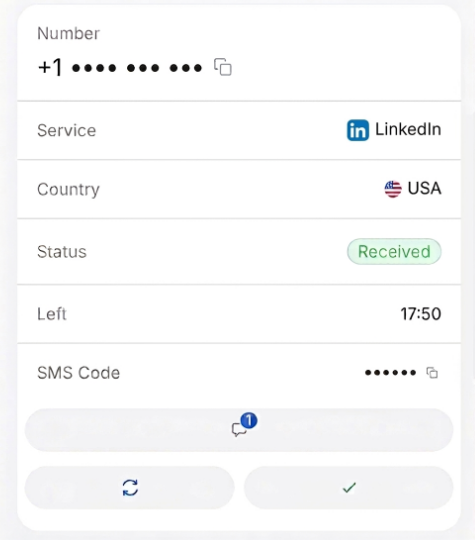
Return to the SMSFAST dashboard, where the LinkedIn code usually lands within a minute. If no code arrives in activation mode, click Cancel and your balance refunds at once, with no support ticket. Pick another number and retry.

Read the code in your SMSFAST dashboard
Step 4

Confirm the number on LinkedIn

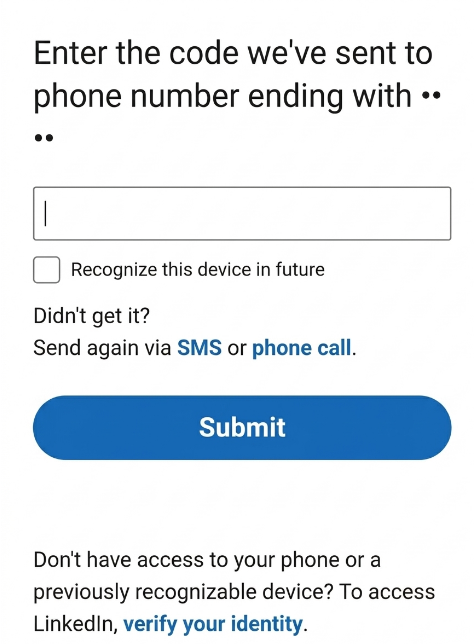
Copy the code into LinkedIn before the on-screen timer runs out, and LinkedIn confirms the number once it matches. For ongoing 2FA and recovery, a long-term rental holds the number from 1 day to 1 year; cancellation for long-term rental is coming soon.
Confirm the number on LinkedIn

Free or paid – what’s right for you?

Both options let you receive an SMS code on a LinkedIn number. The difference is in reliability and privacy.

Landline

Public numbers

$0 no sign-up needed

Available instantly

No registration

Private – messages visible to everyone

LinkedIn often blocks these numbers

No delivery guarantee

No refund if SMS fails

Paid numbers

Exclusive non-VoIP

From $0.21 per activation

Private - only you see the SMS

Works with LinkedIn in most cases

190+ countries to choose from

Delivery rate up to 53%

Auto-refund if SMS doesn’t arrive

Instant activation

Frequently Asked Questions

Does SMSFAST work with LinkedIn?

SMSFAST supplies mobile-tagged numbers that generally fit LinkedIn's accepted type rather than VoIP, with delivery shown by country and operator on the Prices page. Acceptance depends on the specific number and country. A long-term rental suits anyone who needs a steady number for two-factor authentication over time.

Can I use LinkedIn without a phone number?

Email still covers account creation, so a phone number often stays optional at that first step. LinkedIn requests one to switch on SMS-based two-factor authentication, verify the account, and restore access after a lockout. Without a number, several security features stay out of reach.

Is it safe to use a virtual phone number for LinkedIn verification?

A mobile-tagged number keeps your personal line private and, in most cases, verifies LinkedIn. The platform does not accept VoIP numbers, so the number's carrier classification matters more than the label "virtual". SMSFAST supplies mobile-tagged numbers, though acceptance still depends on the number and country. Treat this as general information, not legal advice.

Can I use the same virtual number for multiple LinkedIn accounts?

 A number already tied to one LinkedIn account will not verify a second while it stays in use, a block users report though LinkedIn does not publish it as a rule. Each separate account needs its own verification number. SMSFAST assigns a fresh number for every activation, which keeps each account on a distinct line.

How do I keep my phone number hidden on LinkedIn?

A number added only for verification stays off your public profile by default. To control who can look you up by number, open Settings, then Visibility, then Profile discovery using phone number; the options run from Anyone through the connection-degree levels to Nobody. The Contact Info card holds a separate display setting.

Are physical numbers better than virtual for LinkedIn?

LinkedIn documents one difference only: VoIP numbers fail verification. A mobile-tagged virtual number clears the same check as a physical SIM in most cases. The platform states no preference for physical over virtual, so the real question stays whether a number reads as VoIP or not.

How long can I use a temporary virtual number for LinkedIn?

Activation mode runs 20 to 90 minutes, enough to clear LinkedIn verification. After that, the account stays active on its own. For continuous 2FA and account recovery, a SMSFAST long-term rental holds the number from 1 day to 1 year, with renewal. Cancellation for long-term rental is coming soon.